
Truck Simulator PRO 2 MOD APK (Free Shopping)

Description
The fuel and fatigue system in Truck Simulator PRO 2 can leave your rig stranded in the Nevada desert if you do not plan every run carefully — and that one mechanic alone separates it from most mobile driving games. This post is written for new players and returning drivers who want to earn more money, avoid costly fines, and expand their transport business without wasting hours on bad decisions. It covers core driving mechanics, cargo mission strategy, the police penalty system, truck customization, and the strongest beginner tactics for growing your fleet fast.
What Is Truck Simulator PRO 2 and How Does It Work
Truck Simulator PRO 2 is a premium mobile trucking simulation developed by Mageeks Apps and Games. Players start with a single truck and a handful of delivery contracts. The goal is to complete cargo runs, collect wages, and reinvest earnings into better trucks and upgrades until a full transport business takes shape. Every decision — from route selection to rest timing — affects how quickly that business grows.
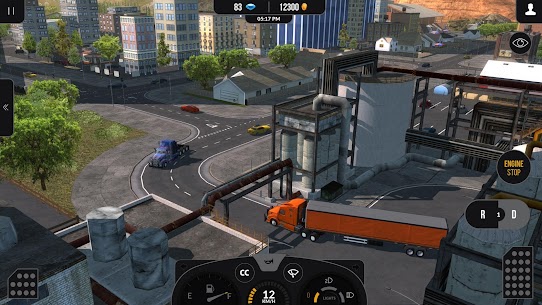
The game runs on Android and iOS. It features a single-player career mode and open-world free drive across a map modelled on the American West Coast. Cities are distinct, roads vary between highway straights and mountain switchbacks, and each delivery feels slightly different from the last. That variety keeps the game from feeling repetitive even across hundreds of missions.
Mageeks positioned this title as one of the most technically detailed mobile simulators available. The result is a game that rewards planning and punishes recklessness — which is exactly what keeps serious simulation players coming back.
What the fuel consumption and fatigue mechanics actually do
The fuel consumption and fatigue system is the core challenge that defines every run in Truck Simulator PRO 2. Fuel drains at a realistic rate based on speed and engine load. Players must plan fuel stops before heading into long stretches of open highway, or risk running dry with no help in sight.
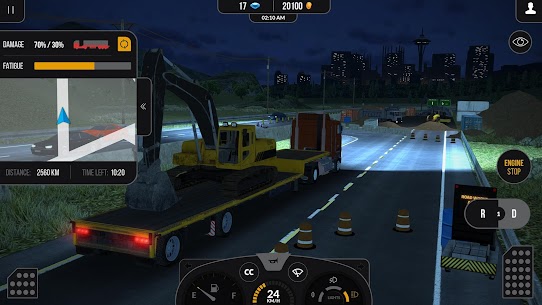
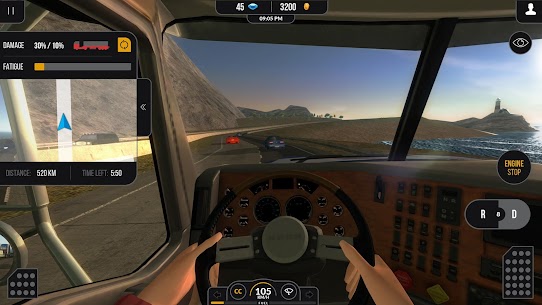
The fatigue system adds a second layer of pressure. Driver stamina depletes over time behind the wheel. Once fatigue reaches a critical level, in-game indicators warn the player to rest. Ignoring those warnings increases the risk of errors and accidents. Together, these two systems force players to treat every route like a real logistics problem rather than a simple point-to-point drive.
The open-world USA setting and its 10 driveable cities
The map covers thousands of miles of West Coast highway, including 12 named cities that players drive between during career missions. Las Vegas, San Francisco, Los Angeles, Seattle, Denver, Phoenix, Portland, Salt Lake City, Helena, El Paso, Albuquerque, and San Diego each appear on the map. Routes between them pass through varied terrain — hills, valleys, bridges, swamps, and flat desert highways — so no two runs feel identical.
The open-world design lets players drive freely outside of missions. This is useful for learning road layouts before committing to a timed cargo contract. Knowing a route before a deadline saves money and reduces the chance of a costly wrong turn.
How Truck Simulator PRO 2 compares to Truck Simulator USA Revolution and World Truck Driving Simulator on Android
Truck Simulator USA Revolution focuses on European road networks with free-to-play access and a strong garage customization loop. World Truck Driving Simulator takes a similarly open approach but emphasises physics-heavy handling across Brazilian-inspired terrain. Truck Simulator PRO 2 sits apart because it combines a premium USA open world with the fatigue and police penalty systems, which neither competitor enforces with the same level of consequence. The result is a more demanding experience that suits players who want genuine stakes on every delivery.
How Gameplay Controls and Driving Physics Feel on Mobile
Mobile controls in Truck Simulator PRO 2 use on-screen tilt steering, virtual buttons, or tap-based input depending on device settings. Steering sensitivity can be adjusted, which helps players who find the default setup too twitchy on highway bends. The throttle and brake are mapped to simple on-screen buttons, keeping the layout uncluttered even on smaller screens.
The driving physics give each truck a sense of real weight. Acceleration is slow and deliberate. Braking takes distance. Corners require planning well in advance, especially when pulling heavy cargo. These are not arcade-style controls — they demand attention and consistency.
New players often struggle in the first few hours because the physics do not forgive sudden corrections. However, the learning curve flattens quickly once the basic weight and momentum behaviour becomes familiar.
How steering, throttle, and braking work in the mobile interface
Tilt steering is the default setting and works well on flat roads. For tighter city driving, switching to the virtual wheel or tap-based controls reduces the margin for error. The throttle requires a sustained press rather than a tap — releasing it too early on an incline causes the truck to lose momentum, which matters when carrying heavy cargo uphill.
Braking at high speed takes longer than most players expect. Trucks do not stop quickly. Beginning the braking process early — especially approaching intersections in cities like San Francisco or Portland — prevents collisions that trigger police fines or cargo damage.
How cargo weight and road terrain change how the truck handles
Heavy cargo makes the truck slower to accelerate and harder to stop. On flat highways between Las Vegas and Los Angeles this is manageable. However, on hilly routes near Helena or the mountain passes above Salt Lake City, heavy loads shift the truck’s centre of gravity and make slope braking genuinely difficult.
Terrain type also matters. Swamp roads near the southern cities feel slick. Bridge crossings narrow the available lane width. Players who plan for terrain — not just distance — complete more deliveries without incident. Checking the route terrain before accepting a contract is one of the strongest habits to build early.
What happens when a delivery is completed successfully
Completing a delivery credits the player’s account with the contracted wage. The payout reflects distance, cargo type, and delivery condition. Arriving on time with undamaged cargo earns the full rate. Arriving late or with damage reduces the final payment. The money then becomes available for truck upgrades, fuel purchases, or saving toward a new vehicle.
Each completed mission also contributes to the broader career progression. Over time, players unlock access to higher-value cargo contracts. Therefore, consistent clean deliveries in the early game accelerate access to the most profitable mission types.
How Cargo Delivery Missions Work in Truck Simulator PRO 2
The mission system in Truck Simulator PRO 2 offers hundreds of contracts across over 30 cargo types. Jobs range from delivering timber to sawmills and heavy construction machinery to road works sites, through to general freight between cities. Each mission specifies the pickup location, destination, cargo type, and payment rate before the player accepts.
Players choose jobs from a mission board. The board refreshes regularly, so waiting for a better contract is always an option. However, turning down jobs slows down earning pace in the early career stages. Balancing risk against reward is part of what makes the mission system genuinely interesting.
Not every contract suits every truck. A smaller starting vehicle struggles with the heaviest cargo types. Accepting jobs that exceed the current truck’s practical capacity results in slower travel, more fuel consumption, and a higher chance of a penalty-triggering incident.
How to pick the right cargo job for your current truck
Match cargo weight to the truck’s current upgrade level. In the early career, short-distance jobs with lighter freight earn less per run but reduce the risk of an incident that wipes out the profit. Timber deliveries and standard freight are the best starting contracts. They pay reliably and do not demand advanced handling skills.
As the truck gains engine and suspension upgrades, heavier machinery contracts become viable. The jump in payout is significant. However, rushing into heavy cargo before the truck is ready produces more losses than gains. Patience in the early mission phase pays compound dividends later.
How cargo weight and type change driving difficulty
Heavier cargo increases braking distance, reduces uphill acceleration, and makes lane changes slower. Liquid or unstable cargo types create a shifting load effect that requires smoother throttle and steering inputs. Road works machinery is among the most demanding — it sits high on the trailer and amplifies the truck’s movement through corners.
By contrast, standard parcel or document freight is the lightest category. These runs are faster and easier to manage. New players benefit from completing several light-freight runs before attempting the heavier specialty deliveries. The handling experience carries forward directly.
What the over-30 cargo types cover and which pay the most
The cargo list spans standard parcel deliveries at the low end, through agricultural goods, construction materials, and specialist equipment at the high end. Heavy machinery contracts — particularly road works equipment — offer the highest per-kilometre payout in the game. Timber deliveries to sawmills sit in the mid-tier and represent the best balance of risk and reward for intermediate players.
The distance multiplier matters as much as cargo type. A high-value cargo job over a short route may pay less than a standard freight run between cities on opposite sides of the map. Always check both the cargo type and the total route distance before accepting.
How the Police and Penalty System Affects Your Earnings
Truck Simulator PRO 2 includes an active police traffic system. Police vehicles patrol the roads and monitor player behaviour. Speeding, colliding with other vehicles, and causing road damage all trigger fines. Those fines are deducted directly from the mission payout, which means a single reckless stretch of highway can erase much of the profit from an otherwise successful delivery.
The penalty system is one of the most underexplained mechanics in the game. Players who do not understand how it works often wonder why their earnings stall despite completing many missions. The answer, in most cases, is a high fine rate eating into each delivery’s gross payout.
Traffic enforcement is most active in and around the 12 city areas. Open highway stretches carry less enforcement density. Adjusting driving behaviour by location — strict in cities, more relaxed on remote highways — is the most effective way to keep fines low without sacrificing travel time.
What triggers a fine in Truck Simulator PRO 2
Three actions trigger fines: exceeding the posted speed limit, making contact with another vehicle, and causing damage to road infrastructure. Speed limit violations are the most common because highway speed limits feel low relative to the truck’s maximum capability. Many new players maintain top speed through limit zones without realising enforcement is active.
Vehicle contact fines apply even when other drivers cause the collision. This mirrors real-world traffic law and demands defensive driving habits. Maintaining a generous following distance and slowing early at city intersections prevents most contact situations before they happen.
How traffic penalties reduce your delivery wage
Each fine is processed at mission completion. The game deducts the total fine amount from the contracted delivery payment. A sequence of three or four fines on a single run can reduce a mid-tier delivery payment to near zero. On longer routes with higher-value cargo, a fine-free run can pay two to three times more than the same run with multiple violations.
Fine amounts scale with violation severity. A minor speeding infraction costs less than a full collision with another vehicle. However, the cumulative effect of small fines across a long career compounds into a significant lost earnings total. Treating every city transit as a zero-fine opportunity is the right mindset.
How to drive legally and reach destinations on time
The key is route timing, not speed. Truck Simulator PRO 2 delivery deadlines are set with legal driving speeds in mind. A player who stays within speed limits and drives cleanly through city zones almost always arrives within the time window. The temptation to speed comes from the assumption that deadlines require it — but in most cases, they do not.
Planning the route before departure also saves time. Knowing which sections are city zones and which are open highway lets players maintain momentum on free stretches and decelerate early before enforcement zones. This approach produces clean, profitable runs without the panic driving that creates fines.
How Truck Customization and Upgrades Work in Truck Simulator PRO 2
The customization system in Truck Simulator PRO 2 lets players modify both the performance and appearance of all eight available trucks. Engine upgrades increase power and fuel efficiency. Suspension upgrades improve handling under heavy cargo loads. Exterior customization covers paint, livery, and body kit options. Each truck also features a detailed interior view, so cab personalisation has visual impact during driving.
Upgrades are purchased using in-game currency earned from deliveries. The system encourages players to invest consistently after each mission rather than saving for large one-time purchases. Small, frequent upgrades compound over time and produce a noticeably better driving experience much sooner.
The upgrade path differs between trucks. Some vehicles are better suited to long-distance highway running. Others handle city-based short routes more efficiently. Choosing the right truck for the primary mission type and then investing in relevant upgrades is the most direct route to higher earnings.
What the 8 available trucks offer in terms of handling and capacity
The eight trucks span a range from lighter entry-level vehicles to heavy long-haul rigs. Earlier trucks in the progression are more forgiving to handle but earn less on heavy cargo contracts. Later vehicles carry more weight and cover distance faster after engine upgrades, but they demand better driving technique to avoid incidents.
Each truck has a distinct set of driving modes available. These modes affect how throttle input translates to wheel power, which changes the feel between highway cruising and city delivery driving. Experimenting with driving modes on familiar routes helps players find the configuration that produces the fewest errors for their style.
How to customize a truck’s exterior and interior
Exterior customization options include paint colour, cab decals, and body panels. Changes are applied in the garage between missions. Interior options modify dashboard elements and cab layout details visible during the first-person cockpit view. Neither exterior nor interior changes affect performance, but they matter for player satisfaction and personal attachment to a specific vehicle.
Players who spend time customizing their primary truck tend to drive it more carefully. This is a practical benefit — emotional investment in a vehicle translates to fewer careless incidents and lower fine rates over a long career.
Which truck upgrades improve earnings the most
Engine upgrades produce the largest direct impact on earnings by reducing travel time and improving fuel efficiency simultaneously. A more fuel-efficient engine cuts the per-kilometre fuel cost, which increases net profit on every run. Combined with the reduced travel time benefit, engine investment pays back faster than any other upgrade category.
Suspension upgrades matter most for players who consistently take heavy machinery contracts. They reduce the handling penalty that heavy cargo imposes and make uphill routes manageable. For players who prioritise lighter cargo jobs, suspension investment can be deferred in favour of a second engine upgrade first.
What Common Mistakes Cost New Players Money in Truck Simulator PRO 2
Most early-game money problems trace back to three repeated errors: ignoring the fatigue system, under-preparing for fuel consumption on long routes, and accepting cargo contracts that exceed the current truck’s practical capabilities. Each mistake individually is manageable. Together, they drain earnings fast enough to stall progression for hours.
New players also tend to underestimate the penalty system. A single city run with multiple speed violations can cost more in fines than the delivery earns. Understanding that fines are a direct tax on careless driving changes how players approach every transit through a populated area.
The good news is that all three mistakes are easy to fix once identified. The game provides enough feedback — warning indicators, fine notifications, and fuel gauges — for attentive players to correct course quickly.
How ignoring the fatigue system leads to costly accidents
The fatigue system builds gradually. Players who push past the first warning sign face increasing difficulty controlling the truck accurately. Reaction times slow, steering inputs become imprecise, and the likelihood of a collision or a road departure increases sharply. A single fatigue-related accident can trigger multiple fines simultaneously.
Rest stops cost time but no money. Factoring a rest stop into a long route is always cheaper than the combined cost of a fatigue-driven accident plus the associated fines. Stopping early — before the warning indicator becomes urgent — is the correct habit.
How poor fuel planning leaves you stranded mid-route
Running out of fuel mid-route in Truck Simulator PRO 2 causes a mission failure or forced refuel penalty depending on the game state. Either outcome costs money and erases the time invested in the run. Fuel consumption increases with cargo weight and highway speed, so the fuel gauge depletes faster on heavy runs at full throttle.
Check the fuel level before every departure and plan for a refuel stop on any route that covers more than a moderate distance. Cities along the West Coast map have fuel stations. Knowing their locations on the main routes between Los Angeles, San Francisco, Portland, and Seattle removes most of the fuel risk from long-haul contracts.
Why taking high-value jobs before upgrading your truck backfires
Heavy machinery contracts pay well, but they expose the truck to terrain stress and handling demands that a stock or minimally upgraded vehicle cannot manage cleanly. The result is a higher incident rate, more fines, and frequently a delivery that pays less than a simpler job would have. Additionally, the vehicle takes more wear, which affects subsequent runs.
Build a strong upgrade foundation on the starting truck before targeting the highest-value cargo tier. Two or three engine upgrades and one suspension upgrade transform the same vehicle into something that handles heavy contracts reliably. That investment window is short — but skipping it costs far more in the long run.
Best Truck Simulator PRO 2 Tips and Tricks for Beginners
How to plan fuel stops before long-haul cargo runs across the West Coast map
Before accepting any long-distance delivery between cities like Las Vegas and Seattle or Phoenix and Portland, open the route and identify the fuel stations along the path. The West Coast map has stations at or near most major city approaches. Plan to refuel at the halfway city on any route that spans more than two cities. Never depart with less than half a tank on a run that crosses mountain terrain — fuel consumption spikes on elevation changes.
Additionally, consider the cargo weight when estimating fuel needs. Heavy construction loads drain fuel noticeably faster than standard freight. On those runs, budget for an extra stop. The time cost of a planned refuel is always lower than a forced stop or a mission failure.
How to use the fatigue timer to time rest stops without missing delivery deadlines
The fatigue indicator in Truck Simulator PRO 2 builds at a predictable rate. Monitor it from the moment a long run begins. When the indicator reaches approximately half its range, find the next safe stopping point — ideally a fuel station or city — and take a rest. This proactive approach keeps fatigue manageable without requiring a full stop at the worst possible moment.
Delivery deadlines in the game account for rest stops on long routes. Players who stop early and rest for the minimum duration still arrive within the time window on most contracts. Conversely, players who ignore fatigue until the final warning often make a costly error in the last quarter of the route when driving accuracy matters most.
How to avoid police fines while keeping pace with tight delivery schedules
The most effective fine-avoidance strategy is speed zone awareness, not driving slowly everywhere. On open West Coast highways between cities, maintain a steady legal speed — no more, no less. The fuel efficiency at legal highway speed is also better than at maximum throttle, which adds a second financial benefit.
In city transit zones — particularly the dense downtown areas of Los Angeles, San Francisco, and Seattle — reduce speed proactively before entering the zone boundary, not after. Police enforcement density is highest at intersections and near populated stretches. Clearing a city at legal speed adds only a few minutes to the route but removes the fine risk entirely. Over a full day of play, that discipline compounds into significantly higher net earnings.
Frequently Asked Questions About Truck Simulator PRO 2
Is Truck Simulator PRO 2 free to play on Android?
Truck Simulator PRO 2 is a paid game on the Google Play Store and is not available as a free download through official channels. It is published by Mageeks Apps and Games and priced as a premium title. Players purchase it once with no mandatory in-app subscriptions, though in-app purchases for currency are available within the game.
How many missions does Truck Simulator PRO 2 have?
Truck Simulator PRO 2 includes hundreds of realistic delivery missions across more than 30 cargo types. Mageeks describes the mission volume as enough to keep players occupied for a long period of time. Missions include specialist jobs such as delivering timber to sawmills and heavy machinery to road works sites, alongside standard freight contracts between the 12 mapped US cities.
How many trucks can you own in Truck Simulator PRO 2?
Truck Simulator PRO 2 features 8 trucks that players can own, each with different driving modes, handling characteristics, and cargo capacity. Players earn money from deliveries and use those earnings to purchase additional trucks or upgrade existing ones. Each truck supports both performance upgrades and visual customization through the in-game garage.
Why Truck Simulator PRO 2 Is Worth Playing for Mobile Sim Fans
Truck Simulator PRO 2 is best suited for players who want a mobile sim with real consequences. The fuel system, fatigue mechanic, and police penalty structure create genuine stakes on every delivery. This is not a game where mindless driving produces results — it rewards planning, route knowledge, and clean driving habits.
After spending significant time with the fuel and fatigue system specifically, the standout quality is how it forces a rhythm into long sessions. Stops feel earned. Clean deliveries feel satisfying. For mobile simulation fans who have outgrown lighter trucking titles, Truck Simulator PRO 2 delivers the depth that most Android sims avoid. It is one of the strongest premium mobile trucking experiences currently available, and the Mageeks open-world map is genuinely impressive at this scale.
Images


Download links
ℹ️ Download link not working? Please refresh the page and try again.
Developer's apps




Related apps





What's new
Truck Simulator PRO 2 v1.9.1 MOD APK
New Apps
Most Played Mobile Games


