
Bus Simulator PRO 2 MOD APK (Free Shopping)

Description
Bus Simulator PRO 2 stands apart from basic mobile driving games because it puts ticket sales, timetable pressure, and accessibility ramp operation directly in the driver’s hands — all from inside a fully detailed cockpit. This post is written for beginners and returning players who want to earn cash faster, avoid penalties, and unlock new buses without wasted detours. Below you will find coverage of the core driving mechanics, the timetable and GPS system, unique bus features like the wheelchair ramp, the full bus and city unlock progression, and answers to the most common player questions.
What Is Bus Simulator PRO 2 and How Does It Work
Bus Simulator PRO 2 is a mobile driving simulation developed by Mageeks. It places players in the role of a brand-new bus driver with no experience and a single short route to prove themselves on. The goal is not just to drive — it is to manage the full job of a real bus operator, including fares, timing, and vehicle-specific equipment.
The game runs on Android via Google Play at a paid price of $2.99 and also plays for free through browser platforms including Miniplay and Kiz10. Most of its audience arrives through the Android version, which offers the fullest progression experience. Because it is a paid title, players expect more mechanical depth than a typical free-to-play mobile sim — and the timetable system, ticket management, and bus-specific cockpits mostly deliver on that expectation.
How the Realistic Bus Driving Mechanic Works
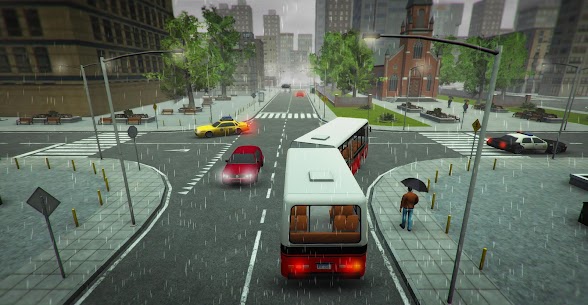
The driving mechanic in Bus Simulator PRO 2 is built around control and consequence. Players steer, brake, and accelerate through US city streets while managing live AI traffic — both vehicles and pedestrians. Collisions cost cash directly, so reckless driving damages your income rather than just displaying a warning message. Speed penalties apply as well, which means players feel the financial pressure of every decision behind the wheel.
Each bus handles differently because of its size and weight. The game uses a physics-based approach to bus movement. Because of this, a large bus takes more braking distance than players expect after experience with car-sized mobile vehicles. Stops must be precise — parking too far from the curb prevents passengers from boarding cleanly.
The Setting, Career Premise, and City Progression
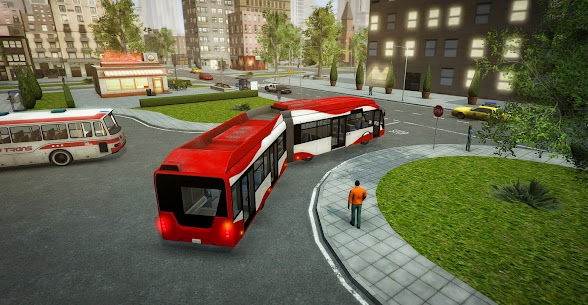
The game is set across five detailed maps of US cities. Players begin in an entry-level city with basic routes and work outward by earning cash and experience points. The career structure starts with an old, simple bus on a short loop. As progression advances, new routes open across the additional cities, each with more complex traffic layouts and tighter timetables.
The tone is practical rather than narrative. There are no cutscenes or story beats. Instead, the sense of advancement comes from unlocking better buses, tackling longer routes, and watching the transport empire grow through repeated successful runs. That structure rewards consistency more than speed.
How Bus Simulator PRO 2 Compares to Bus Simulator Extreme Roads and World Bus Driving Simulator on Android
Bus Simulator Extreme Roads by Badpixels Games and World Bus Driving Simulator by Dynamic Games Ltda are the two main Android competitors in this genre. Bus Simulator Extreme Roads is larger in scope — it covers multiple countries, supports multiplayer, and offers a company-management layer with hired drivers. World Bus Driving Simulator focuses on visual polish and off-road driving scenarios alongside city routes. By contrast, Bus Simulator PRO 2 is narrower in scope but more precise in its simulation details. The ticket sales system, the wheelchair ramp operation, and the individual cockpit layouts per bus give it a depth in vehicle-level realism that both competitors lack. Players who want a management empire will prefer Bus Simulator: Ultimate. Players who want the most authentic feel of operating a real bus will find Bus Simulator PRO 2 more rewarding.
How Bus Simulator PRO 2 Controls and Mechanics Feel in Play
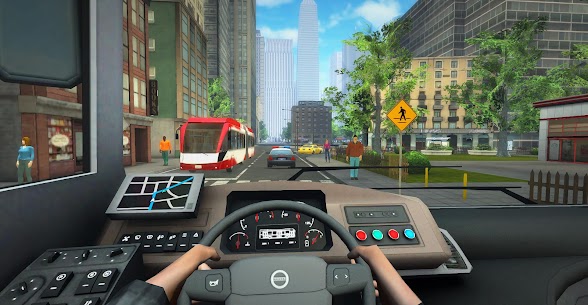
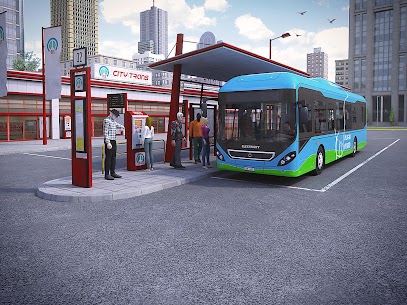
The control layout in Bus Simulator PRO 2 uses on-screen touch buttons for mobile play. Players access gear changes, horn, wipers, turn signals, lights, and camera angles through dedicated controls. The steering uses a virtual wheel. This level of cockpit interaction is unusually detailed for a mobile bus simulator at this price point.
AI traffic responds realistically — vehicles stop at red lights, pedestrians cross at crosswalks, and other buses share the road on fixed schedules. However, player reviews on Google Play note that the AI occasionally triggers collisions that feel unavoidable. This is a known friction point. The penalty system still charges players in these cases, so situational awareness remains important even when traffic behaves unexpectedly.
Steering, Acceleration, and Stopping a Full-Size Bus
Steering in Bus Simulator PRO 2 requires forward planning. A full-size bus does not turn like a car. Players must begin turns earlier than instinct suggests. Entering a corner too fast or too late causes the bus to clip barriers, which triggers collision penalties. The braking system requires the same patience — players need to begin deceleration well before a bus stop appears on screen.
Acceleration builds slowly on low-gear buses. The gear change mechanic matters most at the start of each run. Holding a gear too long reduces efficiency. Shifting up at the right moment keeps the bus moving at pace without triggering a speeding penalty, because the speed limit changes block by block through each city map.
The Timetable, GPS Navigation, and Passenger Pickup Loop
The GPS displays the active route in real time. Players follow the highlighted path to each stop in sequence. The timetable runs in parallel — each stop has a scheduled arrival time, and the game tracks whether players arrive on time. Late arrivals reduce total route income. Early arrivals are acceptable, but the bus must wait at the stop until the scheduled departure time before moving on.
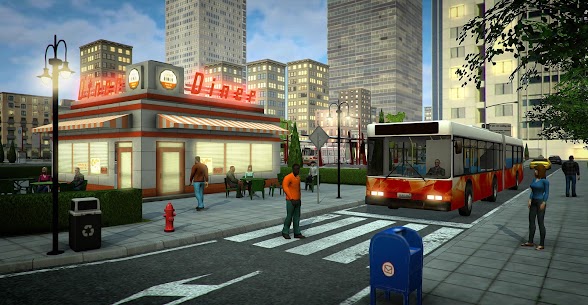
Passenger pickup works automatically when the bus parks at the correct position. Players open the doors, passengers board, and the ticket system activates. Therefore, stop positioning directly affects how smoothly the boarding loop completes. Missing the ideal stop position means passengers cannot board, which creates a delay that compounds into timetable problems later in the route.
What Happens After a Route Is Completed — Cash, XP, and Penalties
When a route ends, the game calculates total earnings. The formula combines fare income from boarded passengers, time bonuses for on-schedule arrivals, and deductions for collisions, speeding tickets, and late stops. Players receive both cash and experience points from each completed run. Cash unlocks buses and cities. Experience points track career progress and gate access to longer routes.
Consequently, a clean run with zero penalties earns significantly more than a fast but sloppy run. New players often prioritise speed — however, the penalty structure makes slow and accurate driving far more profitable during the early career stages.
How the Ticket Sales System Works in Bus Simulator PRO 2
The ticket sales system is one of the features that sets Bus Simulator PRO 2 apart from most mobile driving games. Rather than passengers boarding automatically and fares counting silently in the background, the game requires drivers to actively manage fare collection. This creates a layer of pressure that compounds with the timetable system — players are simultaneously navigating, watching the clock, and handling transactions.
Each passenger presents a fare scenario when they board. The driver must respond correctly. Errors in fare collection reduce income. Because this interaction happens at every stop across a 50-line network, players who understand the system earn consistently more than those who rush through it.
When and How Drivers Collect Fares From Passengers
Fare collection activates when passengers board at a stop. The game presents the fare amount and the passenger’s payment. Players must complete the transaction before the bus can continue. This mechanic ties directly into the timetable — spending too long at any stop risks falling behind schedule. Therefore, speed and accuracy in fare handling matter as much as driving precision.
The system rewards players who stay attentive. Each correct transaction adds to route income. Additionally, managing ticket sales well keeps boarding stops short, which preserves the timetable buffer for later stops on long routes.
Handling Change Correctly — The Step That Trips Up New Players
The change-giving mechanic is the most common source of confusion in Bus Simulator PRO 2. Player reviews on Google Play specifically mention this step as unclear. When a passenger pays more than the fare, the game requires the driver to return the correct amount of change. The interface presents options, and players must select the right value.
New players frequently select the wrong amount or skip the step. Both outcomes reduce earnings. Some players mistake the change prompt for a bonus selection screen. However, it is a required transaction step — not optional. Reading each fare screen carefully before tapping is the fastest way to avoid this mistake.
How Fare Income Affects Your Total Route Earnings
Fare income compounds across a full route. A 10-stop line with clean fare collection at every stop earns noticeably more than the same route with three skipped or incorrect transactions. Moreover, the experience points gained from fare events stack alongside time bonuses. This means the ticket system is not a minor side feature — it is a primary income source that shapes how quickly players unlock the next bus or city.
Players who focus only on driving and ignore the fare prompts will find progression slower than expected. Additionally, fare income is affected by how many passengers board — which depends on stop accuracy. So the entire system connects: precise parking leads to full boarding, full boarding triggers more fare events, and more fare events generate higher total route income.
How Unique Bus Features Work — Wheelchair Ramp and Kneeling Bus
Bus Simulator PRO 2 includes two accessibility features that no competing mobile bus simulator currently replicates at this level of detail: the wheelchair ramp and the kneeling bus function. These are not cosmetic additions. Players must operate them at specific stops, and failing to do so correctly affects route completion quality.
These mechanics reflect the real responsibilities of a professional bus driver. They add depth to the simulation without increasing complexity to an unmanageable level. New players often overlook them because no tutorial explicitly walks through when they apply — which is one of the most underserved areas in competing articles about this game.
When the Wheelchair Ramp Is Required and How to Operate It
The wheelchair ramp deploys from the bus at stops where a wheelchair user is waiting. Players must activate it from the cockpit controls before that passenger can board. Skipping this step means the passenger cannot enter the bus, which costs a boarding fare and affects the completion quality of that stop.
Operating the ramp adds a brief pause to the boarding sequence. Therefore, players should account for this time in their timetable buffer. Arriving at ramp-required stops slightly early helps absorb the extra boarding time without falling behind schedule. The ramp control is accessible from the same cockpit interface used for doors and lights.
What the Kneeling Bus Function Does and When It Activates
The kneeling function lowers the front of the bus toward the curb level. This makes boarding easier for elderly passengers and those with mobility challenges. In Bus Simulator PRO 2, certain passenger types at certain stops require the kneeling function before boarding proceeds.
Players activate the kneeling feature from the cockpit before opening the doors. The sequence matters: kneel first, then open doors, then allow boarding. Doing these steps out of order causes boarding to stall. However, the function takes only a few seconds to activate, so it does not create meaningful delays when used correctly.
How Individual Cockpit Layouts Differ Across All 8 Buses
Each of the 8 buses in Bus Simulator PRO 2 has a unique cockpit interior. Instrument placement, steering wheel design, and dashboard layout vary from bus to bus. This means players cannot rely on muscle memory from one bus when they switch to a new one — the controls are in different positions.
New buses unlock with different handling profiles as well. A longer, heavier bus requires earlier braking and wider turns than the entry-level model. Spending time with each cockpit after unlocking a new bus prevents the handling adjustment from causing early collisions and penalty losses on unfamiliar routes.
How Bus and City Unlocks Progress in Bus Simulator PRO 2
The progression system in Bus Simulator PRO 2 uses two parallel currencies: cash and experience points. Cash buys new buses and opens access to new cities. Experience points gate the longer, higher-paying lines. Players earn both from every completed route, with bonuses for punctuality and clean fare collection.
The structure begins with short routes in the first city. These early lines build cash slowly but reliably. Most new players make the mistake of spending cash on a new bus before unlocking enough lines to make the new bus profitable. Holding cash until a full city unlock is available generates better returns faster.
How Cash and XP Work Together to Unlock New Routes
Cash and XP function separately but advance together through normal route completion. Cash purchases unlock gates directly — a specific amount opens a new city, a different amount purchases the next bus. XP unlocks additional lines within cities already open. Because both accumulate from the same source, players naturally progress on both tracks simultaneously during regular play.
However, the rate of accumulation depends on route selection. Longer lines pay more cash and XP per run but carry higher penalty risk. Shorter lines pay less but allow cleaner runs with minimal penalty deductions. Early in the career, shorter lines generate safer and often faster total progress than attempting high-value routes before the driving skill is consistent.
Which Cities and Bus Lines Open as Career Advances
The game maps five US cities, each with a distinct road layout and traffic density. The first city acts as a training ground — lighter traffic, shorter stops, lower speed limits. Each subsequent city increases in complexity. By the third and fourth city, AI traffic density rises noticeably and timetable tolerances tighten.
Over 50 lines spread across these five cities. Lines within each city unlock in sequence — earlier, shorter lines must be completed to open access to longer cross-city routes. This gating system prevents players from skipping directly to high-income lines before they have the driving precision to run them cleanly.
What Fully Progressing Through All 50 Lines and 8 Buses Unlocks
Completing all 50 lines and unlocking all 8 buses represents the full extent of the career in Bus Simulator PRO 2. There is no additional campaign layer beyond that point. Instead, the replayability comes from optimising run quality — improving punctuality ratings, reducing penalty counts, and increasing per-route income on lines already completed.
The eighth and final bus represents the peak of the fleet. Each bus along the progression path handles differently from the previous one, so unlocking the full roster provides a genuine sense of advancement rather than a cosmetic reward only.
What New Players Get Wrong — Common Mistakes in Bus Simulator PRO 2
Most early losses in Bus Simulator PRO 2 come from three predictable mistakes. Each one compounds with the others — a late arrival causes rushing, rushing causes a collision, and the collision penalty wipes the time bonus entirely. Understanding where these failure points appear in advance saves players significant early-career cash.
These gaps are consistently underserved in competing content about this game. Most articles list features without explaining how the penalty structure punishes specific errors. The following three H3s cover the exact situations where new players lose the most cash and progress the slowest.
Ignoring the Timetable and Losing Cash to Late Penalties
The timetable is active from the first second of every route. Players who focus entirely on driving and check the schedule only occasionally will consistently arrive late at stops. Each late stop applies a cash deduction to the final route payout. Therefore, the GPS and timetable must be monitored together throughout every run, not checked only when a problem is already visible.
The most common timetable mistake is spending too long at the first two stops. Early stops on a route feel easy and unhurried. But slow boarding management at stops one and two creates a deficit that cannot be recovered by the end of a long route. Starting each run at full attention from stop one is the single most effective habit new players can build.
Skipping Accessibility Ramp Use When It Is Required by the Route
New players frequently skip the wheelchair ramp and kneeling bus steps because the cockpit controls feel unfamiliar. The result is a passenger left at the stop, a missed fare, and a reduced stop-completion rating. Across multiple stops on a long line, these skips accumulate into a significant income loss.
The fix is straightforward: before opening the doors at any stop, check the boarding queue. If the waiting passenger has a wheelchair indicator or a boarding-assistance cue, activate the relevant cockpit function first. This takes four to six seconds, but skipping it costs far more time and income through the missed boarding event.
Handling AI Traffic Collisions — Why the Penalty System Punishes Even Unavoidable Hits
Bus Simulator PRO 2 applies collision penalties regardless of fault. Player reviews on Google Play confirm that the AI occasionally crosses red lights and pulls into the bus lane unexpectedly. However, the game’s penalty system does not distinguish between a player-caused accident and a traffic-caused one. The cash deduction applies either way.
Consequently, the correct response is defensive driving at all times — not just when the road looks clear. Reducing speed approaching intersections, even on a green light, builds a reaction buffer that prevents a significant portion of AI-triggered collision penalties. Treating every intersection as a potential risk rather than a guaranteed safe pass is the most effective strategy for protecting route income.
Best Bus Simulator PRO 2 Tips and Tricks for Beginners
The three most valuable habits in Bus Simulator PRO 2 address the specific mechanics that separate a profitable run from a penalised one. None of these apply to any other mobile bus game — they are built around the timetable pressure, the accessibility feature activation sequence, and the precise stop parking geometry that define this simulator.
Each tip below targets one of the game’s most common failure points. Applying all three from the first route significantly reduces the penalty deductions that slow early career progression.
How to Use the GPS and Timetable Together to Avoid Late Fines on Short-Route Lines
The GPS shows the path. The timetable shows whether players are on pace. Using both simultaneously means players must glance between the route arrow and the schedule display while managing speed through traffic. New players typically focus on the GPS alone. However, ignoring the timetable during navigation causes late arrivals that only become visible at the stop — at which point the penalty is already applying.
The most effective technique on short-route lines is to memorise the first two or three stops before beginning the run. Because short lines repeat the same loop, players who know where the first stops sit can navigate by memory and use the timetable display as the primary screen reference instead of constantly switching attention to the GPS. This keeps time tracking active throughout the entire run rather than only between turns.
When to Wait for a Running Passenger and When the Timetable Says Leave Without Them
Bus Simulator PRO 2 presents a real driver decision: a passenger is running toward the stop but has not yet arrived. Waiting costs timetable time. Leaving costs a fare and boarding count. The game does not make this decision for players — it waits for input.
The correct call depends on the timetable buffer remaining. If the run is ahead of schedule by more than 15 to 20 seconds at that stop, waiting for the running passenger usually pays off — the fare collected outweighs the time spent. If the run is already at the timetable edge, leaving is the better financial decision. Therefore, players who keep an active mental note of their schedule buffer at each stop are equipped to make this call quickly rather than hesitating and losing time either way.
How to Approach Bus Stop Parking to Trigger Clean Door Opens and Full Fare Collection
Stop parking in Bus Simulator PRO 2 requires the front door of the bus to align within a specific proximity to the stop marker. Parking too far past the marker or too far away from the curb prevents the door from opening cleanly and delays or blocks passenger boarding.
The best approach technique is to begin braking earlier than feels natural — aim to arrive at the stop slowly rather than stopping precisely at speed. A slow arrival gives players the physical space to adjust lateral position while decelerating. Because each bus cockpit has a different sightline to the front door, players need to recalibrate their parking approach reference point when switching to a newly unlocked bus. The wider the bus and the longer its front overhang, the earlier the braking point needs to begin relative to the visible stop marker on screen.
Frequently Asked Questions About Bus Simulator PRO 2
Is Bus Simulator PRO 2 free to play on Android?
Bus Simulator PRO 2 costs $2.99 to download from Google Play on Android. It is not a free-to-play title on the Android platform. However, the game is available to play at no cost through browser-based platforms including Miniplay and Kiz10, which run the HTML5 version directly in a mobile or desktop browser without a purchase.
How hard is Bus Simulator PRO 2 and how long does it take to finish?
Bus Simulator PRO 2 presents moderate difficulty. The timetable, AI traffic, and penalty system create real challenge for new players, but the learning curve is manageable within the first few routes. Completing all 50 lines and unlocking all 8 buses across the five US cities takes several hours of play, with total progression time varying based on how cleanly each route runs and how quickly penalties are avoided.
Does Bus Simulator PRO 2 get updates and is there enough content for long-term play?
Bus Simulator PRO 2 received its last notable update in October 2023, bringing the current version to 1.9. The game contains over 50 lines across 5 US cities and 8 unlockable buses, which provides meaningful progression depth. However, Google Play reviews note that route variety becomes repetitive at higher career stages. Players seeking ongoing content updates or multiplayer should look at Bus Simulator: Ultimate as an alternative for long-term engagement.
Why Bus Simulator PRO 2 Rewards Patient, Detail-Focused Drivers
Bus Simulator PRO 2 is best suited to players who want a realistic, consequence-driven bus driving experience on mobile — not a fast-paced arcade game. The timetable system, fare management, accessibility ramp operation, and individual cockpit layouts per bus all contribute to a simulation depth that most free Android bus games do not attempt. Beginners will find the penalty system demanding at first, but the structure becomes rewarding once the core habits — early braking, timetable awareness, and clean stop parking — become automatic. After spending time across the full 50-line career, the progression feels earned rather than handed over. My honest verdict: the ticket-change mechanic needed a clearer tutorial, but the wheelchair ramp and cockpit detail made this the most authentic bus simulation I have run on a mobile screen. If you value precision driving over spectacle, Bus Simulator PRO 2 delivers exactly what it promises.
Images
Download links
ℹ️ Download link not working? Please refresh the page and try again.
Developer's apps




Related apps





New Apps
Most Played Mobile Games


