
Construction Simulator PRO MOD APK (Free Shopping)

Description
Construction Simulator PRO hands you 17 heavy machines and a single connected map built from two cities and two villages. New contractors who stall after the first few small jobs will find the machine order that actually moves the money here. Over 20 contracts sit on that map, and the wind turbine build needs a static crane rather than a mobile crane.
How to Play Construction Simulator PRO on Android
Construction Simulator PRO is a single player construction simulation where you run a contracting company across a shared map, taking paid jobs, buying heavy machines, and raising buildings from empty lots. Progress runs on cash and an experience system that opens bigger contracts.
Mageeks, a small studio based in Warsaw, both built and publishes the title. Google Play tags it as Simulation, Management and Casual, with single player and offline support. Behind that sit over one million installs and a 4.4 star average from roughly 10,300 reviews.
Nothing here runs on timers or energy bars. First you accept a contract, then you haul the right machines to the construction site, and finally you work through the build phases until the structure stands. However, the contract screen lists required machines before you accept, and skipping that screen is where most early runs go wrong.
What the Contract Loop Asks You to Build
Every job follows the same shape. The city issues a contract, you gather materials from supply stores, and you deliver them to the construction site before any machine work begins. Because deliveries come first, a player who drives straight to the site with an excavator often arrives with nothing to dig for.
Work then splits into phases. One phase might involve excavation, the next foundation pouring with the concrete pump, and a later one structural lifting with a crane. Each phase reports its own completion percentage, so you always know how far along the build sits.
The City and Village Map Setting
The world is one continuous map holding two main cities and two villages. There are no loading screens between them, which means a job in a village and a job in a city sit on the same road network. For example, a materials store in one city can supply a build several kilometres away in a village.
Tone stays practical rather than dramatic. No story characters appear, and no narrative cutscenes interrupt the work. Instead, the setting tells its story through the skyline you gradually change, since finished buildings stay standing on the map afterwards.
How It Compares to Other Mobile Construction Sims
Construction Simulator 3 Lite from astragon Entertainment is the closest direct rival on Android. That game leans harder on licensed real-world machine brands and a tighter mission structure. By contrast, this title puts more weight on free movement around one map and on the cab view experience inside every vehicle.
Transit King: Truck Simulator takes a different angle again, focusing on logistics chains and company management rather than machine operation. Forklift Extreme Simulator sits closer to a pure vehicle handling challenge. Players who want physical machine work rather than menu-driven management will find this construction sim closer to what they want.
Android Version vs the Windows Version
Google Play lists the title as available on both Android and Windows through Google Play Games. The Windows build runs the same game with mouse and keyboard input instead of touch controls, which helps considerably with the crane and concrete pump. Touch works fine on a phone, although a tablet gives noticeably more room for the on-screen sticks.
Price stays identical across both, since the free listing carries through. Progress does not always carry across cleanly between platforms, so treat each install as its own career until you have tested a save transfer yourself.
Gameplay Mechanics, Cab View and Machine Controls
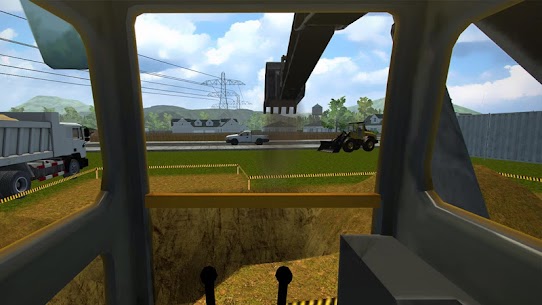
Cab view exists for every machine in Construction Simulator PRO, placing the camera in the operator seat. That single design choice separates it from most mobile builders, which keep players locked to a distant third person camera.
Control layouts sit on screen as virtual sticks and pedals. Each machine class handles differently, so a bulldozer blade behaves nothing like an excavator boom. Also, the physics apply weight properly, meaning a loaded dump truck accelerates and brakes slower than an empty one.
Realistic handling cuts both ways. It rewards patience and punishes rushing, particularly around narrow village roads. The game does provide a task skip option for players who get genuinely stuck on a single step, though using it costs you the practice that makes later contracts easier.
ISO and SAE Excavator Control Schemes
Excavators support two separate control layouts. The ISO scheme and the SAE scheme swap which stick handles the boom and which handles the arm, matching the two standards used on real machines. Update notes confirm both were added over time, with SAE arriving after ISO.
This matters more than it sounds. Anyone who has operated a real excavator, or who has played other sims, arrives with muscle memory tied to one layout. Switching the scheme in settings takes seconds, so there is no reason to fight a mapping that feels backwards.
Load Physics, Dump Trucks and Material Delivery
Soil behaves like soil. Fill a dump truck past a sensible level and the vehicle handles heavy, drives slower, and can spill on rough ground. Players consistently praise this weight simulation, and it changes how you plan a route from the excavation pit back to the site.
Material delivery follows the same logic. You collect products from a store, load them onto a flatbed, and drive them to the construction site before the relevant phase can start. However, an overloaded flatbed on a village lane is a slower solution than two clean trips.
What Happens When a Construction Phase Finishes
A completed phase pushes its progress counter to full and releases the next stage of the build. Cash and experience arrive on full contract completion rather than on each individual phase. Players report that a video ad usually plays at the moment a project finishes, which is the trade for a free install.
Occasionally the game does not advance automatically to the next phase even at full completion. In those cases the skip option moves you forward. For example, a foundation phase that reports complete but leaves the site static usually resolves the moment you trigger the next stage manually.
How to Unlock All 17 Heavy Machines in Your Fleet
Construction Simulator PRO carries 17 different heavy machines, and you unlock them by earning cash from completed contracts and buying each one outright. Nothing in the fleet arrives free, so the order you purchase machines decides which jobs you can accept next.
The roster covers excavators, bulldozers, tower cranes, mobile cranes, static cranes, concrete pumps, dump trucks, flatbeds, flatbed trailers and lowbed transporters. Some machines do site work. Others exist purely to move the first group around.
Buying purely by price is the classic beginner error. A cheap machine you never need blocks the purchase of one that unlocks three contracts. Therefore, read the required vehicle list on upcoming jobs before you spend anything, since the contract screen tells you exactly what the next tier of work demands.
Starter Machines: Excavator, Bulldozer and Flatbed
Your opening jobs revolve around ground work. An excavator handles digging and loading, while a bulldozer levels and pushes material into place. Both appear in the earliest small contracts, so they justify their cost within a few jobs.
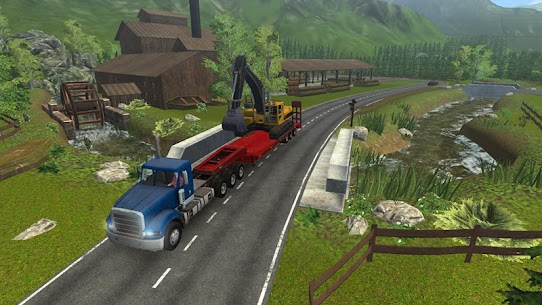
The flatbed is the third essential purchase and the one beginners delay too long. It hauls other machines between construction sites, which turns a fifteen minute drive into a single transport run. In addition, it doubles as the delivery vehicle for building materials collected from supply stores.
Tower Crane, Mobile Crane and Static Crane Jobs
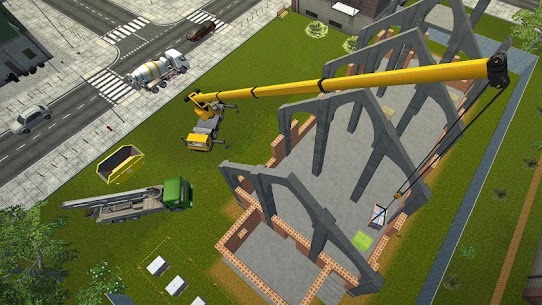
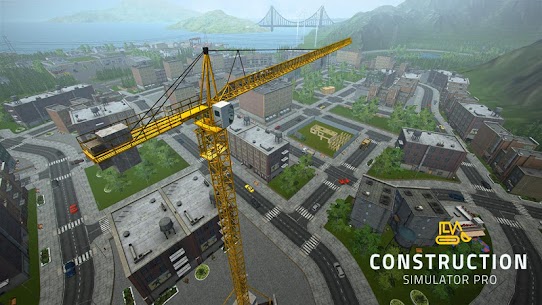
Cranes split into three distinct types, and the game treats them as genuinely different tools. The tower crane sits fixed on a site for the length of a tall build and gives you the map view many players use for route planning. A mobile crane drives itself between jobs and handles lighter lifting.
Static cranes occupy the middle ground and appear on specific contract requirements. Because the requirement lists name a crane type rather than “a crane”, turning up with the wrong one wastes the trip. Check the contract card, then send the matching machine.
Concrete Pump and Lowbed Transport Work
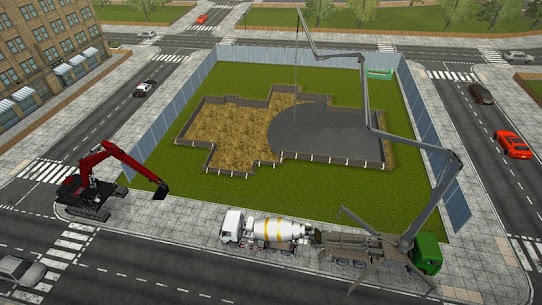
The concrete pump handles foundation and structural pours. It sits among the more technical machines to operate, since you position the boom precisely rather than simply driving into place. Landmark builds lean on it heavily, so it is worth buying before you attempt the larger city contracts.
Lowbed transporters carry the heaviest machines that a standard flatbed cannot handle. Although it feels like an indulgent purchase early on, the lowbed pays for itself once your fleet includes large excavators and static cranes. Similarly, a flatbed trailer extends carrying capacity for material runs across the longer village routes.
How to Complete Over 20 Contracts Across the Map
Over 20 contracts sit across the Construction Simulator PRO map, spread over two main cities and two villages, and each one lists the exact machines and materials it needs before work can begin. Contracts pay cash and experience on completion.
Named builds include a skatepark, a tennis court, a church, a city hall and a wind turbine. Smaller municipal jobs open first. Larger landmark projects unlock as your contractor standing rises.
Completed structures stay on the map permanently. That gives the career a visible record, since driving through a city you have built feels different from driving through a generic one. Moreover, you can raise buildings on lots you own and sell them for profit, which is a separate income stream from contract work.
Small City Jobs: Skatepark and Tennis Court
The skatepark is one of the friendlier early contracts. It involves ground preparation, a modest concrete pour, and minimal heavy lifting, which suits a fleet of two or three machines. First-time players usually finish it inside one sitting.
Tennis court work follows a similar shape and appears in update notes as a site the developers have adjusted for object placement issues. Both jobs teach the phase rhythm without demanding a crane. Consequently, they are the right place to test whether your excavator control scheme feels correct before a bigger commitment.
Landmark Builds: Church and City Hall
Church and city hall contracts are the long-form projects. Both run across several phases, demand structural lifting, and in my runs each took roughly two to three hours from first delivery to final handover. Plan them for a session where you will not need to stop midway.
Material volume is the real challenge. These builds need repeated supply runs, so a flatbed trailer removes several round trips. Instead of collecting materials phase by phase, stage what you can near the site before you start the lifting work.
The Wind Turbine Contract and Its Static Crane Rule
The wind turbine job carries a specific vehicle requirement that changed during the game’s development. An earlier update switched it from a mobile crane to a static crane, meaning any walkthrough written before that change sends you to the site with the wrong machine. This is the single most useful requirement detail in the entire contract list, and it appears nowhere in the competing articles I checked.
Assembly runs vertically, so the lifting sequence matters more than on ground-level builds. Bring the static crane, position it before the components arrive, and keep the delivery vehicle clear of the lift radius. As a result, the whole contract runs smoothly rather than stalling at the tower section.
How Experience, Cash and Fleet Upgrades Progress
Completing a contract pays out cash and experience at the same time in this construction sim. Cash buys machines and materials, while experience raises your standing and opens contracts that were previously locked.
Two currencies exist in total. Cash comes from work. Coins arrive through optional in-app purchases and act as the premium layer.
The career arc starts you as an inexperienced contractor taking small municipal jobs. Over 50 hours of gameplay sit between that point and full company ownership, according to the official listing. Because reinvestment drives everything, the players who progress fastest are the ones who buy fewer machines earlier and better ones later.
How the Experience System Raises Your Contractor Rank
Experience accrues per completed contract rather than per phase. Finishing a landmark build therefore returns far more than finishing three small ones, even where the cash difference looks modest. That weighting rewards players who commit to the long jobs once their fleet can handle them.
Rank gates access. Higher standing releases larger contracts and, with them, larger payouts that fund the expensive machines. Although the skip option lets you bypass an awkward task, skipping does not accelerate the experience curve, so it stays a rescue tool rather than a strategy.
Earning Cash and Spending Coins
Contract payouts are the primary cash source, and building on your own lots for resale is the secondary one. The resale loop takes longer to set up but scales better, since you keep the margin rather than a fixed fee. Reviews mention players buying coin packs, sometimes at twenty dollars, so treat coins as a shortcut rather than a requirement.
Nothing in the career locks behind coins permanently. Everything the fleet contains remains reachable through cash earned in-game. For example, the tower crane is expensive, but two landmark contracts will cover it comfortably.
What a Fully Upgraded Fleet Unlocks
Upgrades improve machine performance and efficiency, and customization lets you repaint vehicles to your own scheme. Performance upgrades matter most on transport vehicles, where speed directly converts into session time saved. Cosmetic changes affect nothing mechanically, so spend on function first.
A complete fleet removes the planning constraint entirely. Once you own all 17 machines, any contract on the map becomes immediately accessible without a purchase decision first. That is the point at which the game shifts from resource management to pure operation.
Common Mistakes That Stall Your Construction Company
Players lose more session time to driving machines across the map than to any other habit in this construction sim. Flatbed and lowbed transporters exist specifically to prevent that, yet reviews are full of people asking for smaller trailers because they never used the ones already available.
A second cluster of problems comes from save behaviour. The developers added a save history list precisely because corrupted saves were an issue, and several players still report progress not resuming exactly where they left off.
Third, the skip option gets used as a habit rather than a fix. Skipping a task advances the build but hides whatever went wrong, so the same confusion returns two contracts later. Each of these three mistakes is fixable in under a minute once you know it exists.
Driving Machines Point to Point Instead of Hauling
An excavator crossing from one city to a village under its own power can eat a large slice of a play session. Load it onto a flatbed instead and the same journey happens at road speed. This is the most common time sink in the entire game, and almost no article about it mentions transport as a system at all.
Plan transport in batches. If a contract needs three machines, haul them in sequence before starting any work rather than fetching each one mid-build. Consequently, your actual construction time stays uninterrupted.
Ignoring the Save History and Losing Progress
The save history list exists to recover from corrupted data, and knowing where it sits before you need it saves real frustration. Players who close the app mid-contract report the most trouble, since the game does not always resume at the exact point of exit. Finishing a phase cleanly before you stop is the simplest protection.
Treat phase boundaries as save points in practice. Complete the current stage, watch the progress counter settle, then leave. In addition, avoid switching devices mid-career unless you have confirmed the transfer works, because at least one long-standing review describes purchased content vanishing after a phone change.
Skipping Tasks Instead of Fixing the Real Problem
Skip exists for genuine blockers, such as a phase that reports full completion but refuses to advance. Used that way it is a legitimate tool. Used every time a task feels unclear, it removes the practice that makes the next contract readable.
Most stuck moments trace back to a missing delivery or a wrong machine on site. Check the contract requirements panel first. For example, a foundation phase that will not start almost always means the concrete pump is not present, not that the build is broken.
Hidden Details Most Contractors Miss on the Map
Google Play tags this title as offline and single player, which means the entire career runs without a connection once installed. That single tag answers a question most articles about the game never address, and it changes how the ads behave.
Beyond connectivity, several small systems sit in plain sight and go unused. The tower crane doubles as an observation point. Cab view offers different camera angles per machine.
Language support is broader than the audience assumes, covering 14 languages on the iOS build including Polish, Japanese, Korean and Simplified Chinese. Players outside English-speaking markets often assume a small Polish studio ships English only. Instead, the localisation list runs wider than several larger competitors.
Tower Crane Views and Route Planning
Climbing into the tower crane cab gives you an elevated view over the surrounding area. The store listing points this out directly, and it is genuinely useful rather than decorative. From that height you can read the road layout between your current site and the nearest supply store.
Use it before a materials run rather than after. Spotting the shortest route from above saves more time than any driving upgrade. Similarly, it helps you position delivery vehicles so they do not block the lift zone.
Offline Play and Ad Timing
Video ads appear after completed projects on the free build. Since ads need a connection, an offline session generally runs without them, which is a meaningful quality of life difference on a long landmark contract. Players who prefer uninterrupted sessions have a simple option available.
One historical caveat sits in the review history: some players experienced crashes tied to the post-project ad. Finishing a phase, then letting the game settle before continuing, reduces the chance of hitting that. The developers have shipped stability fixes across multiple updates addressing exactly this area.
Language Support and Cab View Camera Angles
The 14 supported languages cover Arabic, Catalan, English, French, German, Italian, Japanese, Korean, Polish, Portuguese, Russian, Simplified Chinese, Spanish and Turkish. Chinese-language requests appear repeatedly in older reviews, and the current listing shows that support arrived. Anyone who bounced off the game years ago for language reasons should check again.
Camera options sit in the settings tab. Every vehicle offers cab view, but the external angles differ by machine, and the wider view helps considerably during precise blade or bucket work. Switch between them freely rather than committing to one for the whole contract.
Best Construction Simulator PRO Tips and Tricks for Beginners
Every contract screen names the machines and materials the build needs before you accept it. Reading that panel first is the highest-value habit in the entire game, because it converts a wasted trip into a planned one.
The three habits that follow all come from the same principle: prepare before you drive. Cash is finite early, session time is finite always, and both get destroyed by unplanned trips.
Nothing here requires spending real money. A patient contractor with an excavator, a bulldozer and a flatbed can reach the landmark contracts entirely on job income.
Match the Machine to the Contract Before You Drive
Contract requirements name machine types precisely, and the wind turbine’s static crane rule proves the game means it. Before leaving your yard, open the contract card and list every machine named. Then haul all of them in one transport sequence.
This single habit removes most of the frustration beginners report. Rather than discovering a missing machine mid-build, you arrive with a complete kit. As a result, a landmark contract runs as one continuous session instead of three interrupted ones.
Bank Cash Before Buying the Tower Crane
The tower crane is a genuine milestone purchase, and buying it too early strips the cash you need for materials. Finish the skatepark and tennis court tier first, since those jobs need no crane at all. Their combined payout builds a comfortable buffer.
Aim to hold enough cash for both the crane and one full material run after the purchase. Otherwise you own an expensive machine and cannot afford to feed it. Finally, remember that a mobile crane covers lighter lifting for a fraction of the cost.
Level the Ground Before Concrete Pump Work
Foundation pours go wrong when the excavation underneath is uneven. Bulldozer levelling is quick and prevents rework, so run a pass across the site before bringing the concrete pump in. Physics apply to poured material the same way they apply to soil.
Position the pump once and position it well. Repositioning mid-pour costs more time than the initial setup did. For example, on a church foundation, one careful placement covers a span that two rushed placements struggle to reach.
Frequently Asked Questions About Construction Simulator PRO
Is Construction Simulator PRO free to install?
Yes. Construction Simulator PRO costs nothing to install from Google Play, carries a 3+ content rating, and has passed one million installs. The store sells coin packs inside the app as optional extras. Short ads play after finished jobs, which is the trade for free entry.
How long does it take to finish the game?
The store listing promises over 50 hours of play, and that number holds if you finish every contract without skipping tasks. Sessions run long by design, since a single landmark build spans several phases. Most players get through the small city jobs in short sittings and save the church and city hall for longer runs.
Can you play it offline?
Yes. Google Play tags the title as offline and single player, so contracts run without a connection. The ads that follow finished jobs need data, so offline sessions generally skip them. It also ships in 14 languages, including Polish, Japanese, Korean and Simplified Chinese.
Who Should Install This Construction Sim
Anyone who wants to actually operate machines rather than tap through a management menu will get real value from this title. Players chasing fast rewards or multiplayer competition should look elsewhere, since the pace is deliberately slow. Having spent long sessions with it, my honest verdict is that the cab view and the load physics carry the whole experience, and the transport system I ignored for hours turned out to be the thing that made it enjoyable. Bring patience, buy a flatbed early, and read every contract card before you drive. This is one of the most genuinely hands-on construction sims on Android.
Images
Download links
ℹ️ Download link not working? Please refresh the page and try again.
Developer's apps








New Apps
Most Played Mobile Games


