
Tower Craft MOD APK (Free Shopping)

Description
Tower Craft is one of the few idle building games that sends your skyscraper from ground level all the way to Mars, with each floor carrying its own unique design. This post is written for new players and returning builders who want to get more floors, smarter upgrades, and better scores faster. It covers the core tap-and-idle mechanic, the per-floor design system, the multi-environment progression from Earth to Mars, the diamond tier system, common mistakes, and the full FAQ.
What Is Tower Craft and How Does It Play
Tower Craft: Skyscraper Builder is a free idle construction game developed by CASUAL AZUR GAMES, available on both Android and iOS. Players tap the screen to stack blocks, choose materials for each floor, manage cash, and upgrade their construction to build the tallest skyscraper possible. The core loop is simple: tap to earn, spend to upgrade, and repeat as your tower climbs higher.
The game belongs to the idle tycoon genre. However, it adds a layer of construction simulation that most idle clickers skip. Players decide which parts to buy, which materials to use, and which upgrades best suit their skyscraper at each stage. Each decision affects both the visual look of the building and the speed of future construction.
How the Tap and Idle Block Stacking Mechanic Works
The tap effect is the heart of the game. Each tap places a block and adds progress toward the current floor. Players build faster by increasing their tap power through upgrades. However, the game also runs an idle income system in the background, earning cash even when the player is not actively tapping.
Both systems work at the same time. The tap mechanic adds floors quickly during active sessions. The idle income mechanic accumulates cash during breaks. Players who understand this distinction upgrade both systems on separate schedules, rather than pouring all cash into just one. This is one of the most important mechanics to understand early.
The Setting and Skyscraper-to-Space Theme
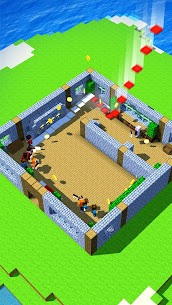
Tower Craft opens on Earth. The player begins with a tiny tower and stacks it floor by floor toward recognisable landmarks. As the tower climbs higher, the environment shifts. First the tower rises into the clouds. Then it enters space. Finally, construction on Mars becomes available.
This multi-environment structure gives the game a genuine sense of scale. Each environment does not just change the visual backdrop. It also introduces new building materials and design options. The tone stays light and fun throughout, aimed at casual players who enjoy a relaxing build-and-earn loop with visually impressive milestones.
How Tower Craft Compares to Tiny Tower and Idle Construction 3D
Tiny Tower (NimbleBit), available on Android and iOS, focuses on managing residents called Bitizens inside your floors. It is a social, pixel-art experience. Tower Craft, by contrast, is purely a construction tycoon game. Players do not manage residents. Instead, they focus entirely on stacking blocks and optimising upgrades.
Idle Construction 3D (Green Panda Games), also on Android and iOS, features workers physically carrying bricks in a 3D environment. Tower Craft uses a simpler tap-based block stacking approach with no worker pathing. Therefore, Tower Craft is faster to pick up and better suited to short casual sessions, while Idle Construction 3D rewards players who enjoy a more visual, worker-management loop.
How Tower Craft Controls and Tap Mechanics Function
The controls in this idle construction game are designed for one-handed mobile play. Tapping the screen adds blocks and drives progress. Players do not need to manage camera angles or complex menus. The interface keeps the skyscraper front and centre, with upgrade options accessible via simple on-screen buttons.
Challenges appear at regular intervals as the tower rises. These timed tap challenges ask players to tap as fast as possible within a short window. Completing a challenge earns bonus cash. Watching an optional ad after a challenge multiplies the reward. Players who skip ads entirely still earn the base reward.
How Tapping Adds Floors and Builds Faster
Each tap increases the construction progress bar for the current floor. When the bar fills, the floor is complete and the tower rises one level. The tap effect upgrade directly increases how much each tap contributes to that bar. Players who invest in tap upgrades early see noticeably faster floor completion times.
Bonus floors also appear during play. These grant automatic floor completions or cash boosts and do not require any tapping. They appear as a reward for reaching certain heights or completing challenges. Additionally, characters and cat helpers, once unlocked, passively speed up construction without the player needing to tap at all.
How the Idle Income Mechanic Runs Alongside Tapping
The idle income mechanic is entirely separate from the tap effect. It generates cash continuously, even when the player closes the app. This income funds upgrades between active sessions. Players return to the game and find their cash balance has grown, ready to spend on the next upgrade tier.
However, many beginners spend all their idle income on tap upgrades. This is a mistake, because the idle income system itself can also be upgraded. A stronger idle income rate means more cash between sessions, which ultimately speeds up the entire construction loop. Both systems deserve investment at roughly equal rates, especially in the first hundred floors.
What Happens When a Tower Floor Is Completed
When a floor is fully constructed, the game registers a height increase and updates the score. The player then selects the design for the new floor from available options. Each floor has its own visual style, so no two buildings need to look the same. This design choice is cosmetic but adds a satisfying layer of personalisation.
After selecting the design, construction begins on the next floor immediately. The cash cost of each successive floor increases as the tower climbs. Therefore, players need a growing income rate to keep pace with rising construction costs. This is precisely why balancing tap upgrades and idle income upgrades becomes critical above the first few dozen floors.
What Makes Tower Craft Different from Other Idle Builders
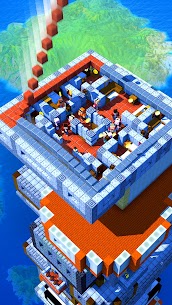
Most idle building games use a flat, 2D interface or a fixed overhead view. Tower Craft uses full 3D block graphics with a viewable skyscraper that grows visibly with each floor. The game also separates itself from city builder games by removing any city management layer. Players focus only on the tower, not on roads, citizens, or resource chains.
The construction tycoon cash system is also structured differently. Instead of unlocking fixed building blueprints, players choose materials per floor. This makes the building process feel more personal. Additionally, the game tracks height as a score, so every floor added is a direct ranking improvement.
How the Per-Floor Custom Design System Works
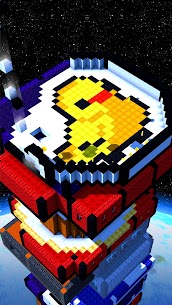
Each completed floor opens a design selection screen. Players choose from several visual options for that specific floor. The design does not affect gameplay stats. However, it determines the visual identity of the skyscraper as it grows. Players can create a consistent architectural theme or mix styles freely across hundreds of floors.
This system makes Tower Craft’s skyscrapers genuinely unique from player to player. Two players at the same height will likely have very different-looking buildings. For players who enjoy creative expression in mobile games, this feature adds significant replay value. It is one of the most underappreciated aspects of the game’s design.
How the 3D Block Graphics Differ from 2D Mobile Idle Games
Tower Craft renders each floor as a visible 3D block structure that stacks upward in real time. Players can see their building grow with each tap. This is meaningfully different from 2D idle games, which often represent progress as a number or bar rather than a visible structure.
The 3D presentation also makes the multi-environment transitions more satisfying. When the tower breaks through the clouds or enters the space environment, the background shifts in a way that feels like a genuine milestone. Consequently, players are more motivated to keep building because the visual reward is clear and immediate.
Why the Construction Tycoon Cash System Sets It Apart
The cash management layer in this building simulator asks players to make real decisions. Players choose which upgrade to buy next, which floor parts to purchase, and how to balance spending between the tap effect and idle income. These choices directly affect how fast the tower rises.
Most idle clicker games automate spending entirely or provide only one upgrade path. Tower Craft’s system, by contrast, rewards players who think ahead. For example, investing in the idle income upgrade before a long break pays off more than investing in tap power, which only helps during active sessions. This small strategic depth is what keeps engaged players returning.
How the Multi-Environment Height Progression Works
The game structures height milestones around distinct environments. Players start on Earth, building through early landmark heights. As the tower surpasses certain floor counts, the surrounding environment changes to reflect the new altitude. Each transition is a visible event, not just a stat change.
This environmental progression also introduces new materials and floor design options. Players unlock access to construction materials that are only available in the space or Mars environments. Therefore, reaching higher environments is not purely cosmetic — it expands what the player can build with.
What Triggers the Move from Earth to Clouds to Space
The transition from Earth to clouds happens as the tower reaches a height milestone tracked by the game’s score system. There is no single announced floor count. Instead, the environment shifts as the tower visually breaks through the cloud layer in the 3D render. Players notice the background change and the available floor design options shift accordingly.
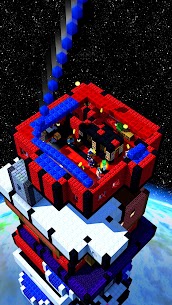
The space transition works similarly. The sky darkens, the background environment becomes the void of space, and new construction materials become available. Each environment transition also unlocks new bonus floor types that cannot appear in lower environments. Consequently, players who push through the early Earth stage unlock a meaningfully broader building palette.
What the Mars Construction Stage Unlocks
The Mars stage is the highest environment currently available in Tower Craft. Reaching it is a long-term goal that requires sustained investment in both the tap effect and idle income upgrades across thousands of floors. At the time of this post, the Mars stage was listed as the final major environment milestone.
Players on Mars have access to the full range of floor design options accumulated through all previous environments. Construction materials at this stage are more expensive per floor. However, the score multiplier for each Mars-level floor is also higher. Therefore, players who reach Mars see their overall game score increase at a faster rate per floor completed.
What the Diamond Tier System Unlocks at Each Stage
The diamond tier system activates once players reach approximately 1,500 floors on Earth. At that point, the game introduces a Diamond rating. However, the progression does not stop at one Diamond tier. The system continues through Diamond 2, Diamond 3, and so on — theoretically without a fixed ceiling.
Each diamond tier requires more floors to unlock than the last. This is the source of the most common player frustration in Tower Craft. Many players expect a fixed end point. Instead, the diamond tier functions as an infinite prestige-style ranking. Players who understand this from the beginning approach it as an ongoing score competition rather than a finish line.
Progression, Floor Unlocks, and Diamond Tiers
The overall progression system in Tower Craft ties together height, score, cash, and unlockables. Every floor completed raises the score. A higher score improves the player’s standing in tournament leaderboards and unlocks higher design options. Cash earned from each completed floor funds the upgrades that determine how fast future floors are completed.
Gems function as a secondary currency. Players earn gems through gameplay and can spend them to speed up construction, increase income rate, or complete multiple floors at once. The gems system is optional but offers meaningful acceleration for players who want to push their height quickly.
How Score Increases with Tower Height
Score in Tower Craft is directly tied to tower height. Every floor added increases the score. However, the score increase per floor also depends on the environment. Floors completed in the clouds, space, and Mars environments contribute more to the total score than Earth-level floors. Therefore, players who invest early in reaching higher environments see exponential score growth over time.
The tournament leaderboard compares height scores between players. This adds a competitive element to what is otherwise a solo construction experience. Performing well in tournaments rewards the player with bonus resources, which further accelerates construction.
What Unlockable Characters and Cats Do for Your Tower
Characters and cats are passive helpers in Tower Craft. Once unlocked, they automatically speed up construction and increase the idle income rate without any player input. Characters typically boost the tap effect or reduce construction time per floor. Cats increase income generation.
Unlocking multiple characters and cats creates a compounding passive benefit. The more helpers active at once, the faster the tower rises even during idle periods. Players who unlock helpers early in the progression tend to reach higher environments faster than those who spend all their cash purely on tap and income upgrades. The helpers represent strong long-term value per gem spent.
How Gems Speed Up Construction and Income
Gems allow players to take several powerful actions. They can speed up construction directly, completing floors in seconds rather than minutes. They can also boost the income rate for a set period, effectively multiplying passive earnings. Additionally, players can spend gems to complete multiple floors at once, which is particularly useful during slow mid-game phases between major environment transitions.
Gems are earned through gameplay milestones rather than exclusively through real-money purchases. However, the gem system is also the primary monetisation path in the game. Players who choose not to spend real money can still accumulate gems through consistent play. The pace of free gem accumulation is slower but sufficient for steady progression.
All Tower Craft Mistakes That Kill Your Score
Many players stall their progression by making the same three core mistakes. These errors all stem from the same source: misunderstanding how the tap effect, idle income, and diamond tier systems interact with each other. Catching these mistakes early makes the difference between a tower that stalls at a few hundred floors and one that reaches space.
Understanding the two-income system is the most important step any new player can take. The tap effect and idle income are not the same upgrade path. Treating them as alternatives rather than parallel systems is the single most common reason players find their cash running short when floor costs increase.
Why Ignoring the Tap Effect Upgrade Costs You Floors
The tap effect upgrade directly determines how much progress each tap adds to the current floor’s construction bar. Players who neglect this upgrade spend more taps per floor than necessary. This matters most during active sessions, where tap efficiency determines how many floors a player can complete in a given time window.
However, the tap effect upgrade is also the one players most frequently overfund. Some players spend all available cash on tap upgrades while ignoring idle income entirely. This creates a situation where the player is fast during active sessions but returns to barely any accumulated cash after a break. The correct approach is to alternate between tap and idle upgrades, keeping both at comparable levels.
Why Players Misread the Diamond Tier Loop and Give Up
Many players reach the first Diamond milestone around 1,500 floors and assume it is the final reward. When Diamond 2 appears, they feel the progression was misrepresented. Some quit entirely at this point, which means they abandon the game just as the highest-scoring environments and design options become reachable.
The diamond tier system is not a finish line. It is a ranking mechanic. Each diamond tier exists to segment high-level players by height, not to signal an approaching end of content. Players who reframe diamond tiers as ongoing score brackets rather than completion levels stay engaged far longer and ultimately reach the Mars environment.
How Mismanaging Cash Between Floors Stalls Progress
Floor costs increase with every level added to the tower. Players who spend cash freely in early floors often hit a wall in the mid-game when construction costs suddenly outpace income. This stall typically happens between the first and second hundred floors, well before any environment transition.
The fix is straightforward. Players should prioritise the idle income upgrade during any session where they know they will be away from the game for several hours. They should prioritise the tap effect upgrade during active sessions where they plan to play continuously. Following this simple rotation keeps the cash balance healthy and prevents the stall that slows most new players.
Best Tower Craft Tips and Tricks for Beginners
The following tips are drawn from specific systems in Tower Craft that do not apply to other idle games. Each one targets a mechanic or decision point unique to this construction simulator.
How to Spend Your Cash Without Slowing Progress
The most effective spending pattern in Tower Craft is to keep the tap effect and idle income upgrades at roughly equal levels throughout the first 500 floors. Neither should exceed the other by more than two upgrade tiers. This balance ensures that cash accumulates steadily during idle time and that active tapping remains efficient.
Players should also avoid spending gems to complete floors during the early Earth stage. Gems are significantly more valuable in the mid-game, when construction costs per floor are high and environment transitions are close. Therefore, save gems until at least the clouds environment before using them on floor completion acceleration.
How to Use the Per-Floor Design System to Maximise Score
The per-floor design choice does not affect the score directly. However, it does determine which bonus floor types become available later in the progression. Players who select design options consistently from a single material category in early floors unlock bonus floor rewards in that category faster.
Additionally, the visual consistency of a designed skyscraper makes it easier to spot which floor tier the player is currently building on. This is useful when tracking progress toward the next environment transition. A player who mixes random designs loses this visual reference point.
When to Prioritise the Idle Income Upgrade Over Tap Power
Prioritise the idle income upgrade in three specific situations. First, any time the player is about to close the app for several hours or overnight. Second, when the current floor cost exceeds the player’s active session earnings by more than 30 percent. Third, when an unlockable character or cat is one or two gem purchases away and the player wants to accumulate gems faster.
By contrast, prioritise the tap effect upgrade during challenge sessions and tournament periods. The tap challenge mechanic rewards high tap speed, but tap speed alone is useless without a strong tap effect behind each press. Therefore, players who enter tournaments should ensure their tap effect is at least two to three tiers higher than their idle income before the competition period begins.
Frequently Asked Questions About Tower Craft
Is Tower Craft available on Android and iOS?
Tower Craft: Skyscraper Builder is available on both Android and iOS. Players can find it on Google Play under the developer CASUAL AZUR GAMES and on the Apple App Store under AI Games FZ. The game requires Android 6.0 or higher. It is free to download on both platforms with optional in-app purchases available.
How many floors can you build in Tower Craft?
Tower Craft does not have a fixed floor limit. The tower can be extended indefinitely. Players reach the first Diamond ranking milestone around 1,500 floors and continue through Diamond 2, Diamond 3, and beyond. The game’s progression system is designed as an ongoing ranking loop rather than a game with a fixed completion point.
What are the main features of Tower Craft Skyscraper Builder?
Tower Craft offers idle block stacking, per-floor custom design, a multi-environment progression from Earth to clouds, space, and Mars, a 3D block graphic engine, character and cat helpers, a gems currency system, a tournament leaderboard, and optional timed tap challenges. The game is free to play with optional in-app purchases for gem acceleration and ad removal.
Why Tower Craft Is Worth Your Time as an Idle Builder
Tower Craft works best for players who enjoy a relaxed but layered idle tycoon loop without city management complexity. The per-floor design system, the multi-environment height milestones, and the dual income mechanic give it more depth than its simple tap interface suggests. Players who take the time to understand the tap effect and idle income balance will reach the clouds, space, and eventually Mars environments without stalling.
Having played through the Earth and clouds stages personally, the most satisfying part is watching a skyscraper that genuinely looks different from any other player’s build. The diamond tier system requires a mindset shift — but once you treat it as an ongoing ranking rather than a finish line, the game opens up significantly. Tower Craft is a well-structured idle building simulator that rewards consistency and smart upgrade timing above all else.
Images

Download links
ℹ️ Download link not working? Please refresh the page and try again.
Developer's apps



Related apps





What's new
Now our app is faster and more convenient! Have a good game! Thanks for staying with us!
New Apps
Most Played Mobile Games


