
MudRunner MOD APK (Unlocked)

Description
MudRunner strips away hand-holding and drops players into extreme Siberian terrain with nothing but a vehicle, a map, and a compass. It rewards patience, vehicle knowledge, and smart route planning — skills that take real time to develop. This post covers everything from basic controls to advanced physics, all 16 vehicles, all 15 maps, and the key strategies that separate players who finish their objectives from players who stay stuck in the mud.
What Is MudRunner and How Does It Play?
MudRunner is an off-road simulation built around one core challenge: getting powerful all-terrain vehicles from point A to point B across terrain that actively fights back. Unlike arcade driving games, this one measures success in inches. Every slope, every river, and every muddy track demands careful thought before you commit.
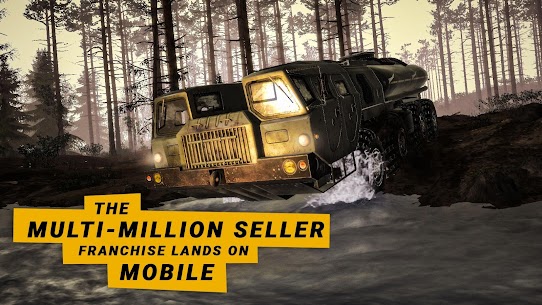
The game comes from the multi-million seller franchise behind SnowRunner. Its mobile version brings the same demanding physics and open world structure to handheld devices. That combination makes it one of the most technically serious driving simulations available on mobile platforms.
The Core Off-Road Premise
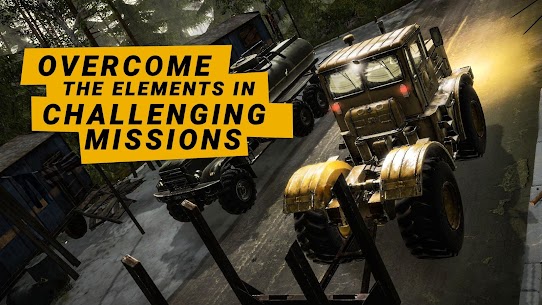
The premise is simple on paper. Players complete objectives and deliveries by driving all-terrain vehicles across wild, untamed Siberian landscapes. In practice, those objectives become grueling tests of vehicle control and route planning. Mud, rivers, swamps, and steep forest tracks all stand between you and your destination.
Progress depends entirely on skill and decision-making. There are no shortcuts, no fast travel options, and no easy paths. Every route requires assessment, and every mistake — an overcorrected turn on a slope, a misjudged river crossing — can leave your vehicle embedded in terrain that refuses to let go.
Siberian Environments and Open World Structure
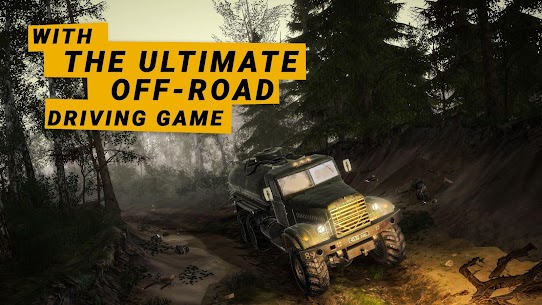
The environments in MudRunner draw from extreme Siberian wilderness. Players navigate forests dense enough to block sightlines, swamps that disguise their depth until a vehicle is already sinking, and mountain tracks that punish any loss of momentum. The terrain is varied enough that no two routes feel the same.
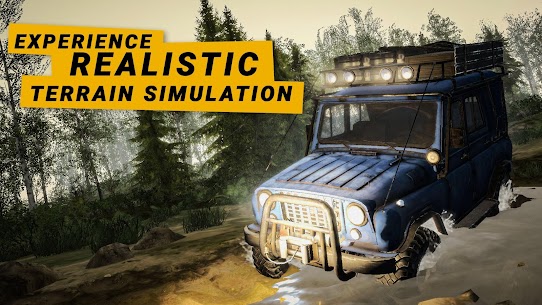
Importantly, the world reacts dynamically. The advanced physics engine models how soil compresses under vehicle weight and how water resistance changes with river depth and current. These are not cosmetic effects. They directly affect whether a vehicle moves forward or not. Siberian conditions are not just a setting — they are an active opponent.
Mobile Version Features and Platform Notes
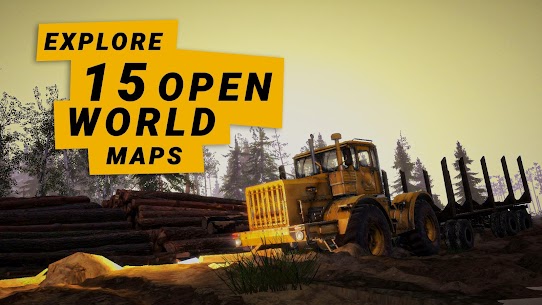
The mobile release of MudRunner brings the full simulation experience to iOS and Android. It includes all 15 maps, all 16 vehicles, and the complete physics system from the original. The control scheme has been adapted for touchscreen input without stripping out the mechanical depth that defines the franchise.
Performance scales across a range of devices. However, the visual fidelity and physics complexity mean players benefit from a reasonably modern device. Stunning graphics are part of the package, and the game shows them off best when hardware can keep up with the simulation demands running underneath.
How to Play MudRunner: Controls and Basic Mechanics
Learning MudRunner controls takes more time than most mobile games require. The control scheme reflects the simulation’s depth. Throttle, steering, camera angle, and gear selection all have meaningful impact. Understanding each one separately is the first step before putting them all together on actual terrain.
The most important early habit is deliberate movement. Aggressive throttle input is the most common reason new players get stuck. The physics engine punishes sudden moves — spinning wheels dig deeper into mud rather than finding traction. Slow, measured acceleration gives the vehicle the best chance of staying on top of the terrain instead of into it.
Steering, Throttle, and Camera Controls
Steering in MudRunner works best with small, consistent inputs. Large steering corrections at speed — especially downhill — can shift the vehicle’s weight distribution dramatically. That shift is modeled by the physics engine and can result in slides, tips, or loss of directional control on uneven terrain.
Throttle management is equally critical. Low revs with steady input give traction on loose surfaces. Flooring the throttle on mud or a steep incline buries wheels immediately. Treat the throttle as a precision tool rather than an on-off switch. Camera position also matters — pulling back the view gives better terrain awareness and helps with route reading ahead of obstacles.
Reading the Terrain Before You Drive
Terrain reading is a skill that MudRunner expects players to develop. Before driving into any section of the map, zoom out and assess the route. Look for high ground, dry paths, and natural crossings at rivers and streams. These rarely appear obvious at first glance, especially in heavily forested areas.
Color and texture cues in the terrain provide useful information. Darker ground areas typically indicate wet or soft soil. Flat-looking routes through forest often hide root systems and soft spots that kill momentum. Experienced players read these cues reflexively. New players benefit from pausing frequently to scan their surroundings rather than committing to a line they cannot recover from.
Using the Map and Compass Effectively
MudRunner gives players a map and compass rather than a GPS or turn-by-turn navigation. That choice is intentional. The game expects players to understand their position relative to terrain features and plan accordingly. The map shows the general layout of each environment, but precise positioning requires attention.
The compass provides directional reference for navigating between waypoints and objectives. Combined with terrain features — ridge lines, river bends, tree density — it becomes a reliable way to orient movement even without modern navigation aids. Players who invest time in reading the map properly move through environments far more efficiently than those who navigate by feel alone.
MudRunner Physics Engine: How Mud and Water Behave
The physics engine is the defining feature of MudRunner. It does not treat terrain as a static surface. Instead, the engine models how soil responds to vehicle weight, tire pressure, and movement. The result is terrain that changes under repeated passes. A path that was passable on the first crossing can become a deep rut that traps a vehicle on the second.
This dynamic interaction makes every playthrough of a map subtly different. Players cannot simply memorize a single optimal line and repeat it. The terrain evolves, and strategy must evolve with it.
How Vehicle Weight Affects Terrain Deformation
Heavier vehicles sink deeper into soft ground. That relationship is not linear — a fully loaded military truck behaves very differently from an unloaded scout vehicle on identical terrain. The physics engine accounts for weight distribution across axles, which means uneven cargo loading can create handling problems even on flat ground.
Terrain deformation compounds over time. Early in a sandbox session, the landscape absorbs vehicle movement relatively cleanly. After multiple passes along the same route, ruts develop that redirect water flow and create new traps for subsequent vehicles. Managing deformation — by varying routes and avoiding unnecessary passes through wet areas — becomes part of advanced play.
River Crossings and What Makes Them Dangerous
River crossings are among the most demanding challenges MudRunner presents. The physics engine models water resistance, current strength, and riverbed composition simultaneously. A crossing that looks shallow can be far deeper at the midpoint, and the current pushes vehicles sideways in proportion to how much lateral surface area they present.
Speed matters at river crossings, but in a counterintuitive way. Too slow and the current has time to redirect the vehicle. Too fast and the bow wave raises the water level around the chassis, risking engine flooding. The correct approach varies by vehicle and river width. Military trucks with high ground clearance handle crossings differently from low-slung scout vehicles. Each one has a particular speed and angle that works best.
Dynamic Day-Night Cycle and Condition Changes
The day-night cycle in MudRunner changes more than lighting. Temperature variations affect terrain conditions in subtle but meaningful ways. Ground that is firm during daylight can soften as the simulation progresses through different environmental states.
Visibility at night drops significantly. Routes that are readable during daylight become harder to assess in low light, and terrain features that provide navigation reference points become harder to identify. Players who reach difficult sections during the night portion of the cycle often find it worth waiting — or repositioning to better ground — rather than pressing forward with reduced visibility.
Best MudRunner Strategy for New Players
New players in MudRunner almost universally make the same mistakes. They overestimate their vehicles, underestimate the terrain, and fail to scout routes before committing to them. Correcting these three habits early makes the difference between constant rescues and steady progress through objectives.
Strategy in MudRunner also means managing resources. Fuel consumption is real, refueling points are not always nearby, and getting a heavy truck stuck far from any support adds a complex recovery problem to an already difficult delivery challenge. Planning routes with refueling in mind is part of competent play.
Choosing the Right Vehicle for Each Situation
Sixteen vehicles are available in MudRunner, and the choice matters enormously. Light scout vehicles excel at path finding — they are fast, nimble, and less likely to get stuck on soft terrain because their lower weight distributes pressure differently. They are not suitable for heavy deliveries, but they are invaluable for assessing routes before committing a truck.
Heavy duty military trucks carry more and power through obstacles that would stop a scout vehicle. However, they require far more careful route selection. A military truck stuck in a swamp is a serious problem. Using a scout first to verify that a route is genuinely passable at truck weight is one of the most effective strategies available to any player.
When to Stick to High Ground
High ground is almost always preferable in MudRunner. Elevated terrain tends to be drier, firmer, and more predictable underfoot. The tradeoff is that high-ground routes are often longer and steeper. However, the time cost of taking a longer but firm route is almost always lower than the time cost of recovering a vehicle from deep mud on a shorter path.
River valleys and low-lying forest areas are the most likely places to encounter soft terrain. Swamps and flooded areas appear most frequently at elevation transitions where water naturally collects. Keeping vehicles on ridgelines and elevated forest tracks preserves momentum and reduces recovery incidents dramatically.
Completing Deliveries Without Getting Stuck
Deliveries are the primary objective structure in MudRunner. Completing them without incident requires planning the full route before moving, not just the first section. Players who plan only the opening leg of a delivery frequently find themselves well committed before encountering an obstacle they did not account for.
Partial deliveries are sometimes the correct call. Carrying a full load across marginal terrain multiplies the risk. Splitting cargo across multiple trips — especially for routes with known difficult sections — is often faster than attempting a single full-load crossing. The game rewards pragmatism over ambition.
All MudRunner Vehicles: ATVs, Scouts, and Military Trucks
MudRunner includes 16 distinct all-terrain vehicles. Each one has its own performance characteristics, ground clearance specification, and range of attachable equipment options. No single vehicle handles all situations — the roster is designed to reward players who understand which tool fits each problem.
Vehicle selection interacts directly with the physics engine. A vehicle’s weight, wheelbase, and suspension travel all affect how it responds to specific terrain types. Understanding these differences at a mechanical level — not just by feel — gives players a meaningful advantage when planning complex routes.
Light Scout Vehicles and Their Strengths
Scout vehicles are built for speed and agility over carrying capacity. Their primary value is reconnaissance — moving quickly through an environment to assess which routes will support heavier equipment. Their low weight means they deform terrain minimally and recover from minor stuck situations more easily than larger vehicles.
They also work well for time-sensitive objectives where cargo weight is low or non-existent. Several scout vehicles in the roster have excellent off-road geometry that allows them to handle terrain angles that would tip heavier trucks. Players who deploy scouts intelligently before committing trucks rarely face serious recovery situations.
Heavy Duty Military Trucks and Cargo Capacity
Military trucks in MudRunner are purpose-built for heavy work in extreme conditions. Their high ground clearance, powerful engines, and robust construction allow them to push through obstacles that stop lighter vehicles entirely. However, their weight creates deep deformation on soft terrain, and their size limits route options in narrow forest tracks.
These vehicles shine on well-scouted routes with firm terrain. Properly routed, a military truck can carry full loads across terrain that looks impassable at first assessment. The key is matching the route to the vehicle’s capabilities rather than expecting the truck to handle anything the terrain presents.
Attachable Equipment and How It Changes Performance
Attachable equipment in MudRunner meaningfully expands what each vehicle can do. Equipment options include winches, cargo platforms, log carriers, and fuel tanks. Each attachment changes the vehicle’s weight distribution, handling characteristics, and operational range.
A winch attachment, for example, turns a stuck situation from a potential reset into a recoverable problem. Attaching a winch to a tree or anchor point and using engine torque to pull free is one of the most important recovery techniques in the game. Players who equip vehicles without considering attachment options are leaving significant capability on the table.
All MudRunner Maps: Sandbox and Challenge Modes Explained
MudRunner offers 15 maps total — 6 sandbox maps and 9 challenge maps. Each category operates differently. Understanding the distinction between them is important for players who want to approach each map type with the right expectations and strategy.
The 15 environments collectively cover the full range of Siberian terrain types. Forests, swamps, mountain tracks, river crossings, and open plains all appear across the map roster. No two maps present the same combination of hazards or require the same approach.
The 6 Sandbox Maps and What Each Offers
Sandbox maps are open-ended environments without a fixed objective structure. Players set their own goals, experiment with vehicles, and develop terrain-reading skills without the pressure of failing a specific mission. These maps are ideal for learning the physics system and getting comfortable with vehicle behavior before attempting challenge content.
Each sandbox map contains its own distinct terrain mix. Some emphasize river networks and flood-plain navigation. Others present dense forest corridors and steep gradient changes. The sandbox format lets players return to specific terrain types repeatedly until they feel genuinely confident in their handling.
The 9 Challenge Maps and How Difficulty Scales
Challenge maps introduce structured objectives and a difficulty curve that escalates through the roster. Early challenge maps present demanding terrain with achievable objectives. Later maps combine complex terrain, longer routes, and tighter operational constraints that require experienced players to think several steps ahead.
The challenge map structure rewards mastery of the core mechanics. Players who skip sandbox entirely and attempt advanced challenge maps typically encounter situations they do not have the vehicle knowledge or terrain-reading skills to handle. Working through the progression — sandbox first, early challenges second, advanced maps third — produces far better results than jumping ahead.
Forests, Swamps, Mountains, and River Terrain Types
Each terrain type in MudRunner demands different handling technique. Forests combine root networks, narrow corridors, and variable ground firmness that requires constant micro-corrections. Swamps present deceptive surfaces that look traversable but conceal deep soft ground beneath shallow water.
Mountain terrain introduces gradient challenges that make every traction decision more consequential. A vehicle that loses momentum on a steep incline faces the risk of rolling backward — a situation that is difficult to control without the right braking technique. Rivers, as noted elsewhere, bring their own distinct physics demands. Players who develop specific techniques for each terrain type move through mixed environments much more effectively than those who apply a single approach to everything.
Advanced MudRunner Techniques Most Players Miss
Most MudRunner players spend their early hours reacting to situations rather than managing them proactively. Advanced technique is largely about anticipation — reading what the terrain is about to do to the vehicle and adjusting before it happens rather than after.
These techniques are not hidden in the sense of being obscure. They emerge naturally from deep engagement with the physics system. However, most players do not spend the focused time needed to develop them deliberately. Understanding them explicitly accelerates the development curve significantly.
Momentum Management on Steep Slopes
Momentum is one of the most important resources in MudRunner. On steep slopes, it determines whether a vehicle crests an incline or stalls halfway up. Managing momentum means planning entry speed, selecting the right gear before the climb begins, and avoiding any steering correction that would redirect force sideways rather than forward.
Descending steep slopes requires equal care. Engine braking — achieved by downshifting before the descent — controls speed far better than friction braking alone on wet or loose surfaces. Players who rely on brakes to control downhill speed frequently experience understeer that pushes them off their intended line.
Using Vehicle Characteristics to Your Advantage
Each vehicle in the MudRunner roster has specific characteristics that make it the correct choice in particular situations. Wheelbase length affects how a vehicle bridges ruts and logs. Suspension travel determines how much axle articulation the vehicle has on uneven terrain. Ground clearance sets the limit for rock or stump obstacles before the chassis contacts them.
Players who understand these specifications — rather than just driving every vehicle the same way — make better vehicle selections and drive each one more appropriately. A long-wheelbase truck needs wider turns and performs better on open terrain. A short-wheelbase vehicle handles tighter corridors but may rock more aggressively on rutted tracks.
Recovering a Stuck Vehicle Without Resetting
Recovery without resetting is a critical skill. The first step when a vehicle is stuck is always to reduce wheel spin immediately. Continued throttle input when stuck digs the vehicle deeper — the physics engine models this accurately. Stopping completely and reassessing is almost always the correct first move.
Winch use is the most reliable recovery technique. Attaching to a solid anchor point — a tree or another vehicle — and applying slow, steady torque pulls a stuck vehicle free without making the situation worse. Players who do not use winches find themselves resetting far more often than necessary. Learning winch technique early saves enormous amounts of time across an extended play session.
Frequently Asked Questions About MudRunner
How many vehicles are in MudRunner on mobile?
MudRunner on mobile includes 16 all-terrain vehicles. The roster spans light scout vehicles, mid-range ATVs, and heavy duty military trucks. Each vehicle has distinct performance characteristics and supports different attachable equipment configurations.
What is the difference between sandbox and challenge maps?
Sandbox maps are open-ended environments with no fixed objectives, ideal for experimentation and skill-building. Challenge maps introduce structured missions and a progressive difficulty curve. MudRunner includes 6 sandbox maps and 9 challenge maps for a total of 15 environments.
Does MudRunner mobile have multiplayer?
The mobile version of MudRunner focuses on solo off-road simulation. The experience centers on single-player navigation, delivery completion, and vehicle management across its 15 open world environments. Players looking for cooperative or competitive play should check for any updates that may have added multiplayer features since the initial release.
Final Verdict on MudRunner for Mobile Off-Road Fans
MudRunner is one of the most mechanically serious driving simulations available on mobile. The physics engine, vehicle variety, and 15-map environment roster give it genuine depth that goes well beyond the average mobile game. Players who commit to learning the terrain-reading and vehicle-management skills the game demands will find an experience that rewards hundreds of hours of play.
It is not the right game for players expecting fast, accessible entertainment. The difficulty is real, the terrain is punishing, and the game never softens its demands for newer players. That difficulty is precisely what makes it compelling for simulation fans. MudRunner on mobile is a serious off-road simulation — and it delivers exactly that.
Images
Download links
ℹ️ Download link not working? Please refresh the page and try again.
Related apps




What's new
Fixed multiple bugs and improved overall stability.
New Apps
Most Played Mobile Games


