
Laptop Tycoon MOD APK (Unlimited Money, Points)

Description
Laptop Tycoon hands you a startup budget, a small team, and 14 separate design fields on your very first product. New founders who watched their opening three launches flop will find the design order, pricing logic and research timing that actually move the needle here. Research Points appear only when your studio designs something new, so frequent cheap launches beat saving up for one perfect flagship.
How to Play Laptop Tycoon on Android
Laptop Tycoon is a single player business simulation where you design a laptop, set its production volume, launch it, and then live with the buyer ratings that decide sales. Roastery Games built the entire game around that one loop, and every other system feeds it.
The studio operates from Odesa in Ukraine. Its listing has passed 1 million downloads on Google Play, sitting at 3.5 stars from roughly 9,660 reviews. That split rating tells you something useful. People love the concept and argue constantly about the pacing.
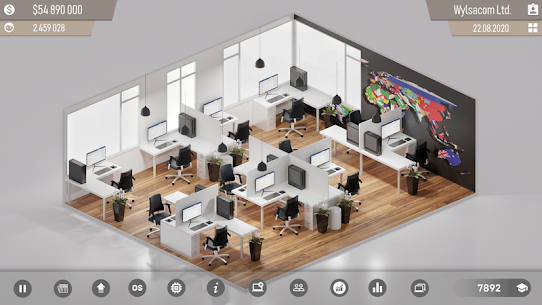
You start with cash, an empty office and a hiring screen. From there the game opens up gradually as your fan base grows and rival brands react. However, nothing arrives automatically. Every new function costs either money or research work, and the news feed keeps nudging you toward whatever the market wants next.
The Design, Produce, Launch and Review Score Loop
Four steps repeat for your entire playthrough. First you design a product, then your staff build it over several in-game days, then you pick how many copies to manufacture, and finally buyers post their verdicts. The higher the score, the faster stock clears the shelves.
That loop sounds simple, yet it hides the real skill of this tycoon game. Each cycle produces feedback about specific parts of your build. Players who actually read the complaint text improve far faster than players who repeat the same configuration and hope for a different outcome.
The Startup Versus Tech Giants Premise and News Feed
You play a young founder with seed capital and no reputation. The established brands already own the market, and the game frames your whole run as an underdog climb against them. There is no named protagonist and no dialogue tree.
Instead, the in-game news feed carries the story. It reports market trends, rival launches and shifting demand. For example, a news item about rising interest in bigger displays is a direct hint to bump screen size on your next build. Most new players ignore this feed entirely, which is a mistake.
How It Compares to Devices Tycoon and PC Creator 2
Three Android titles sit closest to this one. Devices Tycoon and Smartphone Tycoon 2 come from the same studio and share the design-then-launch skeleton, while PC Creator 2 – PC Building Sim from GAMES DEVELOPMENT takes a very different angle by focusing on assembling machines part by part rather than running a company.
Devices Tycoon spreads you across several product categories at once. By contrast, this title keeps you narrow, which makes the early hours simpler but the mid-game slower. PC Creator 2 is the better pick if you want hands-on building. Choose this one if you want spreadsheets, staff and rankings instead.
Android Version Versus the Windows Version
The same product ships on two platforms with two different business arrangements. On Android it is free, carries ads, and offers in-game purchases. On Steam it is a paid one-off with no ads at all, currently rated Mostly Positive with 74 percent of 396 reviews positive.
Touch controls handle the menus fine, since almost everything is a tap on a tab or a slider. Windows players get a mouse and a larger view of the company ranking screen, which genuinely helps once you track several rivals. Progress does not carry across platforms, so pick one and stay there.
Laptop Design Choices in the Create Laptop Tab
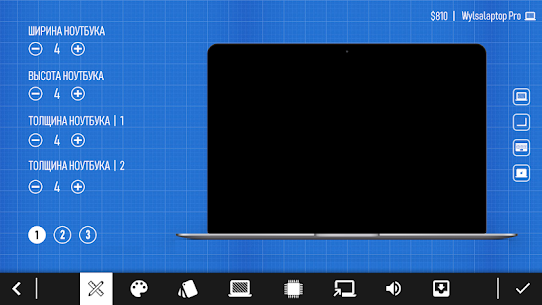
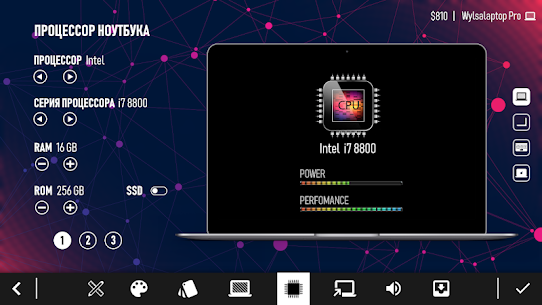
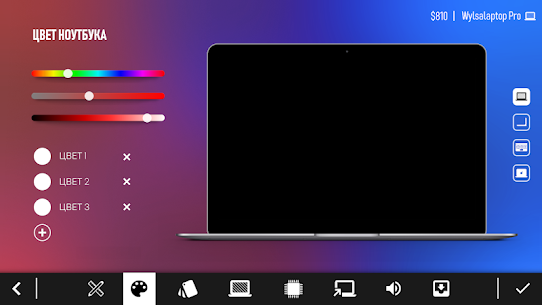
The Create Laptop tab holds 14 separate design fields, running from the product name down to the box it ships in. Colour, width, height, thickness, keyboard size, logo, screen size, screen resolution, screen technology, operating system, processor, video card and packaging fill out the rest.
Every one of those fields feeds the cost side of the ledger. Pick premium options everywhere and your unit cost climbs past what buyers will pay. Pick cheap options everywhere and the complaints arrive within days of launch.
Good design work in this business simulation is really a balancing act between spec and price. Your first build should stay deliberately plain. Save the expensive display technology for a product line that can carry the price tag.
All 14 Design Fields, From Screen Resolution to Packaging
Naming comes first, and it is purely cosmetic. Physical dimensions follow, where thickness matters more than most beginners expect, because thin builds draw heat complaints. Keyboard size and logo are light touches on buyer perception.
The heavy hitters sit in the middle of the list. Screen resolution, screen technology, processor and video card drive both cost and rating together. Packaging closes the sheet, and although it is the cheapest field on the screen, it still nudges the impression buyers form on day one.
Setting Production Volume Before a Launch
After development finishes, the game asks how many copies you want manufactured. This single number decides how much cash you tie up in stock. Set it low and a strong rating leaves you with empty shelves. Set it high and unsold units sit there while your balance shrinks.
Several players have noticed that the game sometimes manufactures more units than the figure they entered. Because of that quirk, a conservative number on your first two launches is safer than an ambitious one. You can always run a second production batch once the ratings land.
What Buyer Reviews Do to Your Sales Curve
Reviews start appearing within the first days of sale. Each one carries a short complaint or compliment, and together they produce the score that drives everything downstream. A strong rating pulls stock off shelves quickly and pushes your brand into the news.
The feedback text is the useful part. Comments about noise, heat, keyboard wear or material quality point directly at fields on the design sheet. Therefore, treat every launch as a data collection run, not just a sales event.
How to Unlock New Features With Research Points
Research Points open every locked function in this game, and you earn them only by designing a new laptop, operating system, or processor. Idle time generates none whatsoever, so the research tree advances only when your studio actively ships something.
That design choice separates this title from almost every other tycoon game on Android. There is no passive income path, no offline accrual, no waiting mechanic that quietly fills a bar while you sleep. Your progress is exactly as fast as your output.
The Research tab lists functions in a locked state until you spend. Some entries stay marked closed for reasons that confuse players, since levelling up does not always open them. For example, several people report seeing research prompts for features they already have available.
Where Research Points Actually Come From
Three activities generate the research currency: designing a laptop, developing an operating system, and developing a processor. Nothing else pays into that pool. Marketing does not, office upgrades do not, and simply holding cash certainly does not.
New players often stall here without understanding why. They finish one product, sit on the profits, and wonder why the tree stays locked. Instead, the correct habit is constant design activity, even when the individual products are small and cheap.
Which Research Unlocks Deserve Your First Points
Component tiers deserve priority over cosmetic options. Better display technology and stronger internals raise your rating ceiling, while extra colour choices and logo variants do almost nothing for sales. Spend early on the things buyers actually complain about.
Your second priority should be the branches leading toward in-house hardware and software. Those two systems change your margins permanently, and reaching them takes roughly the first in-game year on a normal run. Cosmetic unlocks can wait until your company holds a comfortable cash cushion.
The Research Bottleneck and the Paid Shortcut
Market demand rises faster than a small studio can generate points, and that mismatch is the single most common complaint in Google Play reviews. Players describe hitting a wall where rivals ship advanced hardware while their own tree stays half locked.
An in-game purchase exists for topping up the research pool. You do not need it, but you do need discipline without it. Shipping frequently is the only free answer, which is why the design-often habit matters more here than in any comparable Android sim.
How to Build Your Own Processor and Operating System
Custom processors and in-house operating system development give your company parts no rival brand can copy, which lifts buyer ratings on every product carrying them. Both branches open through research after your opening launches, and both cost development time alongside cash.
Your own software also earns money on its own. Several players have noticed private software generating revenue independently of laptop sales, which turns it into a genuine second income stream rather than a spec bonus.
Neither system pays off immediately. Development runs across multiple cycles while your staff stay busy. However, once a custom chip is operational, the rating bump compounds across every future product that uses it.
Developing a Custom Processor
Your first in-house chip needs a dedicated development slot and a meaningful chunk of your balance. Staff assigned to it cannot work on laptop projects at the same time, so plan the timing around a launch you have already banked profits from.
The payoff is differentiation. Rival companies cannot fit your chip into their machines, which gives you a spec advantage that off-the-shelf parts never provide. Additionally, the development run itself pays research currency, so the branch partly funds its own follow-up work.
Running Your Own Operating System as a Side Income
Software development follows the same pattern as hardware. You commit staff and money, wait out the cycle, then fit the result into your next product. Buyers respond well to a coherent in-house package.
The side income matters just as much. Because your software keeps earning between product launches, it smooths out the cash gaps that normally hurt small studios during long development runs. Many players treat this as the moment their company stops feeling fragile.
Why In-House Parts Lift Your Rating and Margin
Two effects stack here. Your unit cost drops because you no longer buy the priciest third-party components, and your score rises because the build reads as premium to buyers. Margin and rating improve together, which almost never happens elsewhere in the game.
There is a timing trap, though. Committing to both branches before your office and staff can handle the workload stalls your laptop pipeline entirely. Finish one, ship a product on it, then start the second.
How Employees, Offices and Company Ranking Progress
Your office caps how many staff you can hold, so hiring simply stops until you pay for an upgrade. Company ranking then tracks your standing against the AI-run brands, and it shifts as your sales and fan totals climb.
Staffing sits at the centre of everything. More people mean faster development cycles, and faster cycles mean more research currency. Consequently, an understaffed studio falls behind on the tech tree even when its bank balance looks healthy.
The ranking screen is your scoreboard. It lists rival companies in order, updating as launches land across the market. Watching it tells you whether your last product actually gained ground or merely broke even.
Hiring and Firing Inside the Employees Tab
The Employees tab is your first stop in a new save. You browse candidates, check what they cost, and bring them aboard before touching any design work. A larger team shortens every development cycle that follows.
Firing is clunkier than hiring, and multiple players have flagged that removing staff does not always behave as expected. For that reason, avoid impulse hires you cannot afford long term. Wage costs are ongoing, while a bad product launch is a one-off loss.
When to Pay for an Office Upgrade
Press Upgrade Office and pay the listed fee to raise your staff limit. The correct moment arrives when your development timelines start feeling long and you have candidates you actually want to hire. Upgrading before that simply raises your overheads.
A useful signal is your project queue. If you are waiting on staff to finish one product before you can start planning the next, an office upgrade will pay for itself. Otherwise, put the money into research or a production run instead.
Climbing the Competitor Company Ranking
The company ranking responds to sustained performance, not to single hits. One well-rated product moves you a place or two. A run of three strong launches with a healthy fan base behind them moves you properly.
Rival brands keep shipping while you develop, so standing still means sliding down. Meanwhile, the news feed usually signals what those rivals are about to release. Reading it before you finalise a design gives you a real timing edge.
Best Marketing Channels for Growing Your Fan Base
Six promotion channels sit inside the Marketing tab: TV, web, electronic billboard, magazines, radio and posters. You choose a channel, choose how long the campaign runs, then pay the full cost upfront.
Fans are the point of all of it. A bigger fan base lifts sales on every product you launch afterwards, which makes marketing a compounding investment rather than a one-time boost. The catch is cash flow, because campaign fees hit your balance immediately.
Timing beats budget here. A campaign running while a well-rated product sits on shelves converts far better than one running during a development gap. For example, launching a magazine push the same week your rating lands will outperform the identical spend two weeks later.
TV, Web, Electronic Billboard and Magazine Campaigns
These four are the premium tier, and they cost accordingly. TV and electronic billboard reach the widest audience, while web and magazines land somewhere in the middle on both price and effect.
Save them for products you are confident about. Pouring a large marketing campaign budget behind a build that then scores poorly wastes the money twice, since disappointed buyers still post their complaints. Confirm the early rating first, then escalate the spend.
Radio and Posters on a Thin Budget
Radio and posters exist for companies that cannot yet afford the big four. Both cost a fraction of a TV run and still add fans steadily. Early on, they are the sensible default.
Do not dismiss them later either. Short poster runs between major launches keep your fan counter ticking upward without touching the cash you need for production. Small consistent spending often beats one dramatic campaign.
Choosing Campaign Length Without Draining Cash
Duration multiplies cost directly, so a long campaign locks up capital you might need for a production run. Two shorter campaigns around two launches usually outperform one long campaign around a single launch.
Watch your balance against your development timeline. If a product finishes in a few in-game days and you have committed everything to advertising, you cannot afford to manufacture it. Therefore, leave a reserve equal to at least one full production run before you book any campaign.
Common Mistakes That Sink a New Laptop Company
Overheating complaints, over-ordered stock and premature marketing research upgrades wreck more playthroughs than weak hardware choices ever do. Each one drains resources while giving nothing back, and each one looks reasonable at the time.
Reviews are where most frustration starts. Players fit strong internals, price the product fairly, and still watch buyers grumble about heat or material quality. That reaction is partly outside your control, and treating it as a solvable puzzle wastes real money.
The other two mistakes are pure cash management. Both tie up money in something that cannot generate a return, which is fatal in a game with no idle income at all.
Chasing Overheating Complaints You Cannot Control
Some complaints track directly to your design sheet. Slow performance points at the processor, poor picture points at screen resolution or display technology, and high price points at your margin. Fix those.
Others fire regardless. Heat complaints appear on builds with excellent components, and “bad material” shows up even when players select the best material the game offers. Since you cannot adjust cooling directly, spending three redesigns hunting that complaint is wasted effort. Accept it as noise and optimise what you can actually change.
Over-Ordering Copies and Freezing Your Cash
A big production volume feels confident. In practice it converts your liquid balance into inventory that sells only as fast as your rating allows. If the score disappoints, that money is stuck.
New players routinely make this error after one good launch, assuming the next product will perform identically. Ratings vary between near-identical builds, though, so treat every launch as an independent event. Scale up only after two consecutive strong results.
Upgrading Marketing Research Too Early
Several players report that upgrading marketing research raises the cost of campaigns without increasing the fans those campaigns deliver. If that holds in your save, the upgrade is actively harmful in the early game.
Test it before committing. Run a cheap campaign, note the fan gain, then compare after any upgrade. Until you have that comparison, put the points into component research where the benefit is visible on your next rating.
Best Laptop Tycoon Tips and Tricks for Beginners
Players who ship a cheap second product within their first in-game year consistently pull ahead of players who save everything for one flagship. The reason is structural rather than tactical, since research currency only flows from design activity.
Pricing is the second lever, and it is the one most beginners handle backwards. They price against what rival brands charge instead of against what their own components cost. That habit destroys margin on cheap builds and leaves money on the table on premium ones.
Buyer feedback closes the loop. Complaint text repeats across launches when a design flaw persists, and that repetition is the clearest signal the game gives you. Reading three reviews carefully beats redesigning blindly five times.
Ship a Cheap Second Laptop Before You Chase a Flagship
Your opening product teaches you the interface. Your second should be deliberately cheap and fast, built purely to generate research currency and a small profit while your team stays busy.
This works because the Create Laptop tab charges you for ambition, not for activity. A basic build with mid-tier internals develops quickly, sells acceptably, and pays into the research pool at the same rate. Then your third product can afford real components.
Price Against Your Component Bill, Not Against Rivals
Add up what your chosen fields cost, then set a price that clears a sensible margin above that number. Buyers complain about value, and value means price relative to what they received.
Undercutting a tech giant on a build that cost you more than theirs is a losing trade. By contrast, a plain product priced low reads as excellent value and scores well despite ordinary specs. Match the price to the build, every single time.
Read Repeat Complaints Before Your Next Design
Open the review list after each launch and note which complaint appears most often. One mention is variance. Four mentions of the same issue is a design problem you introduced.
Then change exactly one thing on the next build. Changing five fields at once tells you nothing about which adjustment helped. This slow, single-variable approach is how experienced players stabilise their ratings in the mid-game.
Frequently Asked Questions About Laptop Tycoon
Is Laptop Tycoon free to play on Android?
Yes. Laptop Tycoon downloads free from Google Play at roughly 65 MB, and it needs Android 7.0 or newer. The listing declares both ads and in-game purchases, and the content rating is 3+. The Windows release on Steam works differently, selling as a paid one-off with no advertising.
Can you play the game without an internet connection?
Yes. Google Play tags the title Offline and Single player, so the whole company simulation runs locally on your device. Play listings also confirm phone, tablet and Chromebook support. Ads need a connection to load, which means airplane mode gives you an uninterrupted session on a commute.
Is there anything to do after you top the rankings?
Plenty, because rival brands never stop releasing products. Steam players rate it Mostly Positive at 74 percent of 396 reviews, and long sessions usually end when players run out of research targets rather than opponents. Updates still arrive from the studio, which also publishes Console Tycoon and Phone Creator.
Who Laptop Tycoon Suits Best on Android
This suits patient planners who enjoy numbers more than action, and anyone curious about how a hardware business really operates. Casual players hunting quick wins will bounce off the research pacing within an hour. My own verdict after several runs is honest: the opening stretch feels slow and slightly unfair, but the moment my in-house chip started lifting ratings across a whole product line, the system clicked and I stopped noticing the ads. Install it if you want a quiet offline planning sim and you accept a grind. Skip it if random buyer complaints will frustrate you. This one rewards patience above everything else.
Images

Download links
ℹ️ Download link not working? Please refresh the page and try again.
About Game
- When you enter the game, continue with the “CONTINUE GAME” option, if you create a new profile, there will be no additional features.
Developer's apps








New Apps
Most Played Mobile Games


