
Devices Tycoon MOD APK (Free Shopping)

Description
Devices Tycoon hands you a device editor with more than 10,000 functions and a company to spend them on. New owners stuck watching every launch settle at six out of ten will find the pricing and part order that lifts it. Software work funds research points faster than early hardware sales, and that order shapes your first ten in-game years.
How to Play Devices Tycoon as a New Tech Company Owner
Devices Tycoon is a business simulator where you found a tech company, then design and sell the hardware yourself. You choose the company name, its home country and the start-up capital before hiring your first designers, programmers and engineers.
Roastery Games put the game on Google Play in June 2023. Over one million players have installed it since, and the store rating sits at 3.9 stars from roughly 26,000 reviews. The loop itself stays simple at heart. You build a product, price it, launch it, then live with the customer reviews it earns.
Money and technology move on separate tracks here, so a rich company can still be stuck shipping dated parts. That gap catches most new owners inside their first five in-game years.
Company Setup: Name, Country and Start-Up Capital
Your first three choices quietly set the difficulty for the entire run. The country decides staff costs and local demand, while the start-up capital decides how many good parts you can afford in the opening build. A recent update also added a start year selector, so you can begin in an era with fewer technologies unlocked.
Pick a small budget only if you enjoy tight margins. Most beginners do better with a larger figure, because the first release usually needs two attempts before scores turn positive. For example, a cheap body paired with a weak screen caps your score no matter how much advertising you buy afterward.
The Build, Launch and Review Loop
Every run repeats four beats: design the product, set the price, hold a presentation, then read what buyers say. Review scores drive sales volume directly. Higher scores push more units onto store shelves, and the difference between a six and a nine is enormous.
Because reviews land after launch, pricing is the last lever you control. Set it too high for the specification sheet and the score drops. Set it too low and you clear your whole stock without covering development costs, which is how new companies go broke while technically selling well.
How It Compares With Mobiles Tycoon and PC Creator 2
Mobiles Tycoon covers smartphones and tablets only, with heavier statistics screens and testable operating systems you can poke at directly. PC Creator 2: PC Building Sim goes the opposite way, focusing on part by part assembly rather than running a company at all. This title sits between those two.
The trade is breadth against depth. You get smart watches, headphones, laptops and chips under one roof, although each individual editor is shallower than a dedicated sim would offer. Players who want one company spanning many product lines usually prefer this approach.
Android Version vs the Windows Build
The same build runs on Windows through Google Play Games on PC, and a Steam page sits live with a coming soon status. Progress and pricing stay identical, since the Windows route simply installs the Android version on your desktop.
Touch input is the real difference. The editor holds dozens of small sliders, so a mouse makes fine adjustments far easier and faster. On a phone screen, however, expect plenty of pinching and zooming while shaping a device body.
Devices Tycoon Gameplay: Device Editor Controls and Parts
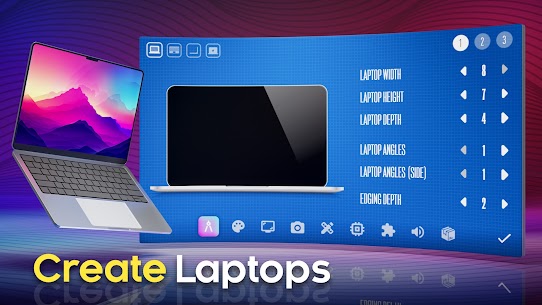
The device editor controls size, color, screen, processor, graphics card, speakers and packaging across more than 10,000 editing functions. Nothing inside that editor is purely cosmetic. Each choice feeds production cost, buyer appeal and the final rating.
You work through it as a list of slots. Some slots hold hardware you have already researched. Others hold pure design decisions such as body angles, thickness and color finish.
A recent update added a graphics card editor and a Drop screen type, so laptops and phones now share more of the same component pool. Warranty length also became a selectable option, and it feeds straight into buyer confidence at launch.
Picking Screens, Processors, Graphics Cards and Speakers
Hardware slots carry the heaviest weight in scoring. A strong screen paired with a weak chip reads as unbalanced to reviewers, so buyers punish mismatched builds harder than they punish modest ones. Balance beats brilliance in one slot.
Graphics card ratings arrived in a recent update, which means the component now carries a public score of its own. Similarly, speaker quality matters more on tablets and laptops than on smart watches. Match the part budget to what each category is actually judged on.
Shaping Size, Color, Angles and Packaging
Design choices cost less than silicon but still move the needle. Body thickness, corner angles, finish color and packaging all feed appeal, and a thinner shell with rounded corners reads as premium to the in-game audience.
Packaging is the cheapest score bump available. Many players skip it entirely on early builds, then wonder why an otherwise decent handset lands flat. Spend a little there before spending more on a faster chip.
Shipping Budget, Standard and Flagship Versions Together
One launch can carry up to three versions at once: a budget unit, a standard unit and a flagship. The structure mirrors a real phone family, where one design spawns three price points from the same development work.
This is the strongest early money move in the game. Because the three versions share research and design effort, your development cost barely rises while your addressable market roughly triples. Skipping it and shipping a single expensive product is the most common beginner mistake.
How to Unlock Every Device Editor and Product Type
Smartphones, tablets, laptops, smart watches, headphones, processors and operating systems each get their own editor. You open each one by spending points on the underlying technology, so new product lines arrive through the research menu instead of a level unlock.
The current version adds an electric scooter editor on top of that list. Roastery Games has kept adding categories since launch, which is why the research tree feels wider than it did in 2023.
Order matters more than speed. Opening an expensive category too early leaves you unable to afford decent parts inside it, and a badly equipped first laptop can sink a company that was doing fine on phones.
Smartphones, Tablets and Laptops
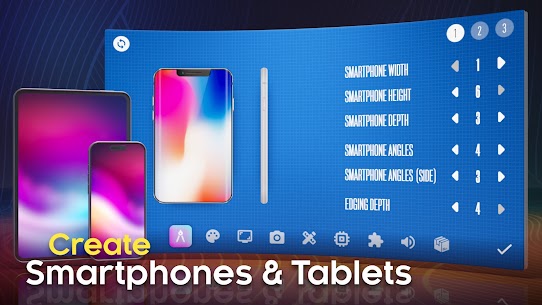
Smartphones are the training ground and the profit engine. They accept the three version structure cleanly, they sell in the largest volumes, and buyers judge them on a shorter list of specifications than laptops get.
Tablets behave like slower phones with bigger screens and lighter chip demands. Laptops, by contrast, need genuine component depth including a graphics card, so they punish thin research trees. Hold laptops back until your chip and screen technologies are solid.
Smart Watches, Headphones and the Scooter Editor
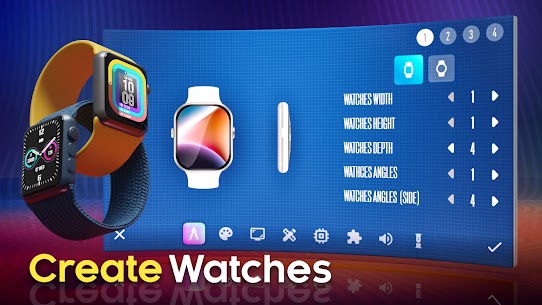
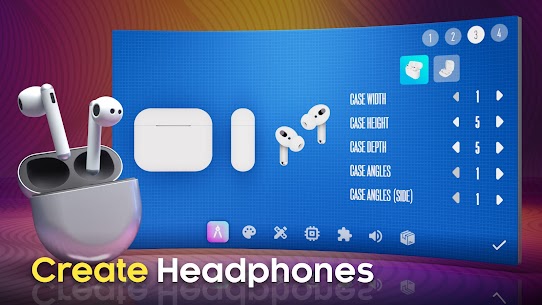
Wearables cost far less to develop and reach the shelf quickly, which makes them ideal filler between bigger launches. Smart watches lean on screen and battery choices. Headphones lean on speakers, and a recent update even added a dedicated headphone case screen.
Electric scooters joined the lineup in the current version and sit apart from the rest of the catalog. They will not carry a company on their own, though they do give a late run something fresh once phone releases become routine.
Processors, Operating Systems and Software
In-house chips are the real milestone. Designing your own processor removes a recurring cost from every future build and lifts the ceiling on what your flagship can score, so most successful runs treat it as the mid-game goal.
Operating systems sit behind software work in the tree. Software projects pay poorly in cash, yet they generate the technology income that opens an OS, which is why experienced players keep a software project running permanently in the background.
How to Get Research Points in Devices Tycoon
Research points come from software projects, completed releases and the research menu itself, and they pay for every new part, feature and product category. Selling well earns money, but only research work moves technology forward, which is why cash-rich companies still ship dated hardware.
Two currencies means two budgets. Your dollars cover staff, offices, marketing and manufacturing. Your points cover everything that makes the next product better than the last one.
New owners usually overspend on advertising while starving research, then hit a wall around the fifth in-game year when rivals start shipping better screens and chips.
Where Research Points Come From
Software contracts are the steadiest source. They tie up programmers rather than the whole company, so you can run one continuously while your designers work on the next handset. Flagship development also returns a meaningful chunk on completion.
Keep at least one project active at all times. Idle programmers cost the same salary as busy ones, and an empty software slot is the quietest way to fall behind on technology in this business simulator.
What Those Points Actually Pay For
Every screen type, camera feature, chip improvement and body material sits behind a research cost. Categories cost the most, individual features cost the least, and the gap between those two prices is where most planning happens.
Spend on features that lift your current category first. A better screen for phones you already sell pays back faster than opening laptops you cannot yet equip properly.
Buying Point Packs With Real Money
The store sells point bundles directly. Roughly speaking, 1,000 points runs about two dollars, 3,000 about three dollars and 5,000 about four and a half dollars, with budget top-ups of 300 million and one billion sitting alongside them.
None of it is necessary. The packs compress the mid-game rather than opening anything exclusive, so a patient player reaches identical technology through software work. Ad removal, at around five and a half dollars, is the purchase most regular players actually rate as worthwhile.
How Offices, Designers, Programmers and Engineers Work
Three staff departments run every project in the game: designers shape appearance, programmers handle software, and engineers cover hardware. You hire from a worldwide pool, place them inside offices you buy and upgrade, then watch their salary demands climb as their skill rises.
More than 16 offices exist to purchase across the game. Each one raises capacity for a department, and capacity decides how fast a build moves from concept to shelf.
Staff quality also feeds product quality directly. A brilliant part list assembled by a weak team still lands soft with buyers, which surprises players who spend everything on components.
The Three Departments and What Each One Raises
Designers govern how appealing a device looks, which feeds the design score reviewers weigh. Programmers unlock and improve software and operating systems. Engineers determine how well your chosen hardware actually performs in the finished unit.
Balance them roughly evenly at first. A company with nine engineers and one designer produces powerful products nobody wants, and the reverse produces beautiful hardware that reviewers call slow.
Buying and Upgrading More Than 16 Offices
Offices are capacity, not decoration. Buying a second location for a department lets you hold more staff, and upgrading an existing one raises what that space supports without a fresh purchase.
Upgrade before you expand. An upgraded first office is almost always cheaper per seat than a brand new building, so the sensible order is to max your starting locations, then buy outward once all three departments feel cramped.
Salary Demands and Staff Turnover
Employees ask for raises as their skill grows, and they will threaten to leave when ignored. Losing a senior engineer mid-project is genuinely painful, since replacing that experience takes both money and in-game months.
Budget for raises the way you budget for rent. Meanwhile, watch which staff you actually rely on. Letting a low skill designer walk costs nothing, although the same decision on your lead programmer can stall software income for a full year.
How Customer Reviews and World Ratings Drive Sales
A device scoring nine out of ten in customer reviews sells far more units than one stuck at six, because the score feeds sales volume directly. Those scores then stack upward into world company tables, award events and a richest people list tracking every rival firm.
Reviews arrive shortly after release and cannot be edited afterward. A recent update added over 500 new review lines, so the feedback reads less repetitively than it once did.
Reputation compounds across releases. Two strong launches in a row lift the next one’s opening sales, while a flop drags the following product down with it.
How Review Scores Set Your Sales Volume
Score is the multiplier on everything else you built. Production run size, store count and advertising all get scaled by it, so a nine turns a modest run into a sellout while a six leaves stock sitting.
Reviewers weigh specifications against price above all. Therefore a mid-range handset priced honestly can outscore a flagship priced greedily, which is the single most useful thing to understand about the scoring model.
Presentations and Marketing Before Launch Day
Presentations happen before sales open and set initial awareness. Study the marketing screen too, since campaign spend decides how many buyers know the product exists on day one.
Neither system can rescue a weak build. Marketing raises the number of people who see your device, but review scores decide what happens after they look, so spending heavily on a poorly specified phone simply burns cash faster.
World Company Ratings, Awards and Rich Lists
The world ratings screen ranks every company by performance, and a recent update added a richest people list alongside the corporate tables. A Company of the Year award event also runs, giving long campaigns a target beyond raw profit.
Use those tables as a benchmark. When a rival climbs past you, open their profile and check what category they are shipping into, then decide whether to compete directly or move to a product line they are ignoring.
How to Open Global Stores and Buy Rival Companies
Opening a store places one outlet in one country, and you tap each country separately to expand. Buyouts work differently, since you negotiate with a rival firm, pay from your own budget, then absorb its position in the market.
Both systems only matter once your products already score well. Distribution multiplies demand rather than creating it.
Expansion is also where the game’s late economy lives. Players regularly report bank balances in the billions with little left to spend on, so knowing where that money still buys advantage keeps a long run interesting.
Opening Your Own Stores Country by Country
Each country accepts a single store, and you open them individually rather than in bulk. It is genuinely tedious at scale, and it remains one of the most common feature requests from players.
Prioritise by market size, not by map position. Opening in a handful of large economies returns more than scattering outlets across small ones, so work down the list rather than filling the map for completeness.
Negotiating a Rival Company Buyout
Buying a competitor removes a pressure source and hands you its market share in one transaction. Negotiation takes cash rather than points, which makes it a natural home for late game profit.
Time it around your own launches. Absorbing a rival just before you release a flagship compounds nicely, since their former buyers arrive with nowhere else to shop that year.
What to Do With Late Game Billions
Money outpaces spending options once your company matures. Rather than hoarding it, push into categories you skipped earlier, since opening scooters or wearables late gives idle staff something productive to build.
Buyouts and full global store coverage absorb the rest. In my own runs, converting surplus cash into rival acquisitions kept the world table interesting far longer than simply raising advertising spend ever did.
Common Devices Tycoon Mistakes and Hidden Details
Players lose more money to over-produced stock than to any other single error here. Manufacturing runs are a bet, and an unsold warehouse quietly eats a launch that reviewed perfectly well.
Several of the game’s rougher edges also go unexplained in-game. Knowing them ahead of time saves entire in-game years of confusion.
Three issues come up constantly in player feedback: the review ceiling, the sell out popularity drop, and confusion about what the paid extras change.
Why Review Scores Stall Near Six Out of Ten
Plenty of players report scores refusing to pass roughly six even after cutting prices and buying heavy advertising. The cause is a ratio problem, not a marketing one. Reviewers compare what the device costs to what its components deliver, so throwing budget at awareness cannot move a number that measures value.
Fix it from the build side instead. Raise weak component slots until nothing on the sheet looks obviously cheap, then set a price your specification actually justifies. Feature count alone will not do it, because a long list of features attached to a slow chip still reads as poor value.
Popularity Drops the Moment Stock Sells Out
Device popularity falls to zero the instant your stock clears, rather than decaying gradually the way a real product fades. Selling out therefore ends a product’s life instead of proving its success, which catches out almost everyone on their first strong launch.
That single behaviour turns production run size into a pricing decision. Manufacture generously for a device you expect to score well, and keep the next release close behind so your brand never sits with nothing on shelves. Warranty length helps here too, since it lifts confidence without needing another manufacturing run.
Warranty, Ads and the Sandbox Mode Toggle
The free version carries advertising, and removing it costs roughly five and a half dollars as a one-time purchase. Sandbox mode is a separate paid unlock at around seven dollars, and it exists for players who want to design freely rather than manage a balance sheet.
Warranty deserves more attention than it gets. Added in a recent update, it acts as a cheap confidence lever on any build, so a mid-range unit with a long warranty can out-review a slightly better specified rival with none.
Best Devices Tycoon Tips and Tricks for Beginners
Your first company survives on component cost control, not on advertising spend. Beginners routinely reverse that order and wonder where the money went.
The three habits below come from the mistakes almost every new owner makes in their opening decade. Each one targets a specific system rather than general advice.
Applied together, they usually shorten the road to an in-house processor from a painful crawl to roughly eight to twelve in-game years.
Ship Three Versions, Not One Flagship
Use the budget, standard and flagship structure on every release from the very first one. Development effort is shared across all three, so your cost barely moves while three separate price brackets open at once.
The budget unit also protects you when a premium release underperforms. Even a mediocre flagship run stays profitable if the cheap version underneath it clears stock, which turns a disaster into a break-even year.
Save Points Before Opening a New Editor
Opening a category is only half the expense, because the parts inside it need research too. Unlocking laptops with an empty technology bank produces a product you cannot equip, and buyers judge it against rivals shipping far better hardware.
Bank a surplus first. Wait until you can open the category and immediately fund two or three decent components inside it, then launch. Patience here is worth more than speed, since a bad debut in a new category damages your reputation across the whole catalog.
Match Price to the Score Your Parts Can Earn
Price after you finish the build, not before. Look honestly at the component sheet, then ask what a buyer would pay for exactly that, and shade slightly under it.
This single habit fixes most stalled runs. A fairly priced mid-range device scoring eight sells better than an overpriced flagship scoring six, and it does it with a smaller manufacturing bill attached.
Frequently Asked Questions About Devices Tycoon
What platforms is Devices Tycoon available on?
The game ships on Android through Google Play and on iOS, where Devices Tycoon needs iOS 15 or later. It also runs on iPad, on Macs with Apple silicon, on Apple Vision headsets, and on Windows through Google Play Games on PC. A Steam release is listed as coming soon.
Is the game hard for beginners?
Not hard, but slow to click. The editor holds hundreds of small choices, so your first two or three launches usually flop while you work out which parts buyers reward. It also plays fully offline, which suits short bus rides. Most players find the pace comfortable after roughly five in-game years.
Does it still get updates, and is there anything left to do late game?
Updates still arrive, and the current one added an electric scooter editor alongside earlier additions such as device warranty and a Company of the Year award event. Late runs lean on buying rivals and chasing the world tables. Roastery Games also builds Console Tycoon and Laptop Tycoon if you want a narrower version of the same loop.
Who Should Install Devices Tycoon and Why
This one suits patient builders who enjoy numbers as much as design, and who want a single company touching phones, chips, wearables and software at once. Players chasing fast wins or a written story will bounce off it quickly. In my own runs the game only truly opened up around the fifth in-game year, once software income finally paid for a decent chip, and that slow burn is exactly why it stayed on my phone. Install it if you like tuning a specification sheet until a launch finally scores nine out of ten.
Images

Download links
ℹ️ Download link not working? Please refresh the page and try again.
Developer's apps



Related apps





What's new
In the new update 4.0 we have added an electric scooter editor. Create the scooter of your dreams and compete with global companies!
New Apps
Most Played Mobile Games


