
European War 4: Napoleon MOD APK (Unlimited Medals)

Description
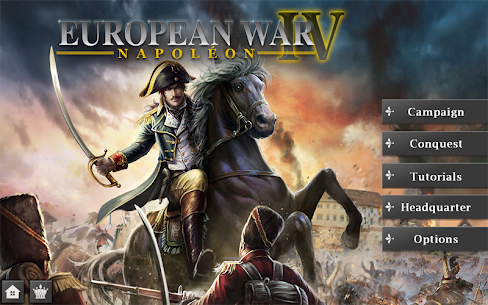
European War 4: Napoleon hands you 200 historical generals, from Napoleon and Murat to Wellington and Kutusov, across a zooming map of Europe, America, and Asia. New commanders who stall out around the fifth or sixth campaign mission get the medal economy and the officer hiring order that fixes the problem. Medals, not raw troop count, decide how fast a save file improves, and a single campaign mission pays a ceiling of 50 of them.
How to Play European War 4: Napoleon on Android
European War 4: Napoleon is a turn-based strategy game set in the Napoleonic era, played on a zoomable map of Europe, America, and Asia. Each turn you move armies, buy units in captured cities, and push toward the mission objective before the turn limit runs out.
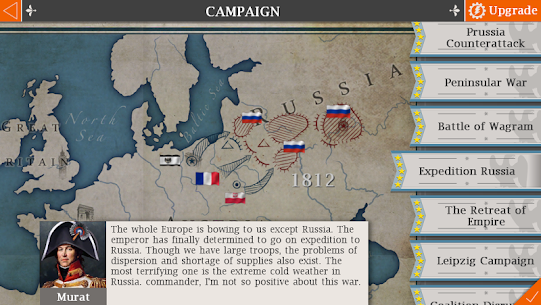
EasyTech built the title around two pillars. Campaign mode splits 84 missions across six war zones, while Conquest mode drops you into an open scenario with no scripted objectives.
The Napoleonic setting carries real weight here. Because the roster pulls from history, your infantry, cavalry, and artillery leaders behave like the men they are named after. Grand War and European War 6: 1804 chase the same audience on Google Play, so the comparison comes up constantly in reviews.
What Turn-Based Combat and Seamless Map Zooming Do
Combat resolves one side at a time. You move every unit you own, attack what sits in range, then hand the turn to the AI, which answers with its own full sweep of moves. Nothing happens in real time, so a mission survives interruptions without punishing you.
Seamless map zooming is the quality-of-life feature that makes this workable on a phone. Pinch out and you see national borders across the whole theatre. Pinch in and individual stacks become readable, which matters when six units share a river crossing. For example, spotting an undefended port two provinces away is often the difference between a three-star finish and a slog.
The Napoleonic Era Setting Across Europe, America, and Asia
Six war zones carry the story: Imperial Eagle, Coalition, Holy Rome Empire, Eastern Overlord, Rise of America, and Sun Never Sets. Each one puts you behind a different power, so the French perspective in one arc becomes the enemy you fight in the next.
Conquest widens the frame with six scenarios of its own. Europe 1798, America 1775, Europe 1806, Europe 1809, America 1812, and Europe 1815 all sit on the menu from the start. Because 42 countries appear in the game, minor powers you would never see in a scripted campaign become playable. Wallachia, Denmark, and the Ottoman Empire all show up in player stories on the Play listing.
How It Compares to Grand War and European War 6: 1804
European War 6: 1804 is the direct successor from the same studio, and it looks sharper. However, its conquest difficulty draws heavy complaints, with reviewers calling the AI overpowered and the medal rewards too thin for the time spent. This older title is gentler, which is exactly why some veterans still prefer it.
Grand War: War Strategy Games takes a different route. It runs hex battles with a morale system and an engineer system, and it leans harder on level-by-level progression than on open conquest. Total War: NAPOLEON also reached Android, though it costs money and demands Android 13 or later. One detail worth flagging: the Apple listing for this game advertises network and Wi-Fi multiplayer, while the current Google Play description does not mention network play at all, so Android commanders should treat it as a single-player experience.
Gameplay Mechanics and Controls for New Commanders
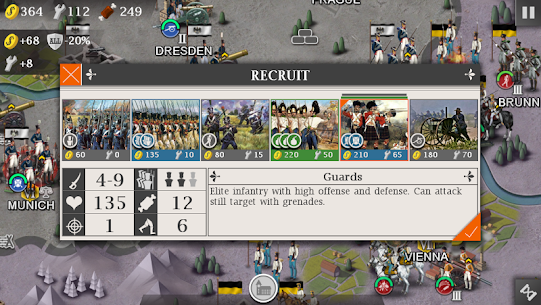
A turn in European War 4: Napoleon gives every unit one move and one attack, and spending both ends that unit’s activity until the next round. Reinforcements come from cities you hold, so territory feeds your army directly rather than through a separate base-building layer.
Touch controls stay simple. Tap a unit, tap a destination tile, then tap an enemy to strike. The interface hides its depth in the numbers rather than the buttons.
Troops carry battle experience between fights, and enough of it turns a plain line regiment into elite forces with better output. Objectives change per mission, from capturing named cities to destroying specific enemy stacks, and some missions add defeat conditions such as protecting a general. That variety keeps the same 130-plus unit types feeling different across the 84 missions.
Moving Units, Attacking, and Ending Your Turn
Movement runs on a fixed allowance per unit type. Cavalry covers ground fastest, artillery crawls, and infantry sits between them. Terrain and rivers eat into that allowance, so a two-tile gap can cost a full turn if you pick the wrong route.
Attacking works best when you stack the odds before committing. Artillery softens a defender from range, then infantry takes the tile, and cavalry chases the survivor before it retreats into a city. Newly purchased units cannot move on the turn you buy them, which catches out almost every new commander during a rushed defence.
How Troopens When You Capture a City or Finish a Mission
Capturing a city flips its production to you. Conquered territory becomes a supply and production point, which funds the units you buy inside that scenario. Ports and factories matter most, since they gate what you can field later.
Finishing a mission triggers the star rating, and speed drives that score. Fast, clean victories pay the top rewards, while slow grinds pay a fraction. The game saves automatically, so a completed mission locks in without a manual step.
How to Unlock Generals in Taverns and the Military Academy
Unlocking generals in this game happens in two places, and both take medals rather than real money. Taverns and the Headquarters screen sell hireable officers directly, while the military academy hands out lower-tier officers as you progress through Campaign missions.
The roster runs to 200 named commanders drawn from history. Napoleon, Murat, Wellington, Nelson, Kutusov, and Washington headline the list, but the mid-tier officers are where most players build their working army.
Each general carries star ratings per unit branch plus a set of skills pulled from a pool of 46. A five-star artillery officer transforms a cannon stack; the same man attached to cavalry does very little. Because taverns and markets only appear inside Campaign mode, hiring runs on a different rhythm than conquest does.
How Taverns and Headquarters Refresh the Officer Pool
Taverns hold a rotating selection rather than a fixed shop. Refreshing that pool costs you time or resets, and community reports put the chance of a meaningful change at roughly nine percent per reload. Patience beats spending here.
The military academy is the free path. It supplies lower-tier officers as you clear content, and several of them are genuinely usable. Players hunting cavalry trainers without paying usually start there, then move to taverns once a medal balance builds.
How General Skills and Star Ratings Change Unit Damage
Star ratings run per branch: infantry, cavalry, artillery, navy, marching, and training. Skills sit on top of that as named traits, and 46 exist in total. Traits such as raid or formation only fire for the branch they belong to, so a mismatched officer wastes half his sheet.
Focused officers beat balanced ones. A general with all four artillery traits turns a single battery into the strongest tool on the map, while a spread of mixed traits produces a commander who is adequate everywhere and decisive nowhere. Therefore, when two officers cost the same, take the narrow one.
How Generals Rise From Soldier to Marshal and Gain Nobility
Two separate ladders run in parallel. Military rank climbs from common soldier toward marshal, and it feeds on combat, so killing enemy units advances it. Nobility climbs from citizen toward Emperor, and players link it to holding and capturing cities instead.
Both ladders change what an officer contributes. Higher rank raises battlefield output, while nobility improves recovery between fights, which is why veterans park high-nobility generals in the toughest campaign slots. Rising through both takes real time, and no shortcut exists that does not involve fighting.
How to Unlock Princesses and Emperor Titles
Princesses unlock by finishing Conquest scenarios quickly and repeatedly, not by paying for them. Community reports point to fast victories, often under roughly 65 turns, plus repeat clears of the same map, with each princess arriving as a playable general.
Sophia, Fatimah, and Kate come up most often in player accounts, and the order varies between save files. Each one carries her own skill set, and none of them is strictly better than a top-tier historical officer.
The Achievement layer sits alongside them. Titles of European Emperor, American Emperor, and Asian Emperor track how much of each continent you have taken, while a world ranking board compares your results against other players. Together these give conquest a reason to exist after the 84 campaign missions are behind you.
Turn Limits That Decide Princess Rewards in Conquest
Conquest has no hard turn ceiling, which confuses new commanders. You can take 200 turns and still win. Rewards, though, scale sharply with speed, and slow victories pay almost nothing.
Player reports cluster around a practical threshold near 65 turns for princess unlocks, with several accounts of finishes in the 40s producing better results. Repeat clears of the same map also appear in most accounts, so one fast win rarely does it alone. Save before the final kill, because that lets you retry the finish without replaying the war.
European, American, and Asian Emperor Titles
The three Emperor titles reward breadth rather than speed. Taking Europe with one nation, then America with another, then pushing into Asia builds the full set across separate runs.
These titles also feed the world ranking. Because rankings compare players directly, the same conquest map rewards a second visit with a stronger nation and a tighter turn count. Most commanders chase titles after they already own a competent officer roster, since weak generals make fast finishes almost impossible.
Where Princess Generals Fit Beside Your Best Officers
Princess generals arrive with unusual stat spreads. One may bring solid naval numbers with almost nothing on land, and another may carry siege-focused skills that shine only in specific missions. Slot them where their traits fire rather than treating them as automatic upgrades.
Their real value is cost. You paid turns instead of medals, which frees your currency for treasures and tavern hires. In a long Europe 1815 run, a naval princess covers the British coastline while your artillery specialists handle the continent.
How Medals, Treasures, and the National Tech Tree Work
Medals are the meta currency, and you spend them on generals, treasures, and equipment between battles. Campaign missions pay up to 50 medals each based on your star rating, while the National Tech Tree spends a separate national budget earned inside each scenario.
Confusing those two economies is the most expensive mistake in the early game. Research resets with each new scenario. Medals persist forever.
Treasures number 58 in total, and their prices sit far above what a single mission pays. Documented costs include 200 medals for a naval movement item, 404 for a cavalry saddle that adds two movement, and 564 for a mounted artillery item. Here is the part almost no article states plainly: at the 50-medal ceiling, that cavalry saddle costs roughly eight perfect campaign finishes, so buying one early means eight missions of nothing else.
How Many Medals Each Campaign Mission Pays
The 50-medal figure is a ceiling, not an average. Star ratings tie to turn count, and a sloppy win on the same mission can pay a small fraction of that. Replaying an early mission you now overpower is often faster than grinding a hard one.
Defence pays too, which surprises most new commanders. Killing attacking units earns currency exactly as attacking does. Because of that, holding a chokepoint against repeated AI assaults generates income without risking your veterans in the open field.
What 58 Treasures Cost and Which Ones Move Units Faster
Movement treasures are the standout category. Adding two movement to cavalry changes which cities you can reach in a single turn, and that single change compresses whole missions. Artillery movement items do the same for the slowest branch in the game.
Economy treasures compete for the same budget, with a five-star commerce item documented at 508 medals. My own preference is movement first, economy second. Speed shortens missions, shorter missions raise star ratings, and higher ratings pay the medals that buy everything else.
How the National Tech Tree Unlocks Stronger Units
The National Tech Tree runs per nation and per scenario. Research opens better unit types and improves what your cities produce, so the tree effectively decides what your army looks like by mid-scenario.
Prioritise the branch your generals already support. If your roster leans artillery, research that line first rather than spreading points evenly. Similarly, in coastal scenarios such as Sun Never Sets, naval research pays back faster than an extra infantry tier ever will.
Common Mistakes New Commanders Make in Conquest
The tutorial in European War 4: Napoleon never properly explains defence values or how damage ranges resolve, and that single gap causes most early losses. Reviewers say the same thing repeatedly: the numbers on screen do not match what actually happens in a fight.
Two other errors show up constantly in player reports. One drains your medal balance. The other can erase an entire save file in a single tap.
None of these mistakes require skill to avoid. They require knowing the interface lies to you slightly, and adjusting how you read a battle before you commit. Conquest punishes all three harder than Campaign mode does, because no mission restart button waits at the end of a bad hour.
Misreading Damage Ranges and Defence Values
Displayed damage is a range, not a promise. Players report swings as wide as four to forty-four points from a stack showing a one to ten range, so a single attack can fail completely against a defended tile.
Treat every attack as a probability, not a calculation. Attack with two units where you planned to use one, and keep artillery behind the line so a bad roll costs you nothing. Because defence is never visualised, terrain and city bonuses stay invisible until they ruin an assault.
Spending Medals on the Wrong Items First
New commanders usually buy a famous general immediately. That feels correct and plays badly, since a top-tier officer with no supporting treasures still moves at standard speed and still leads ordinary troops.
A better order exists. Build a working set of mid-tier officers from the military academy, then buy one movement treasure, then chase a marquee name. In addition, resist refreshing the tavern pool repeatedly, because the odds of a meaningful change per reload sit near nine percent.
Losing a Save to the Restart Button
This is the single worst failure point in the game. The restart control sits close to the save control, and no confirmation prompt appears. One review describes losing a 187-turn Spanish run that had already taken Portugal, Britain, Morocco, Italy, Prussia, and Denmark.
Automatic saving does not protect you here, because the restart overwrites the file it saved. Slow down near those buttons, especially late at night in a long conquest. Players have also reported total progress wipes after updates, so treat any long run as something worth finishing rather than parking indefinitely.
Best European War 4: Napoleon Tips and Tricks for Beginners
Medal income, not battlefield skill, is the real bottleneck in the first twenty hours of play. Veteran players document rates near 100 to 120 medals per hour using defensive tactics, which is several times what casual campaign play produces.
Three habits produce most of that gap. Each one targets a specific system rather than general advice about playing carefully.
Cavalry positioning, turn efficiency, and defensive farming all compound, since faster missions pay more and better pay buys the treasures that make missions faster still. Elite forces amplify all three, because veteran stacks hold chokepoints that fresh troops cannot. The tips that follow work in Campaign mode and Conquest mode alike, though the farming approach belongs firmly to conquest.
Farming Medals With a Defensive Line in Conquest
The documented approach inverts normal play: you deliberately never win. Start a conquest scenario, build a solid line of tough units across a natural divide, then stop advancing and let the AI break itself against you.
Europe 1815 with Russia appears most often in player accounts, since its economy supports a long defensive game. Upgrade towns and factories first, then position generals where respawning enemy stacks funnel toward you. As a result, both your medal balance and your officer experience climb at the same time, and the save file stays reusable indefinitely.
Pairing Cavalry Generals With Movement Treasures
A cavalry officer with five stars in his branch already outperforms infantry leadership. Add the 404-medal saddle for two extra movement, and that same officer reaches cities the AI assumed were safe.
The combination matters more than either half. Movement without leadership produces fast, weak raids, while leadership without movement produces a strong unit that arrives one turn late. Pair them and you capture undefended production sites early, which funds the rest of the scenario.
Cutting Turns to Push Campaign Star Ratings Higher
Star ratings reward speed, so every wasted turn costs currency directly. Identify the objective cities on turn one, then plan the shortest route rather than clearing the map methodically.
Split forces aggressively when defence permits it. Two small columns taking two objectives beats one large army taking them in sequence. Finally, replay early missions once your officers improve, since a mission that took twelve turns as a beginner often falls in six with a proper roster.
Frequently Asked Questions About European War 4: Napoleon
Is European War 4: Napoleon free to play on Android?
Yes. The game is free on Google Play and the App Store, with optional in-app purchases for medals and items. Players regularly point out that it runs with no ads, and total downloads have passed four million across Android alone. It also saves progress automatically.
How long does it take to finish all 84 campaign missions?
Most single missions run roughly 15 to 25 minutes on a phone. The full set therefore fits into short daily sessions rather than long ones. Clearing everything at high star ratings usually stretches across several weeks, because slow finishes push many commanders into replaying the harder scenarios for a better score.
Is there anything left to do after the campaign ends?
Plenty. Conquest offers 33 selectable countries with star-rated difficulty, so a minor nation like Wallachia becomes a self-imposed challenge run. The world ranking board adds a competitive reason to shave turns. Unfinished treasure and princess collections also keep the meta layer alive.
Who Should Command Armies in the Age of Napoleon
European War 4: Napoleon suits patient commanders who enjoy reading a map more than watching an animation. Newcomers to turn-based strategy get a gentler entry here than in European War 6: 1804. Veterans still get 84 missions and six conquest maps of depth. After a long Europe 1815 run with Russia, I rate the medal economy as the most satisfying part of the game. The silent tutorial remains its weakest point. Install it if you want a war game that rewards planning over reflexes.
Images

Download links
ℹ️ Download link not working? Please refresh the page and try again.
Developer's apps







New Apps
Most Played Mobile Games


