
Dome Keeper APK (Unlocked FULL GAME)

Description
Dome Keeper puts you inside a glass dome on an alien planet, where every minute spent drilling for cobalt is a minute your defenses sit empty. New keepers who keep losing the dome on the third or fourth wave will get a clear order for spending iron, water, and cobalt. The biggest early gain comes from heading home with time to spare, because a half-mined haul you deliver beats a full one you never bring back.
How to Play Dome Keeper: Mining Between Alien Waves
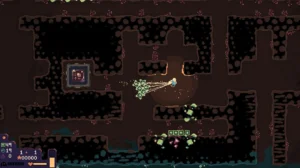
Dome Keeper is a roguelike survival miner where you drill under a glass dome for iron, water, and cobalt, then rush back up to fight each monster wave. You spend resources on upgrades between fights, and a run ends when you deliver the relic or lose the dome.
Bippinbits built the game, and Raw Fury publishes it. It launched on PC in September 2022 and passed one million copies sold by October 2024. Steam reviews sit around 92 percent positive, so the loop clearly holds up after hundreds of runs.
Good Dome Keeper strategy starts with one idea: the dome is the only thing that matters. Every tile you dig and every gadget you grab should keep it standing through the next wave.
How the Dig and Defend Cycle Works
Each cycle splits into two phases. First, you leave the dome and dig, then fly back up with your jetpack and a load of ore. Meanwhile, a wave timer counts down, and the monsters arrive whether you are home or not.
The timer is not a fixed clock. Its length depends on map size and on how much iron you have mined. It also shifts based on how your last fights went. Because of that, I check the timer on every trip instead of trusting the rhythm from the last wave.
The Crashed Dome Setting and Ludum Dare Origins
Your dome doubles as a spacecraft that has crashed on a hostile planet. The locals want it gone, and they attack by air and by ground, some slow and some very fast. Soft pixel art and a synth-heavy soundtrack keep the mood tense but strangely calm between fights.
The game began as Dome Romantik, a 72-hour entry for the Ludum Dare 48 game jam in April 2021. It placed ninth overall, and that result pushed Bippinbits to build a full release. You can still feel those jam roots in how tight and readable every system is.
Dome Keeper vs Terraria and Kingdom Two Crowns on Mobile
On Android, the closest relatives are Terraria and Kingdom Two Crowns. Terraria shares the digging and the raids, but it is an open sandbox with no clock forcing you home. Kingdom Two Crowns shares the defend-your-base tension, yet you never go underground at all.
Dome Keeper sits between them and feels far tighter. A run on a smaller map usually wraps up in well under an hour, and every choice feeds one goal. If Bloons TD 6 is your tower defense pick, expect fewer towers and much more personal danger, since you carry the ore yourself.
Android Version vs PC and Xbox Version
Raw Fury has opened pre-registration on Google Play, and the App Store lists a paid pre-order. That makes the mobile release a premium purchase with no premium currency. The store text describes two keeper types, four domes, and four primary gadgets, which matches the base PC game.
The PC version currently offers more, however. It gained free online and local multiplayer for up to eight players, plus The Lost Keepers DLC with two extra keepers. On phones, touch aim replaces the mouse, so precise weapons like the Tesla Dome may feel different until you adjust.
Dome Keeper Controls: Drill, Jetpack, and Weapon Aim
Drilling, flying, and aiming are the three inputs that run every cycle in Dome Keeper. Your keeper drills tiles block by block, climbs shafts with a jetpack, and steps into the dome to fire its weapon when a wave hits.
Speed beats raw power in the early game. A faster drill means more trips per cycle, and more trips mean more upgrades. The biomes also change as you dig deeper, so harder rock and new hazards wait in each layer.
Good Dome Keeper gameplay starts on the right difficulty. The game defaults to Brutal difficulty, but Normal gives new players a calmer start. Either way, every iron you spend in the tech tree should make trips faster or the dome tougher.
Drilling Tiles and Carrying Iron, Water, and Cobalt
Iron is your main upgrade resource, while water powers gadgets and cobalt fixes your dome. You haul ore as physical chunks that trail behind your keeper. The more you drag, the slower you fly, so big hauls cost real seconds.
Cobalt often sits along the edges of the map, and iron fills most of the middle. Water tends to appear in pockets. I plan each loop to grab one cobalt and one water, then fill the rest of the load with iron.
Aiming Dome Weapons Against Air and Ground Monsters
Once the wave starts, you step inside and take control of the dome weapon. Flyers dive at the glass from above, and walkers crawl in from both sides. Each enemy type moves at its own pace. The real skill, then, is picking targets in the right order.
Kill the fastest threats first, then the shooters, and save slow tanks for last. Ranged attackers chip away from a distance and punish a dome that ignores them. My first Brutal run ended because of two shooters I left alone, since they looked harmless.
What Happens When a Wave Ends
When the last monster dies, the timer resets and the next cycle begins at once. You get a short window to spend iron on upgrades before heading back down.
Some primary gadgets also recover between waves. The Shield, for example, refills to full before the next attack. That reset is your cue to plan the next dig, not to rest, and the keepers who win treat each fight’s end as the start of the next trip.
Dome Keeper Domes: Laser, Sword, Artillery, and Tesla
Four domes are available in Dome Keeper, and each carries a different weapon that changes how you defend. The Laser Dome is the starting pick, while the Sword Dome unlocks after your first successful run.
Each dome also gets supplements, which are special upgrades that change how its weapon behaves. One can split your beam into two turrets, and another straps a bomb to your blade. These choices shape your Dome Keeper strategy far more than a plain damage boost.
Think of your dome as the only tower in a tower defense game. It has to handle all the monster waves alone, from fast flyers to slow armored walkers. Pick the weapon that matches how you like to aim, and the rest of the build follows.
Laser Dome and Its Double Laser Upgrade
The Laser Dome fires a steady beam you sweep across the sky. Upgrades boost its speed and strength, and aim correction helps the beam track moving targets. It shines against single tough enemies, because damage piles up the longer you hold on them.
The Double Laser option adds a second turret but splits your firepower between the two. That trade works well when enemies arrive from both sides at once. Still, the laser hits only one or two targets at a time, so swarms remain its weak spot.
Sword Dome Slice and Stab Timing
The Sword Dome swings a blade around the glass, and a slice deals more damage the faster it moves. You can also hold the button to stab. The blade then extends until it reaches its limit or you let go.
Speed is everything with this dome. Build momentum before enemies reach you rather than waiting for them to arrive. One special upgrade straps a bomb to the blade, and it explodes on the first enemy you stab, which clears tight groups fast.
Artillery Dome and Tesla Dome Strengths
The Artillery Dome is the only dome with two separate weapons. Many veteran players build it for large blast radius and extra mortar shots, which handles swarms better than the laser. It asks you to lead targets, though, since shells take time to land.
By contrast, the Tesla Dome moves a reticle around the screen instead of a turret. A shot fired the exact moment it finishes charging hits far harder than a rushed one. It suits patient players who enjoy rhythm, but it feels harsh when you panic.
Which Primary Gadget Fits Your Run in Dome Keeper?
The best primary gadget for most new players is the Shield, because it gives the dome a refilling health buffer, while Repellent grows stronger once you know the waves. Dome Keeper offers four primary gadgets in total: Shield, Repellent, Orchard, and Droneyard.
You pick one before the run starts, and it sits inside the dome. Each one can overcharge for a short boost and unlocks battle abilities as you upgrade it.
Droneyard arrived in the A Keeper’s Duty update and splits its job between fighting and hauling. Orchard is the hardest to win with. Gadget upgrades also come out of the same tech tree as your dome, so every point here is a point not spent on the weapon.
Shield Battle Abilities and Water Overcharge
The Shield absorbs damage until it breaks, then rebuilds to full after the wave ends. It offers three battle abilities: Electro Blast, Invulnerability, and Reflection. You can only pick one, so that choice locks in your plan.
Electro Blast creates a damaging field around the dome that deals with divers and ticks. Overcharging any primary gadget costs one water and adds strength for that fight. I save my water for waves that bring flyers in clusters, because that is when the Shield breaks fastest.
Repellent Wave Delay and Orchard Upgrades
Repellent pushes back the next wave and recharges every two game cycles. Its mist also slows monsters, which gives a slow weapon like the Artillery Dome more time to land shells. Many experienced players rate it the strongest of the original starting gadgets.
Orchard grows boosts you carry into the mine, from stronger drilling to extra dome defense. It only unlocks after you win a run using Repellent. Even on Normal, a full win with Orchard is a real feat, so pick it after you know your dome well.
Secondary Gadgets From 2×2 Mine Chambers
Secondary gadgets hide inside 2×2 chambers that appear in almost every biome. Break one open, carry the find back to the dome, and pick one of two offers.
Some gadgets take up a slot, so you can never collect them all in one run. The Stun Laser freezes enemies for a moment, while scanner upgrades can reveal caves, water, or cobalt. Grab a scanner early if your map feels sparse, since finding ore faster pays off every cycle after.
How Relic Hunt Works: Nodes, Map Sizes, Final Wave
Relic Hunt asks you to find the relic chamber, activate its nodes, and carry the relic back to your dome while defending against every incoming wave. Once you insert the relic, the final wave begins, and surviving it wins the run.
It is the default mode and the one every new keeper starts with. Maps are procedurally generated, so ore, caves, and the chamber shift from run to run.
Map size controls depth, the number of biomes, and how much ore you can find. Bigger maps give more resources but also more time under pressure. As a result, Dome Keeper relic hunt plans change a lot from one size to the next.
Relic Nodes by Map Size
Nodes act as keys to the chamber, and their count grows with each map size. A Small map has 2 nodes, Medium has 3, Large has 4, and Huge has 5. Wires link each node to the chamber, and they light up once you activate them.
That jump matters more than it looks. A Huge map needs more than twice the node hunting of a Small one, on top of a deeper mine. On larger maps, I aim to clear roughly one node every two or three cycles, or the waves start to outpace me.
Unlocking Medium, Large, and Huge Maps
You start on the Small map. Winning there unlocks Medium, and a Medium win unlocks Large, with Huge at the top of the ladder. Each step adds new layers and tougher monster mixes.
Several achievements track this climb, from Bite Sized on a Small map to The Deep End on a Large one. Another, Deep and Greedy, asks you to reach depth 100. Together, those goals give you a natural path from easy wins to the deepest runs.
Opening the Relic Chamber and the Final Wave
The chamber usually sits in the deepest layer of the map. Once you activate every node, it opens, and you can pick up the relic and fly it home. Carrying it slows you down, so clear a straight shaft before you grab it.
Inserting the relic starts the final wave. If your dome falls during this fight, the relic fires a bomb that wipes out every monster and ends the wave. Winning without that relic bomb earns its own achievement and a cosmetic skin, which makes a fun goal for confident players.
What Are Prestige Mode and Guild Assignments?
Prestige is a score attack mode where you earn points by sending resources home and surviving waves, while Guild Assignments are Relic Hunt runs with special conditions or new goals. Both open up after you start winning Relic Hunt runs.
These modes give the game its long tail. Prestige rewards greed and math, whereas Guild Assignments test whether your builds hold up under strange rules.
Each prestige variant keeps its own leaderboard, and each assignment hands out badges for regular and challenge clears. For a roguelike, that is a lot of structure. It also gives the Dome Keeper endgame a reason to replay long after the relic loses its mystery.
Cobalt Multiplier and Base Prestige Scoring
Your score each wave equals the cobalt multiplier times base prestige. Both start at 1. Sending cobalt home through a dome upgrade raises the multiplier, while sending iron or water raises base prestige.
This creates real tension, since cobalt also repairs your dome. Every cobalt you ship home is health you cannot recover later. The Compounding Interest achievement asks for a multiplier of 10 in Endless, which shows how hard the game wants you to push that trade.
Countdown, Endless, Fixed Cobalt, and Miner Mode
There are four prestige variants. Countdown is open from the start, and the others unlock when you escape by rocket in a prestige run. Endless is the original version, with no set finish line.
Fixed Cobalt hands you exactly 10 cobalt and turns off cobalt in the mine, including the Cobalt Cave. At roughly 15 percent per cobalt repair, that budget covers about one and a half full dome rebuilds for the whole run. Miner Mode, meanwhile, removes monsters entirely and gives you 20 waves to post the best score.
Guild Assignment Badges and Challenge Conditions
The base game has 16 Guild Assignments, and The Lost Keepers DLC adds 9 more on PC. Four are open from the start: Showdown, Iron Contribution, Upside Down, and Maze. You open the rest by collecting badges from the ones you clear.
Each assignment has a regular and a challenge condition, and each grants a reward, for 32 badges in the base game. Challenge clears are tough. Showdown in particular rewards a hauling gadget like Droneyard, since drones move iron while you chase water and gadgets.
Which Keeper to Pick: Engineer, Assessor, and DLC Keepers
The Engineer is the best first keeper because its drill works in a direct, predictable way, while the Assessor suits players who want a trickier mining style. Two more keepers, the Infiltrator and the Beastmaster, arrived on PC with The Lost Keepers DLC.
Your keeper choice changes how you mine, not how you defend. Progression across runs then comes from unlocks: new domes, gadgets, map sizes, worlds, and cosmetics such as suits and pets.
Within a run, upgrades and supplements form your power curve. Across runs, achievements and world unlocks set the long-term goals, which is classic roguelike design. Unlocked suits also change your pixel art look without touching any stats.
Engineer Drill Upgrades vs Assessor Spheres
The Engineer mines with a classic drill and grows stronger through drill, speed, and carrying upgrades. It is easy to read. For that reason, I recommend it for roughly your first ten runs.
The Assessor mines in two ways: compression mining and kinetic spheres that bounce off tiles and damage them. It clears wide areas fast once you aim the spheres well. However, it feels awkward at first, so expect a few clumsy runs before it clicks.
Supplements, Achievements, and Worlds to Unlock
Supplements are special upgrades for gadgets, domes, and keepers. Picks like Dome Resurrection and Scrap Repair can save a run. Scrap Repair, for example, fixes the dome using iron, but it lowers your maximum health in return.
The game also has 47 achievements, and many unlock new content. Opening the orb, behemoth, stalk, and mushroom worlds changes both the look and the monsters you face. Feeding Drillbert ten treats in one run earns an achievement too, and it is a silly side goal I chase every time.
Common Dome Keeper Mistakes That End Runs Early
Most failed runs in Dome Keeper end the same way: ore left in the mine, poorly timed cobalt repair, and a wave arriving while the keeper is still deep. Unlike a classic tower defense game, nothing here defends itself while you are away.
None of these mistakes show up as obvious errors. The run feels fine until one bad wave, and then the dome is gone with cobalt still sitting underground.
Fixing them costs nothing but attention. Each one ties to a signal the game already shows you: the wave timer, the dome health bar, and the difficulty screen. Watching those three closely turns a shaky Dome Keeper beginners walkthrough into steady wins.
Saving Cobalt Until the Dome Is Nearly Dead
Each cobalt repairs roughly 15 percent of dome health, and it can also buy automatic repair upgrades. Many new keepers sit on cobalt waiting for an emergency. Then a burst wave kills them before they can use it.
Instead, repair after any wave that drops you below about half health. A dome at full strength survives surprise flyers that a damaged one cannot. The My Savior achievement rewards finding cobalt below 10 percent health with none stored, and that moment should stay a rare thrill, not your routine.
Staying Too Deep When the Wave Timer Runs Low
Deep ore is tempting, and the game knows it. Every extra tile costs flight time back, and a heavy load slows the climb even more. The monsters will not wait for you.
On deep trips, start heading up when roughly a third of the timer remains. Shallow trips can cut it closer, but deep ones need the margin. The Precisely When I Meant To achievement rewards entering the dome the second a battle starts, which shows how tight good timing really is.
Skipping Brutal Difficulty Before Guild Assignments
Guild Assignment challenge conditions suit players who already handle Brutal difficulty well. Players who only win on Normal often hit a wall there. Then they assume the assignments are unfair.
A better path is to clear a few Relic Hunt runs on Hard, then Brutal difficulty, before chasing challenge clears. That step builds a feel for wave patterns faster than any build change. Normal works fine as a starting point, although it hides how quickly later waves ramp up.
Best Dome Keeper Tips and Tricks for Beginners
Pre-aiming the dome weapon before a wave arrives is the single cheapest upgrade in Dome Keeper. It costs no iron, yet it buys you the first few seconds of every fight.
These Dome Keeper tips focus on habits only this game rewards. They work with any dome and on any map size, and they matter most in the first hour, when monster waves still feel random.
Each habit also saves resources for the tech tree. A survival miner lives or dies on small margins, so a few saved seconds per cycle add up to extra upgrades by the midgame.
Center the Laser and Pre-Aim Before the Wave
When a wave ends with the Laser Dome, swing the beam back to the center and point it straight up. Enemies come from both sides, so the middle cuts your turning time in half.
The same idea applies to every dome in a softer way. With the Sword Dome, building speed before contact matters more than position. With Artillery, aim where the first walkers will land, not where they spawn, and you will catch them as they arrive.
Use the Lift to Move Iron Without Slowing Down
Ore follows real physics, so you can roll or drop chunks toward the lift instead of carrying everything. A loose pile near the shaft becomes free cargo for the next pass. That keeps your keeper light and quick.
Upgrade the lift early if your map runs deep. It saves flight time on every trip and helps you reach the dome when the timer drops. I treat lift upgrades as part of the core build, not a luxury.
Save Water for Flyer-Heavy Waves
Water is scarce, and overcharging a primary gadget burns one unit each time. Spending it on easy waves leaves nothing for the fights that actually threaten the glass.
Watch the enemy mix as each wave begins. When flyers or ranged attackers stack up, spend the water then. On calm waves, however, put that water into gadget upgrades instead, since a permanent boost beats a one-fight burst.
Frequently Asked Questions About Dome Keeper
Is Dome Keeper Available on Android and iOS?
Yes, a mobile release is on the way. Raw Fury opened pre-registration on Google Play and listed a paid pre-order on the App Store, with the launch date still unannounced. Dome Keeper already runs on Windows, macOS, Linux, and Xbox Series X|S, where the Xbox version arrived in December 2025.
How Long Does a Dome Keeper Run Take?
Most Small map runs finish in roughly 20 to 30 minutes, and the Quick Finish achievement rewards retrieving the relic within 20 minutes. Large and Huge maps often stretch past an hour because of extra nodes and deeper mines. Short sessions suit phones well, since a Small map fits a commute.
Does Dome Keeper Have Multiplayer?
Yes, on PC. A free update in April 2026 added co-op across Relic Hunt, assignments, and prestige, plus a competitive versus mode. You can mix local split-screen with online players and play across platforms. Mobile multiplayer support has not been confirmed yet, so check the store page before buying.
Final Verdict: Who Should Play Dome Keeper
Dome Keeper suits players who love short, tense runs where every decision has a cost. Terraria fans who want more pressure, and tower defense players who want to get their hands dirty, will feel at home within a few waves. Start with the Engineer, the Laser Dome, and the Shield, then move to Repellent once the wave patterns feel familiar. After dozens of runs, my pulse still jumps when the timer drops and I am three tiles too deep with a load of cobalt. That feeling is the whole game, and few mining titles deliver it this cleanly.
Images


Download links
ℹ️ Download link not working? Please refresh the page and try again.
Developer's apps




Related apps



New Apps
Most Played Mobile Games


