
Incredibox APK (Free)

Description
Incredibox hands you seven silent beatboxers and twenty sound icons, and every track you build grows out of what you drag onto them. Players who keep filling all seven slots and then wonder why the mix sounds like mud will find the layering order that fixes it. Animated choruses need only five of the seven slots, so a half-empty stage often sounds cleaner and unlocks more.
How to Play Incredibox: Beatboxers, Icons and Mixes
Incredibox is a music app from the French studio So Far So Good where you drag twenty sound icons onto seven animated beatboxers. Each icon plays one a cappella loop, and every loop locks to the same tempo, so the mix always stays in time.
The whole app runs on that one gesture. First you pick a music style, then you start dressing the avatars with sounds. Nothing here uses a timeline, a piano roll, or a tempo dial.
Three people built this thing back in 2009, and one of them sings every part you hear. That detail shapes the sound more than any setting could. Below the stage sit the four icon families and the bonus meter, and both matter for what comes later.
Dragging Sound Icons Onto the Seven Polo Characters
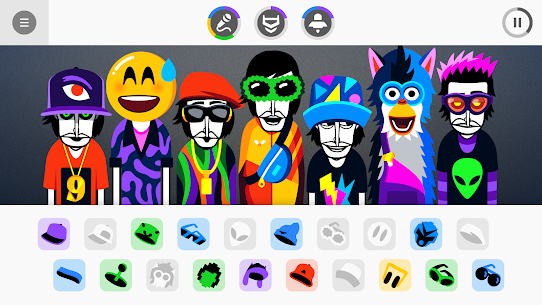
Seven identical characters stand in a row when a style loads, and every one of them starts out bare and silent. The community calls each one a Polo, after Paul Malburet, the musician who recorded every sound in the app. His face is literally the character design, repeated seven times across the stage.
Tap an icon, drag it onto a chest, and that avatar dresses itself in a hat, mask, or pair of shades before joining in. Because each icon carries its own costume, you can read the whole arrangement at a glance without listening. Dragging the same icon onto a second beatboxer simply moves it, so no sound ever doubles up.
The Wordless Theme Behind Each of the Nine Music Styles
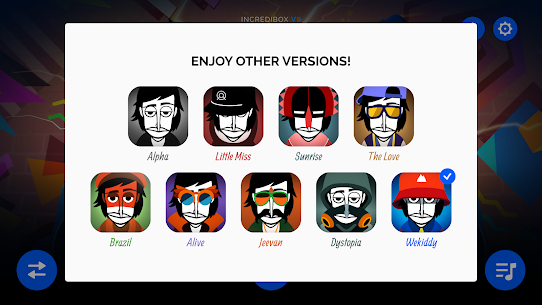
Nine official music styles ship in the app, and none of them tells a story with words. Alpha opened the series in 2009 with jazz and funk textures. Brazil moves into samba and carnival percussion, while Jeevan builds around Indian instrumentation.
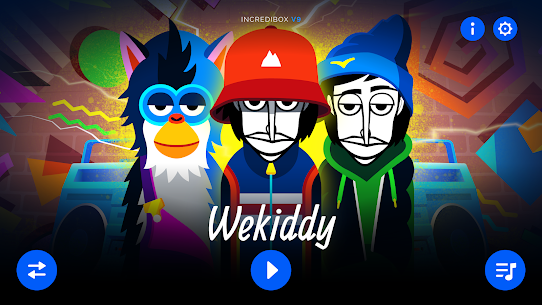
Dystopia swings hardest in the other direction, with distorted vocals and a cyberpunk stage. Wekiddy, the newest of the nine, leans on nineties nostalgia and retro-futurist colour. Sounds never cross between styles, so each one stays a sealed little world with its own palette and its own bonus animations.
Incredibox vs Groovepad and Music Maker JAM on Android
Groovepad by Easybrain is the closest mainstream rival on Android, and it works from genre sound packs instead of characters. Music Maker JAM sits nearby with an eight-channel mixer and thousands of loops. Both are free to install and monetise through ads or in-app purchases.
The trade is straightforward. Groovepad and Music Maker JAM give you far more raw material, but they also hand you a mixer to manage. This app gives you one screen, seven slots, and a set of loops that cannot clash, which is why it holds a beginner’s attention far longer.
The Android App Against the Steam and Windows Release
The same app runs on Android, iOS, macOS, Windows and Steam, with the Android release arriving in December 2017. Content matches across all of them, so no style is locked behind a platform.
Touch beats the mouse here, and that surprised me. Dragging an icon with a fingertip feels closer to placing a physical object than clicking one does. Desktop buyers pay a couple of dollars more, though they get a bigger stage, which helps when you want to watch the animations rather than the icon tray. Steam reviews sit near 97 percent positive across roughly 2,800 write-ups, so neither version is the weak one.
Sound Icons, Loop Controls and Automatic Play
Twenty sound icons sit under the stage in every music style, split into four families of five: beats, effects, melodies and voices. Every icon is a single a cappella loop, recorded by one voice, and colour-coded to its family.
Control here means subtraction as much as addition. You mute, solo, and swap parts to shape a track, rather than editing waveforms or drawing notes.
There is also a hands-off route. Automatic play fills the stage on its own and keeps rearranging it, which turns this beatbox mixer into background music instead of a task. Both the icon families and that automatic option feed directly into how choruses get found.
Beats, Effects, Melodies and Voices: the Four Icon Families
Five icons live in each family, and the split is not decorative. Beats carry the kick and snare patterns, effects add scratches and percussive texture, melodies supply the hook, and voices deliver the sung lines on top.
A balanced stage usually pulls from at least three families. Two beats, one effect, two melodies and two voices makes a reliable starting shape. Seven voices, by contrast, produces a wall of noise with nothing holding the floor down, because no family here can do another family’s job.
Mute, Solo and Swap for Fine-Tuning a Loop
Muting is the most underused control in the app. Tapping an active beatboxer silences that part while keeping the icon in place, which lets you audition an arrangement without losing it.
Solo does the reverse and isolates one loop so you can hear exactly what it contributes. I use it constantly when two melodies fight each other. Swapping simply drags a new icon onto an occupied slot, and the changeover happens on the next loop boundary rather than instantly, so the track never stutters.
Automatic Play and the Endless Random Mix
Automatic play builds a random arrangement and then keeps reshuffling it, generating an endless composition with no input from you. It runs in any style you pick.
Most people treat it as a lazy option, yet it doubles as a teaching tool. Watching the app assemble and dismantle stages shows which family combinations hold up and which collapse. Leave it running for a few minutes and you will hear at least one pairing you would not have tried yourself.
How to Unlock Animated Choruses With Sound Combos
Animated choruses unlock when a specific combination of five sounds sits on the stage together. A five-part indicator near the top of the screen fills as you get closer, then activates and lets you trigger a video sequence over the running track.
Two details trip up new players. The combo needs five particular icons, not five random ones. It also does not need a full stage, since two slots can stay empty.
Each music style hides several of these sequences, and they are the closest thing here to unlockable content. Reading the meter properly turns the hunt from guesswork into something closer to a method.
Reading the Five-Part Bonus Meter
The indicator sits in the upper corner and is divided into five segments, one per required sound. Segments light up as matching icons land on the stage, so partial progress is visible rather than hidden.
Four lit segments mean you are one icon away, and that is the moment to start cycling through a single family instead of shuffling everything. When the meter completes, it changes shape and becomes tappable. Tapping it starts the chorus, and the rest of your mix keeps playing underneath.
Finding Combos by Family Instead of at Random
Random dragging is the slow route, and the numbers explain why. Twenty icons across seven slots produce 77,520 distinct seven-sound line-ups inside one music style, or roughly 697,000 across all nine.
A family sweep cuts that down fast. Lock four icons you like, then rotate the fifth slot through all five icons of one family before moving to the next family. Five swaps per family means twenty swaps covers every option, and the meter tells you when something registers. Most bonus sets in my runs turned up within two or three sweeps.
What Changes on Stage During an Animated Chorus
Triggering a chorus does not stop your track. The existing loops keep running while extra vocals and a short animated film play over the top, so the sequence sits inside the arrangement rather than interrupting it.
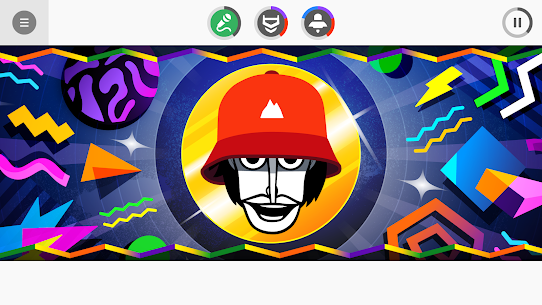
Visuals shift too. Characters move differently, the backdrop changes, and in several styles the whole crew performs together for the first time. Once it ends, the stage returns exactly as you left it, so you can trigger another combo straight away.
How to Save, Share and Export Your Incredibox Mix
Saving a mix generates a unique link that anyone can open and play, no account or app install needed on their end. From there you can post it anywhere, and listeners can vote on it.
The app also keeps your saved work in a playlist. MP3 export lives in that same menu, so a finished track can leave the app entirely.
Sharing has a social layer attached. Other people’s recent mixes appear in a worldwide feed, and voting flows in both directions. This Incredibox breakdown treats that feed as part of the game rather than an afterthought, because votes are what feed the chart.
Recording a Mix and Getting a Share Link
Recording captures the arrangement as you perform it, including every mute, swap and chorus trigger. Timing matters, since the recording keeps whatever silences you leave behind.
Save the take and the app returns a link. Anyone opening it hears the mix and sees the animation, then gets a voting option. I always record one clean loop of the full stage before triggering a chorus, because a bonus that lands too early gives listeners nothing to compare it against.
MP3 Export and the Saved Playlist
MP3 export pulls a finished mix out of the app as a normal audio file. Playlists, video edits, and offline listening all become possible once the track is a file on your device.
The playlist menu holds your saved mixes and doubles as the export point. Keeping three or four takes of the same idea there is worth the space, because the differences between them are often one icon wide. Comparing takes side by side teaches more about arrangement than starting fresh every time.
The Live Tab and Worldwide Voting
The Live tab streams recent mixes from players around the world, and every one of them can be voted on. Nothing is filtered by style, so a Dystopia track can appear right after a Brazil one.
Voting takes one tap, which is why the feed moves quickly. For a new player, it is also the fastest way to hear what a strong arrangement sounds like. Similarly, posting into that feed is how a mix picks up its first votes before anyone shares the link elsewhere.
How the Top 50 Chart and Vote Rankings Work
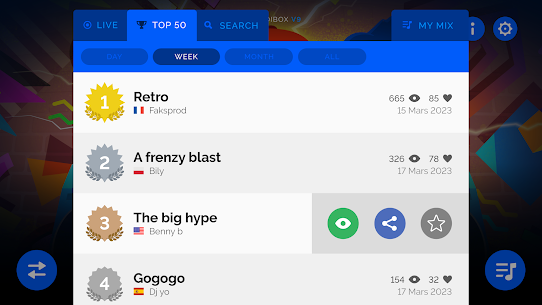
The Top 50 chart is a permanent leaderboard of the highest-voted mixes across the app and website. Votes come from other players, and rolling ranking windows cover the last 24 hours, week, month and year alongside it.
Those shorter windows matter more than the headline chart for most people. A mix that does well in a day can sit in the 24-hour list without ever touching the permanent top tier.
Progress here is social, not mechanical. No experience bar exists, and the nine music styles plus the community-made library form the actual collection you work through.
How Votes Push a Mix Up the Rankings
Each vote is a single tap from another listener, and the rolling windows reset constantly. A mix posted at a quiet hour therefore competes against a smaller field than one posted at peak time.
Reach decides most of it. The online demo alone has pulled more than 100 million visitors since 2009, so the listening pool is enormous and attention is thin. Short, clearly structured mixes travel further than dense ones, because a listener decides within a few seconds whether to vote.
Nine Music Styles as the Real Collection
Working through all nine music styles is the closest thing to a completion goal here. Each one holds its own icon set, its own animations, and its own bonus sequences, so finishing one teaches you almost nothing about the next.
Alpha and Sunrise are the gentlest starting points. Dystopia and Jeevan reward players who already understand layering, since their palettes are denser and less forgiving. Playing them in release order gives a decent sense of how the studio’s sound design grew over fifteen years.
Community-Made Versions Inside the Paid App
Community-made versions now ship inside the paid app itself, added as an official feature in early 2025. Fans build them with their own art and sounds, and the studio curates a selection into the app.
Quality varies, which is part of the appeal. Some run darker and stranger than anything official, and a few match the studio’s polish closely. An import feature also exists for versions that never made the curated list, so the library keeps growing between official releases.
What the Demo Includes and What the Paid App Adds
The free demo carries four music styles, Alpha, Little Miss, Sunrise and The Love, with saving, sharing and the community-made library locked. It runs in a browser and as a separate mobile install.
Buying the app removes all of those limits in one step. Every current and future music style comes with the purchase, and no further payment appears afterwards.
Two audiences sit outside that split. Teachers use a separate licensed service built for classrooms, and the app itself carries no ads or microtransactions at all, which is why it clears school device policies so easily.
Four Music Styles in the Free Demo
Four of the nine styles are playable for free, and they are the four oldest. Alpha, Little Miss, Sunrise and The Love cover jazz, funk, pop and hip-hop territory between them.
Everything else stays behind the purchase. The demo also blocks saving, so a mix you love disappears the moment you leave. Treat it as a fifteen-minute audition of the core drag and drop system rather than a smaller version of the app.
One Payment, No Ads and No Microtransactions
One purchase covers the entire app forever, including music styles that do not exist yet. No ads appear, no currency exists, and nothing inside asks for money again.
That model is unusual in mobile music apps, where free installs and subscription tiers dominate. Groovepad and Music Maker JAM both monetise after install, for example. Paying once here means a child can use the app unsupervised without hitting a paywall or an ad break, which is a large part of its reputation with parents.
Classroom Use and the Schools Service
A dedicated schools service exists with its own access and licensing, separate from the consumer app. Teachers worldwide use it to introduce rhythm, layering and harmony without any instrument in the room.
The app suits that job for a practical reason. Loops inside a style share one key and one tempo, so a class of beginners cannot produce a wrong note. Twenty languages are supported in the app, which is why the practice spread well beyond France.
Common Mistakes That Flatten a Beatbox Mix
Most weak mixes fail for the same three reasons: too many active slots, no rhythmic foundation, and bonus hunting that overrides musical judgement. All three are easy to spot once you know the shape.
Density is the biggest culprit. Seven active beatboxers is the maximum, not the target, and the app never tells you that.
Restraint pays off in the voting feed too, where cleaner arrangements pick up votes faster than crowded ones. Fixing these habits costs nothing and changes how every music style sounds in your hands.
Filling All Seven Slots Too Early
New players tend to fill every slot within the first thirty seconds. Seven simultaneous loops then compete for the same frequency space, and the result reads as noise rather than music.
Build in stages instead. Add one icon, listen through two full loops, then decide. Four or five active parts is where most strong mixes live, and the two empty slots leave room to swap something in during a recording without crowding the track.
Stacking Voices With No Beat Underneath
Voice icons are the most fun to place and the most dangerous to stack. Three or four voices with no beat family underneath leaves the arrangement floating, since nothing marks time.
Start with a beat and keep at least one running throughout. Effects can substitute in a pinch, because several of them carry percussive attacks. However, dropping every rhythmic part at once flattens the track instantly, and listeners in the Live tab skip it within a couple of seconds.
Chasing Bonuses Instead of Building a Track
Hunting animated choruses at the expense of everything else produces technically complete but musically dull mixes. The five required icons for a bonus do not always make a pleasant arrangement on their own.
A better order is simple. Build something you enjoy first, then adjust one or two slots toward a combo. Bonuses layer over an existing track anyway, so a strong foundation makes the chorus land harder when it finally fires.
Best Incredibox Tips and Tricks for Beginners
A beat icon placed first gives every later decision something to sit against, which is why experienced players almost always open that way. The rest is patience and a little systematic testing.
Three habits separate a fifteen-minute session from a track worth sharing. Each one targets a different part of the app: the icon families, automatic play, and the demo itself.
None of these needs musical training. All of them work in every music style, from Alpha through Wekiddy.
Start With One Beat Icon, Then Layer Melodies
Drop a single beat icon and let it loop twice before touching anything else. That establishes tempo in your ear, and every icon you add afterwards gets judged against it rather than against silence.
Melodies come next, then voices, then effects last. Effects are seasoning here, not structure. Following that order consistently produced my cleanest results across the nine styles, and it makes bonus meter progress easier to notice, since fewer parts are moving at once.
Use Automatic Play as a Combo Scouting Tool
Automatic play randomises the stage repeatedly, and the bonus meter still responds while it runs. Leave it going and watch the indicator, because the app will occasionally stumble into partial combos on its own.
When segments light up, note which icons are active before the arrangement changes. Screenshots help. Two or three passes usually surface at least one bonus set you would have missed by hand, which turns a passive feature into genuine reconnaissance.
Test the Demo’s Four Styles Before Buying
The free demo exists precisely so you can test the drag and drop system before spending anything. Twenty minutes with Alpha and The Love answers the only question that matters, which is whether this kind of layering holds your attention.
Judge the interface, not the content. Four styles is a small sample, and the later ones sound quite different. If the demo already has you swapping icons to chase a better arrangement, the full app will keep you busy for months.
Frequently Asked Questions About Incredibox
Is Incredibox free to play?
A free demo runs in any browser and on phones, with four music styles available and no saving. Incredibox itself is a paid app after that, costing about three dollars on Google Play and a few dollars more on desktop stores. One payment covers every current and future style.
Do you need musical experience to play?
None at all, because every loop inside a style shares one key and one tempo. Nothing you drop can clash. Most first sessions run around ten minutes, and children as young as five handle the icons fine. The app also carries an Everyone content rating.
Does the app work without an internet connection?
Mixing works offline once the app is installed, since all sounds sit on the device. Saving a share link, voting, and the Live tab need a connection. Automatic play also runs offline, which makes it useful on flights. Progress on the chart simply waits until you reconnect.
Who Should Add This Beatbox Mixer to Their Phone
Anyone curious about music with no training behind them should buy this, along with parents wanting something creative and ad-free, and teachers who need a rhythm tool that works on any device. Producers hunting real control will find it too narrow, and that is fair. After weeks with all nine music styles, I still open Dystopia most evenings and rebuild the same four-slot arrangement slightly differently, which says more about the design than any feature list could. One payment, no ads, and twenty icons that cannot sound wrong make this the easiest music app on Android to recommend.
Images
Download links
ℹ️ Download link not working? Please refresh the page and try again.
Related apps



What's new
• Finally unlock the latest bonus clip of V9 Wekiddy! • Discover a selection of mods imagined by our wonderful community! • Updated menu interface. • Minor bug fixes.
New Apps
Most Played Mobile Games


