
GUNSIM MOD APK (Unlimited Money, Gold, Premium)

Description
GUNSIM hands you a training range where the practice dummies have woken up, armed themselves, and started multiplying across more than 700 stages. Players who keep hitting a locked weapon screen after twenty rounds will find the access card fix and the Gold economy laid out here. The fastest early progress comes from upgrading one gun to its ceiling before touching a second, because Cash spread thin leaves every weapon too weak for the next difficulty step.
How to Play GUNSIM and Beat the SoldierBot Uprising
GUNSIM is a free first-person shooter where players clear short timed stages by shooting dummy army targets and SoldierBots with realistic 3D weapons. Cash earned from each round buys weapon upgrades, and stronger guns open the next block of tactical training stages. That loop repeats across more than 700 stages.
The setup is simple on purpose. You hold one gun, you face a range full of targets, and a timer or an ammo limit decides whether you clear the round. Difficulty climbs as the dummy army gets tougher and starts multiplying.
SHD Games Inc. built and published the title, and it launched on Google Play in May 2022. Android devices need version 7.0 or higher. The App Store version sits at a 4.7 average across roughly 3,900 ratings, which is high for a free shooter. AppBrain puts Android installs near 3.9 million.
What the Tactical Training Stage Loop Does
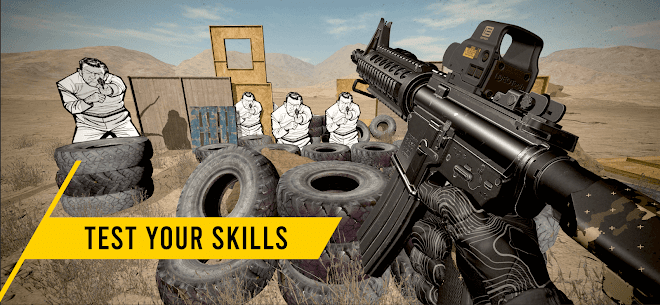
Each stage drops you at a fixed firing position with one weapon and a set of targets. Some rounds count hits, others run on a clock, and the toughest ones do both. You never move your feet, so aim discipline carries every round.
Clearing a stage pays Cash and usually opens a crate. Rounds run roughly three to four minutes, so a normal sitting covers about a dozen of them. Because the range layouts change constantly, the shooting stays fresh far longer than the fixed camera suggests.
The Dummy Army Story and the Jones Storyline
The premise is short and silly in a good way. Firearms training dummies at the range came to life, armed up, and turned into SoldierBots that now threaten to take over. You shoot your way back through the facility to stop them.
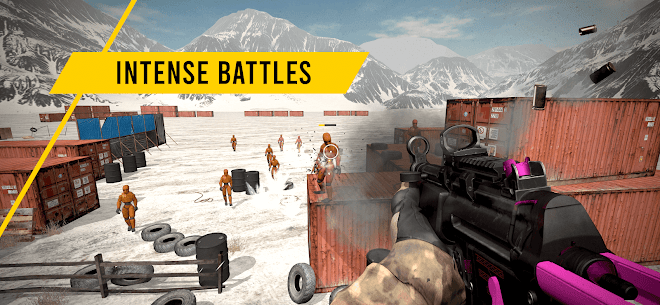
An update added the Jones storyline alongside new stages, which gave the range a thread to follow instead of a pure score chase. SoldierBots arrived as advanced AI targets rather than static boards. However, the story stays light throughout, so nobody should install this expecting a campaign.
GUNSIM vs Other Mobile Gun Simulator Apps
Mobile players usually weigh this title against World of Guns: Gun Disassembly and Gun Builder ELITE 2. World of Guns leans educational, with strip-down animations and component study rather than stage combat. Gun Builder ELITE 2 focuses on assembling and customizing weapons at a bench.
This title splits the difference. You get the weapon fidelity those apps sell, then an actual stage progression wrapped around it. Sniper Range Game covers similar ground for long-range fans, but it lacks the boss battles and the Sector structure. For anyone who wants shooting with consequences instead of a sandbox, this one wins that comparison.
Android Version vs Google Play Games on PC
Both versions run the same build, so the stages, Cash rates and weapon list match exactly. Touch aiming on a phone gives you a drag to aim and a tap to fire, which suits quick sessions. Recoil control feels tighter on a small screen because your thumb never leaves the glass.
Google Play Games on PC runs the Android build on Windows with mouse aiming. Precision improves noticeably on boss stages. The trade is portability and the offline convenience that makes this a commute game. Price stays identical, since the title is free on both.
Gameplay Mechanics, Recoil, and Touch Controls
Recoil in this shooter pushes your aim point upward after every shot, and each weapon climbs at its own rate. Controlling that climb is the actual skill ceiling. The Micro UZI sprays wide, while the Glock settles fast between shots.
Firing, reloading and target priority make up the whole control set. There is no movement stick and no cover system. Instead, the game leans on timing and on how well you handle each gun’s kick.
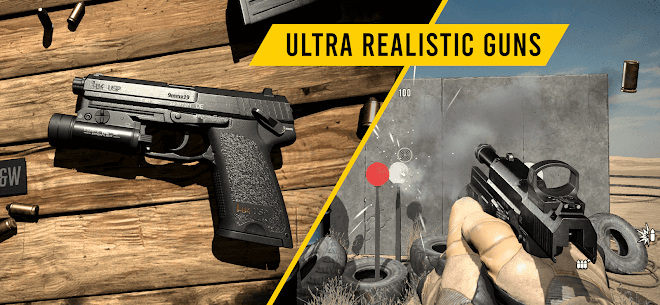
Every gun came out of work with firearms experts, so reload animations and mechanical cycles match the real weapons. That detail matters in play, not just in screenshots. A slow reload on a timed stage costs you the round, so knowing your weapon’s cycle length becomes part of the strategy.
Aiming, Firing, and Reload Timing
Aim by dragging, fire with the trigger button, and reload before the magazine runs dry. The reload window is the most common place new players lose a stage. Because the animation plays in full, a mistimed tap freezes your output for a second or more.
Long strings of fire also punish you. Recoil stacks, so the fifth shot lands far above the first. Short bursts of two or three rounds keep the point of aim usable and drop targets faster overall.
Boss Battles and Fast Re-Try Restarts
Boss stages close out sections and bring the hardest SoldierBot patterns in the game. They hit harder, take more rounds, and often demand specific target order. Failing one used to mean a slow trip back through the menu.
An update added fast re-try on boss stages, which changed how these rounds feel. Now you can rerun a boss immediately and adjust your approach while the pattern is fresh. That single change turned boss battles from a wall into a practice loop.
What Happens When You Clear a Stage Crate
Finishing a stage opens a crate that pays Cash, and Sector completions add Gold on top. Crates are the main income source in normal play, so every clear counts toward your next upgrade. The payout scales with stage difficulty.
Watch the crate result screen carefully. Players report crate rewards occasionally failing to pay out after boss stages, especially when the round ends and the app is backgrounded quickly. Staying on the results screen until the currency counter ticks up avoids most of those losses.
How to Unlock Guns With Cash, Gold, and Access Cards
Weapons unlock three ways in this shooter: Cash purchases from the armory, direct Gold purchases added in a recent update, and access cards earned by clearing specific stages. Access cards gate each weapon’s next block of rounds. Gold buys past that wait entirely.
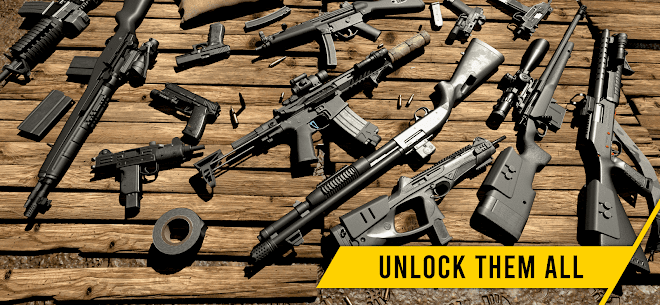
The armory holds real firearms including the Micro UZI, the Glock, the USP and the CX9. Each one handles differently, and each has its own stage line to work through. Cash comes steadily from stage crates, so patient players unlock plenty without paying.
Progress stalls for most new players at exactly one point. A weapon stops accepting new stages until you produce its access card. The fix is not grinding harder with that gun, and understanding why saves days.
How the Gauntlet Stage Unlocks the Glock
One specific stage named Gauntlet unlocks the Glock, and it is an early skill check. Gauntlet throws a dense target run at you with little margin. Clearing it hands over one of the most reliable sidearms in the game.
The stage had a rough start. An update fixed Gauntlet so it correctly paid its stage reward and allowed checkpoint restarts, which removed a genuine dead end from early play. If you stalled there long ago and gave up, the round behaves properly now.
Buying Weapons Like the CX9 With Gold
A recent update added the CX9 and, more importantly, let players buy guns with Gold. That changed the armory from a pure Cash economy to a two-track system. Gold skips the unlock requirement rather than reducing a price.
Spend Gold carefully at the start. A gun bought early with Gold still needs Cash upgrades to stay useful, and an unupgraded premium weapon loses to a fully upgraded starter. First build your income, then buy the gun you actually want.
Why Access Cards Stall Weapon Progress
Access cards work per weapon, not per account. Your progress with one gun does not open the next block for another. Most players miss this and grind the same stalled weapon for days, which is the single biggest source of quitting in the early game.
Rotate instead. When one gun hits its card wall, switch to another weapon and clear its stage line while the first sits idle. You keep earning Cash, you keep clearing Sectors, and cards come in across multiple weapons at once.
How to Get Gold and Skin Shards Without Paying
Gold is the premium currency, and free players earn it two ways: by completing whole Sectors and through daily challenges. Skin Shards are a separate cosmetic currency that buys weapon skins and camos. Neither currency requires a purchase, though both accumulate slowly without one.
Most published coverage skips this entirely and treats Gold as purchase-only. That is wrong, and it costs free players real value. An update specifically added Gold payouts for finishing full Sectors.
Cash, by contrast, flows constantly from stage crates. Think of Cash as fuel for weapon upgrades and Gold as the currency for unlocking things you would otherwise wait for. Skin Shards sit outside both, since cosmetics change nothing about performance.
Earning Gold by Clearing Whole Sectors
Sector completion is the most reliable free Gold tap in the game. Partial progress pays nothing extra, so leaving a Sector at 80 percent wastes the bonus sitting behind those last rounds. Finish what you start.
Plan your sessions around this. If a Sector has four stages left, clearing them in one sitting pays better than spreading them across a week of partial runs. Because each stage takes only a few minutes, a full Sector usually fits inside one commute.
Skin Shards, Weapon Skins, and Camo Costs
Skin Shards buy cosmetic camos and skins for your weapons. The store sells 30 Skin Shards for $4.99, which sets the rough value of the currency. Nothing bought with Shards affects damage, recoil or reload speed.
Skip them until your weapons are strong. A camo on an underpowered gun does nothing for stage progress. That said, the cosmetic layer does help you tell upgraded weapons apart at a glance once your armory grows.
Daily Challenges and Offline Earning Runs
Daily challenges rotate and pay out on top of normal stage income. Checking in once a day keeps a steady trickle of currency coming even during weeks you barely play. They also push you onto weapons you might otherwise ignore.
The whole game runs offline, which makes it genuinely useful on flights and underground commutes. No connection means no interruptions and no waiting on servers. Your progress saves locally, so an offline session earns exactly what an online one does.
How Weapon Upgrade Tiers and Sector Progress Work
Weapon upgrades in this shooter raise damage, handling and capacity through Cash-bought tiers on each individual gun. Sectors group the stages into blocks that pay Gold when finished. Together those two systems set your pace through the whole game.
Upgrades apply per weapon, so investment never transfers. A fully built Glock does nothing for your USP. That single rule shapes every Cash decision you make.
Difficulty rises sharply across the Sector chain. Players regularly describe three broad difficulty bands, from rounds that fall over instantly to rounds that feel near impossible without a properly built gun. Reading that wall as a gear problem rather than a skill problem is usually correct.
Upgrade Tiers and What They Change Visually
Each tier costs more Cash than the last and raises the weapon’s performance stats. The cost curve steepens quickly, so the jump from tier three to tier four hurts far more than the first two steps. Budget for that.
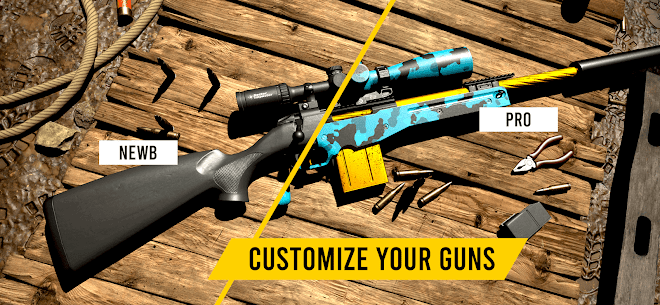
Visually, upgrades recolor parts of the weapon rather than reshaping them. A higher tier magazine changes color instead of growing physically, and no attachment swapping exists. Some players dislike the bright multi-color result on otherwise realistic weapons, which is fair criticism.
Sector Structure Across 700 Stages
More than 700 stages sit across the Sector chain, and the listing points to 40 or more hours of play to work through them. Each Sector holds a run of stages plus its own difficulty ramp. Boss battles typically close out a section.
Progress through Sectors is the backbone of the whole game. Because Sector completion pays Gold, the structure rewards finishing blocks rather than cherry-picking easy rounds. Treat each Sector as the real unit of progress instead of counting individual stages.
What Finishing a Weapon Line Unlocks
Completing a weapon’s stage line pays out its access cards, opens further rounds and moves you toward the next armory tier. The reward is access, not just currency. Each finished line widens what you can attempt next.
Finished lines also stack. Two or three completed weapon lines give you enough armory depth to rotate freely whenever one gun stalls. That rotation is the difference between steady progress and a hard stop.
Common GUNSIM Mistakes That Stall Stage Progress
The most costly mistake in this shooter is buying several weapons early instead of upgrading one to a competitive tier. Cash spread across four guns leaves all four too weak for the next difficulty band. One strong weapon clears stages that four weak ones cannot.
Two other errors cost players real progress. Some lose crate rewards by leaving the results screen too early. Others push a stalled weapon for days without realizing the block is an access card requirement.
None of these are skill problems. Each one comes from a system the game never clearly explains, which is exactly why they trip up so many new players. Fixing all three usually restarts progress within a single session.
Spreading Cash Across Too Many Guns
New players see the armory and want everything. That instinct is expensive here, since upgrades never transfer between weapons. Every Cash unit put into a second gun is a tier your main weapon does not get.
Pick a primary and take it as far as your Cash allows. Only after that weapon hits its access card wall should you fund a second. This single habit change carries more players past the mid-game difficulty spike than any aiming advice.
Missing Crate Rewards After Boss Stages
Crate payouts sometimes fail after boss rounds, and this is a documented, repeated complaint. Players finish the fight, open the crate, and see no Cash added. Losing a boss-tier payout sets your upgrade schedule back noticeably.
The workaround is simple. Stay on the results screen until you watch the currency counter increase, then back out through the menu instead of closing the app. If a payout does vanish, the fast re-try option makes a repeat run quick.
Fighting Difficulty Spikes Instead of Re-Gearing
A stage that feels impossible is usually a gear signal. The dummy army gets tougher and multiplies as you advance, so a weapon that cleared the last Sector may simply lack the damage for this one. Repeating the round twenty times will not close that gap.
Back out and earn instead. Clear easier stages with the same gun, bank the Cash, and buy the next upgrade tier before returning. An update rebalanced early difficulty specifically because this spike frustrated so many players, so the curve is gentler now than it once was.
Best GUNSIM Tips and Tricks for Beginners
Three habits separate players who reach the later Sectors from players who quit around the first access card wall. Focused Cash spending comes first. Offline session planning and pre-round target reading follow close behind.
None of this requires spending money. Each tip leans on a system already in the game, from the crate economy to the fixed firing position that makes target layouts readable. The advantages compound over a week of short sessions.
These GUNSIM tips assume you are working with a starter weapon and normal Cash income. Players who bought the Rookie Pack can move faster, but the same order applies.
Pick One Starter Gun and Push It First
Choose the weapon whose recoil suits your aim, then put every Cash unit into it. A fully upgraded starter outperforms a stock premium gun in almost every stage. The Glock earned through Gauntlet makes an excellent anchor weapon because it settles quickly between shots.
Resist the armory until that gun stops progressing. When its access card wall arrives, you will have both a strong primary and a healthy Cash balance. That is the right moment to start a second weapon line, not before.
Use Offline Sessions for Steady Cash Runs
Because the whole game works without a connection, dead time becomes income. A subway ride or a waiting room delivers three or four stages, which adds up to a meaningful Cash total across a week. No ads interrupt an offline run either.
Structure those sessions around Sector completion. Starting a Sector you cannot finish leaves the Gold bonus stranded. Instead, check how many stages remain and pick a block you can close in the time you actually have.
Read the Target Layout Before the Timer Starts
Your firing position never moves, so the target layout is the whole puzzle. Take the opening second to scan left to right and pick your order before firing. Hitting the far targets first while your aim is fresh usually beats sweeping from the center.
Burst discipline finishes the job. Two or three rounds at a time keeps recoil manageable and leaves your reload timing intact. Players who hold the trigger down lose stages to the climb, not to the targets.
What GUNSIM Premium and the Bundle Actually Change
GUNSIM Premium costs $5.99 on the App Store and sits alongside a GUNSIM Bundle at $13.99 and a Rookie Pack at $5.99. The title itself downloads free and earns through optional currency packs and ads. No purchase is required to reach the later Sectors.
Currency packs run on a standard ladder. Gold sells at $2.99 for 20, $6.99 for 55 and $18.99 for 160. Cash sells at $2.99 for 10,000, $6.99 for 25,000 and $18.99 for 75,000, while 30 Skin Shards cost $4.99.
Nothing in that list is required for progress, though the pace difference is real. A recent update also improved the ad experience, so the free path is less interrupted than it was at launch. Decide based on how much time you plan to put in.
What Premium Removes and Adds
The Premium unlock is the entry-level purchase and the one most players consider first. At $5.99 it sits well below the Bundle, which packages more value for players already committed to the game. Both are one-time purchases rather than a subscription.
Judge it by session count. If this is a game you open daily on a commute, the smoothed experience pays for itself over months. Casual players who open it twice a week get more out of the free path.
Cash, Gold, and Skin Shard Pack Pricing
The pricing ladder rewards larger purchases, as it usually does. 160 Gold at $18.99 costs about a third less per unit than 20 Gold at $2.99. The same pattern holds across the Cash tiers.
Skin Shards break that logic, since they only buy cosmetics. Paying $4.99 for 30 Shards changes nothing about your stage performance. For players optimizing progress, Cash packs deliver the most direct effect because upgrades are what clear difficulty walls.
When Free Players Should Skip Spending
Skip every purchase until you hit your first genuine wall. Most players who think they need Gold actually need weapon rotation, which costs nothing. The access card system creates the illusion of a paywall where none exists.
Spending also makes more sense later than earlier. Once you know which weapon suits your aim and how far you want to push the Sector chain, a single Cash pack targets a real bottleneck. Buying on day one usually funds a gun you later abandon.
Frequently Asked Questions About GUNSIM
Is GUNSIM free on Android and iPhone?
Yes. GUNSIM downloads free on both Google Play and the App Store, with optional in-app purchases. The iOS build weighs about 1.9 GB and needs iOS 13.0 or later, so clear space first. Android devices need version 7.0 or higher, and a Windows version runs through Google Play Games on PC.
How long does it take to finish all the stages?
The full stage chain runs past 40 hours for most players. Individual rounds are short, so the time comes from volume rather than length. A typical half-hour sitting covers roughly a dozen rounds, which makes this a game people finish across months of commutes instead of long weekend sessions.
Does the game still get new weapons?
Yes, though updates arrive in bursts rather than on a fixed schedule. The CX9 joined the armory in a recent update, alongside changes to how Gold purchases work. SHD Games also maintains SIERRA 7, LONEWOLF, GOLIATH AC130 and Tactical Assassin, so development attention rotates across a small catalog.
Who Should Put This Shooter on Their Home Screen
Firearms enthusiasts who want authentic weapon handling without a battle royale attached will get the most out of this one. It also suits anyone who needs a genuinely offline game for commutes, since nothing here depends on a connection. Players wanting movement, multiplayer or deep attachment customization should look elsewhere.
After weeks of short sessions, the thing that kept me coming back was the recoil work rather than the stage count. Rotating weapons past the access card walls turned a frustrating grind into steady progress. Build one gun properly, finish your Sectors, and this shooter delivers far more than its free price suggests.
Images
Download links
ℹ️ Download link not working? Please refresh the page and try again.
Developer's apps

Related apps




What's new
• Updating security and libraries!
• Update game to run better on modern devices
• Improved ad experience
• Bug Fixes - SoldierBots are coming
New Apps
Most Played Mobile Games


