
Draw a Stickman: EPIC 3 APK (Unlocked)

Description
Draw a Stickman EPIC 3 is the only mobile adventure game where your Hero is a blank page — literally, because you draw them before the first level even starts. This post is written for beginners picking up EPIC 3 for the first time and returning players from EPIC 2 who want to make the most of the new pencil system. You will find a full breakdown of how the magic pencil system works, how to collect every Color Buddy, how the 3-Star rating affects unlocks, and the most common mistakes players make in early levels.
What Is Draw a Stickman EPIC 3
Draw a Stickman EPIC 3 is a creative adventure game developed by Pocket Pinata and published by Hitcents. Players draw a custom Hero from scratch, then guide that Hero through a handcrafted world filled with monsters, hidden paths, and collectibles. The game has been played over 100 million times worldwide and won 5 Webby Awards, making it one of the most recognised drawing-adventure franchises in mobile gaming.
The game sits in a unique genre. It blends puzzle-solving, light combat, and creative expression in a single mobile package. However, what sets it apart from standard adventure games is that players shape the experience before they even take their first step — the Hero is whatever you draw them to be.
How the draw-your-own Hero mechanic works from the first screen
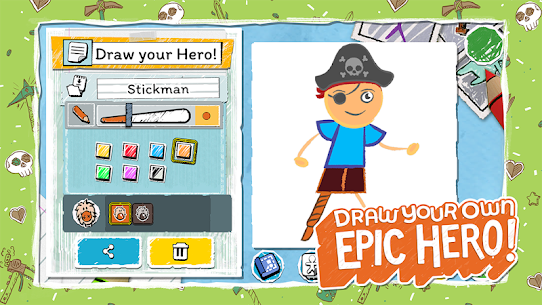
The draw-your-own Hero mechanic is the foundation of the entire experience. Players open the Sketchbook on the very first screen and use the drawing tools to create their character. There are no pre-built models to select. Your Hero is whatever shape, size, or creature your imagination and finger produce.
Because your Hero is hand-drawn, the shape matters in practical gameplay. A very large drawing can block sight lines in tight corridors. A smaller, simpler Hero tends to navigate puzzle rooms more cleanly. The mechanic creates a real connection between your creative choices and your performance across levels.
The Corruption storyline and the world of the Stickman universe
The story of EPIC 3 picks up after the events of EPIC 2’s Drawn Below. The Corruption — a spreading ink-based threat — has returned to the Stickman universe. Players set out to defeat it by solving puzzles, defeating monsters, and restoring colour to a world drained of it.
The tone is light and family-friendly. However, the story has genuine stakes. Familiar characters return from earlier entries alongside new NPCs. The Hub World serves as a narrative anchor between levels, giving the adventure a sense of place and continuity that earlier EPIC titles lacked.
How EPIC 3 compares to Inked: A Tale of Love and Scribblenauts Remix on mobile
Among mobile drawing-adventure games, EPIC 3’s closest counterparts are Inked: A Tale of Love and Scribblenauts Remix. Inked gives players a sketched hero navigating a pencil-drawn world, but it removes the draw-your-own element entirely — the hero is pre-designed by the developer. Scribblenauts Remix lets players write words to summon objects, which is a different form of creative interaction but lacks the direct drawing mechanic that defines EPIC 3.
Therefore, EPIC 3 occupies a distinct space. Players actively create both the character and the tools they use, whereas Inked and Scribblenauts provide creativity within tighter constraints. For players who want their imagination to genuinely shape what appears on screen, EPIC 3 is the stronger mobile choice.
How Draw a Stickman EPIC 3 Gameplay and Controls Work
The control system in EPIC 3 is built entirely for touchscreen play. Players tap on the screen to set a destination, and the Hero walks there. There are no joysticks or on-screen buttons. Additionally, players draw using their finger or a stylus directly onto the game world to activate pencil effects.
This simplicity is intentional. Because drawing demands attention and precision, the movement controls stay out of the way. However, managing both movement taps and drawing actions at the same time becomes genuinely challenging in later levels with fast-moving monsters.
How touch controls move your Hero through each level
Players tap where they want the Hero to move. The Hero walks or runs to that point automatically. Tap-to-move means players can plan routes deliberately. For example, in levels with Oozes — the slow-moving infected blobs — players can tap a path around them before committing to a pencil action.
Combat also uses tap-to-approach. Players get their Hero close to a monster, then use a pencil to deal with it. Bully Goats, for instance, charge in a straight line. Tapping the Hero to one side and then drawing a barrier stops the charge cleanly.
How each magic pencil type changes your approach to puzzles
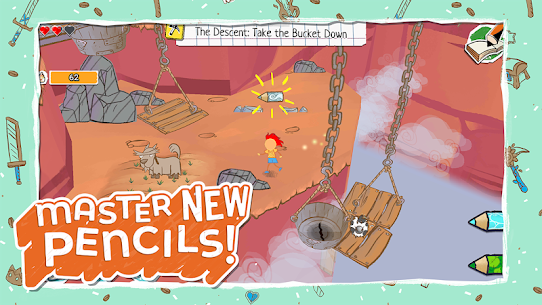
The magic pencil collection is the game’s deepest system. Each pencil draws a different element into the world. A fire pencil sets objects alight to clear wooden barriers. A water pencil creates streams to extinguish hazards or create paths. Additional pencils unlock later, including specialised tools for boss encounters.
Consequently, every puzzle has multiple solutions depending on which pencil a player picks. A locked gate could be burned down with fire or flooded open with water. The game rewards players who experiment and who collect all the pencil blueprints, because more options mean more creative solutions.
What happens when players complete a level and how progress saves
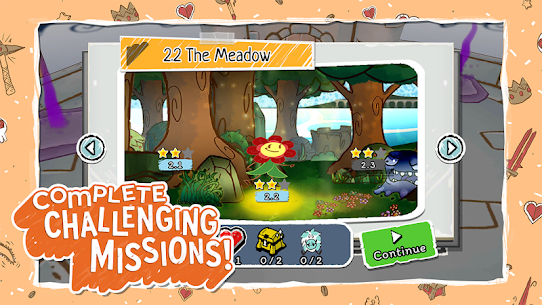
When a level ends, the game scores the run based on performance. Players earn between one and three stars per level. Stars reflect how thoroughly they explored — collecting Color Buddies, finding hidden paths, and completing optional objectives all contribute. Progress saves automatically after each completed level.
However, players can replay any level at any time. This means there is no penalty for finishing a level with one star the first time. Players can return later with better pencils and collect what they missed.
How the Limitless Sketchbook Changes the Way You Play
The Limitless Sketchbook is a new feature in EPIC 3 that stores an unlimited number of Hero drawings and Tool drawings. Players build up a personal library of characters and equipment over time. Swapping between these during a playthrough is instant.
This system changes the strategic dimension of the game. Previously, players were tied to a single character. Now, a player might design a small, nimble Hero for tight puzzle sections and a larger, more imposing figure for boss encounters. As a result, the Sketchbook becomes a tool of adaptation, not just a gallery.
Storing and swapping Heroes using the Sketchbook system
Players access the Sketchbook from the Hub World or from level-select screens. Any Hero drawn and saved appears in the library immediately. Swapping to a different Hero takes a single tap. The current Hero leaves the level and the selected one enters, carrying all the pencils and progress already earned.
Because each Hero is hand-drawn, no two Sketchbooks are the same. A player who draws a simple circle character and a player who draws a detailed robot will interact with the same puzzle in visually different ways. The mechanic makes every playthrough feel personal.
Saving tool drawings and using them at the right moment
Tools are drawn separately from Heroes and stored in the same Sketchbook. A drawn bridge, a ladder, or a platform can be saved and reused in later levels. When a player spots a gap or an elevated platform during a level, they open the Sketchbook and deploy a saved tool drawing rather than drawing from scratch each time.
This rewards planning. Players who save tool drawings early spend less time drawing during high-pressure moments. For example, having a pre-drawn platform ready before the Evil Hamster boss encounter makes the fight significantly less stressful.
Why swapping Heroes mid-adventure gives you tactical flexibility
Different Hero shapes interact with the environment differently. A tall, thin Hero slips through gaps that a wide Hero cannot. Additionally, some players draw Heroes with distinctive features — wings, extra limbs, unusual proportions — that create unexpected advantages in specific level layouts.
Moreover, swapping Heroes mid-playthrough means players can role-play different styles across a single session. They might use a fast, sketchy figure to clear enemy-heavy rooms and switch to a carefully drawn character for the collectible hunts. This flexibility is unique to EPIC 3 among mobile drawing-adventure titles.
How the Hub World and NPC System Works in EPIC 3
The Hub World is a central space between levels where the player’s Hero can walk freely and interact with other characters from the Stickman universe. It replaces the static level-select menu of earlier EPIC entries with a living environment. Players visit the Hub World after each chapter to gather information, unlock new objectives, and see the Stickman universe evolving as the Corruption retreats.
This is one of the biggest structural changes EPIC 3 makes compared to its predecessors. However, some players rush past Hub World interactions entirely. Doing so means missing unlock triggers and narrative context that make later levels easier to navigate.
What the Hub World adds compared to earlier EPIC titles
Earlier EPIC titles used a straightforward map screen to select levels. EPIC 3 replaces this with a navigable world. NPCs stand at fixed points and deliver dialogue. The Hub World grows and changes as players clear chapters. New areas open up, and characters who were absent at the start appear after key story moments.
Therefore, the Hub World acts as a visual progress tracker. Players who return to it between chapters can see tangible evidence of how the Corruption is retreating and how the Stickman community is recovering.
How NPC conversations unlock objectives and new areas
Each NPC in the Hub World carries one or more objectives. Some unlock new levels directly. Others point players toward hidden paths in completed levels that they may have missed. A character might mention that a Color Buddy was spotted near a specific landmark in a previous world, effectively flagging where to search during a replay.
Consequently, skipping NPC dialogue is never free. Players lose practical gameplay information. Interacting with every visible character before entering a new chapter is one of the most efficient habits a player can build.
Why revisiting the Hub World after each chapter matters
After completing a chapter, new NPCs appear in the Hub World who were not there before. Some of these characters give access to previously locked sections of the map. Others offer tool blueprints that expand the pencil collection, which directly affects puzzle options in upcoming levels.
Additionally, some Hub World collectibles only become available after specific story beats. So players who check back regularly after each chapter collect more, unlock more, and enter later levels better equipped than players who treat the Hub World as a loading screen.
How Collectibles and the 3-Star System Work in EPIC 3
Draw a Stickman EPIC 3 has a layered collectible system built around Color Buddies, coloring guides, and tool blueprints. These items are scattered through every level, often in hidden corners or behind obstacles that require specific pencils to remove. Additionally, the 3-Star rating system tracks how well a player has explored each level.
Together, these systems create strong replay incentive. A first run through a level rarely captures everything. However, the game is generous — nothing is permanently missable, and all levels stay open for replays.
How the 3-Star rating system connects to unlocking hidden areas
Stars are earned by completing objectives within a level. The third star on any given level typically requires finding the most hidden content — a Color Buddy tucked behind a wall or a blueprint locked behind a puzzle that most players solve a simpler way. Earning all three stars on a level unlocks hidden areas and doors that do not respond to any pencil in the main toolkit.
Therefore, 3-star completion is not just for completionists. Some hidden areas contain the best pencil blueprints in the game. Players who pursue stars systematically are significantly better equipped for late-game boss encounters.
What Color Buddies are and where players find them in each level
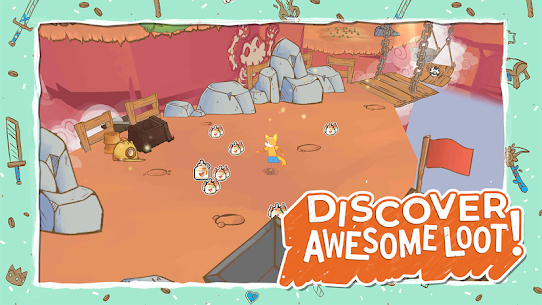
Color Buddies are small lost characters scattered throughout every level. Finding them adds new colours to the drawing system, which affects both Hero creation and tool drawing. A player who finds every Color Buddy in the first chapter unlocks a broader colour palette for their Sketchbook before the second chapter even begins.
Color Buddies tend to sit in off-path locations. They appear behind waterfall barriers that need the water pencil, above elevated platforms that need a drawn ladder, and inside locked rooms opened by specific blueprint tools. Players find the majority of them by exploring every side path rather than moving directly toward the exit.
What coloring guides and tool blueprints unlock when collected
Coloring guides expand the drawing tools visually, giving players more precise options when designing Heroes and equipment. Tool blueprints unlock new pencil abilities. For example, a blueprint collected in the third world area unlocks a pencil that draws elemental platforms — a mechanic that becomes essential in the game’s final boss section.
Consequently, missing blueprints does not block progress. However, it does make certain encounters significantly harder. Players who collect every blueprint before reaching the later chapters will find the Evil Hamster boss fight — widely regarded as the game’s toughest encounter — far more manageable.
What the Free Demo Covers and What the Full Experience Adds
Draw a Stickman EPIC 3 offers a free demo before players commit to the full purchase. This is one of the least-discussed aspects of the game online, even though it directly affects how new players experience the opening hours. Understanding what the demo includes helps players make an informed decision before spending.
The demo is generous by mobile standards. However, it does not represent the full scope of the game. The best content — including the complete pencil collection, the full Hub World, and all boss encounters — sits behind the purchase gate.
What content the free demo includes before you buy
The demo covers the opening sections of the game. Players experience the Hero creation system, the first set of levels, and early Hub World interactions. The magic pencil system is introduced, and players receive access to two or three pencil types to begin with. Color Buddies in the demo levels are fully collectible.
However, the demo locks off entire chapters and withholds several pencil blueprints. Players who only complete the demo will encounter the Bully Goat and Ooze enemy types but will not face the Troll or Evil Hamster encounters. The difficulty curve the demo presents is also noticeably softer than what the full game delivers.
What the full purchase unlocks beyond the demo levels
The full experience unlocks every chapter, every NPC quest, the complete Hub World map, and all pencil blueprints. Players gain access to the deeper layers of the 3-Star system, including hidden areas that only appear after reaching chapters three and beyond. The Evil Hamster boss — mentioned in every review of the game — only appears in the full purchase.
Moreover, the full game unlocks the complete colour palette for the Sketchbook. Players who upgrade from the demo notice the difference immediately in the drawing interface.
Why the demo-to-full transition is worth it for adventure fans
The demo-to-full jump costs a one-time purchase. There are no subscriptions and no energy systems that force players to wait. For mobile adventure fans who spend regularly on the genre, the value of EPIC 3’s full experience compares favourably to other paid mobile titles. The Sketchbook system alone — which deepens considerably post-demo — justifies the upgrade for players who enjoyed the Hero creation mechanic in the first few levels.
Furthermore, because the full experience has no time gates, players can complete the entire game in continuous sessions. That structure is increasingly rare in the mobile market and makes EPIC 3 feel more like a traditional game purchase than a free-to-play product.
Best Draw a Stickman EPIC 3 Tips and Tricks for Beginners
Starting strong in EPIC 3 means understanding three things early: how to draw a Hero that works in tight spaces, how to pace pencil use across a full level, and why thorough exploration before leaving a level matters more than speed. Many beginners rush through the opening chapters and then find themselves underprepared when the monster variety increases.
Each of the tips below is specific to EPIC 3’s systems. None of them apply to other mobile adventure games in the same way, because the Hero drawing mechanic and the pencil collection system are unique to this title.
How to draw your Hero so their shape does not block puzzle interactions
The draw-your-own Hero mechanic has a hidden consequence beginners often discover too late. A Hero drawn with a wide body or long limbs will physically occupy more space on screen. However, in narrow puzzle corridors or rooms where the game highlights interactive elements, a large Hero can visually overlap the interaction point, making it hard to tap correctly.
Therefore, beginners benefit from drawing a compact Hero for their first full playthrough. A simple figure with clear head and body separation and short limbs works best for puzzle-heavy sections. Players can always save more elaborate designs in the Sketchbook for open combat sections where size matters less.
How to manage your pencil collection without running out at boss encounters
Each pencil has limited uses before it needs to be refreshed from a blueprint or a picked-up refill. Beginners tend to overuse high-value pencils in standard enemy rooms when a weaker pencil would handle the same encounter. As a result, they arrive at boss fights with the fire and water pencils at low capacity.
The fix is straightforward. Use the lowest-tier pencil that solves the current puzzle or clears the current enemy. Save specialised pencils specifically for encounters where no other pencil type will work. Bully Goats go down to a simple barrier drawn with any pencil, for example, so spending the fire pencil on them is unnecessary.
Why exploring every corner before finishing a level prevents missed Color Buddies
The most common early mistake in EPIC 3 is treating the level exit as the goal. Players who move directly to the exit clear levels with one star and miss Color Buddies that were visible but not yet collected. Because Color Buddies unlock new colours that feed back into the Sketchbook, missing them early creates a cumulative gap in the drawing experience.
Instead, treat every level like a room to be cleared rather than a corridor to be crossed. Walk into every side path. Try the water pencil on surfaces that look wet or damaged. Check elevated areas by drawing a quick platform in the Sketchbook. The levels are designed so that all collectibles are reachable on a first run — players just need to slow down and look.
Frequently Asked Questions About Draw a Stickman EPIC 3
Is Draw a Stickman EPIC 3 free to play on iOS and Android?
Draw a Stickman EPIC 3 is free to download on both iOS and Android. The free version includes a playable demo covering the opening levels and introducing the Hero creation and pencil systems. The full adventure, including all chapters, boss encounters, and the complete pencil blueprint collection, requires a one-time in-app purchase to unlock.
How long does it take to finish Draw a Stickman EPIC 3?
Draw a Stickman EPIC 3 takes most players between four and six hours to complete the main story levels. However, full 3-Star completion — collecting every Color Buddy, every tool blueprint, and every coloring guide — extends the total playtime considerably, often into the ten-to-twelve-hour range depending on how thoroughly players explore each level.
Does Draw a Stickman EPIC 3 have updates or new content?
Draw a Stickman EPIC 3 has received updates since its original May 2020 release on mobile, including performance improvements and bug fixes across iOS and Android versions. Hitcents has not announced major story expansions for EPIC 3 as of the current version, though the game received a console and PC port in 2023, suggesting the developer continues to support the title actively.
Why Draw a Stickman EPIC 3 Stands Above Other Drawing Adventures
Draw a Stickman EPIC 3 is the best mobile drawing-adventure available for players who want creative ownership over their experience. The draw-your-own Hero mechanic, the Limitless Sketchbook, and the layered pencil system combine into something no other mobile game delivers quite the same way. Having played through every chapter, I can say the Evil Hamster boss is as genuinely surprising and chaotic as the community claims — and earning the final set of stars after fully collecting every Color Buddy gives a real sense of completion. This title suits creative players aged eight and up, families playing together, and anyone who wants a mobile adventure that rewards patience over speed. EPIC 3 is not a game to rush. It is a game to draw your way through.
Images

Developer's apps

Related apps




What's new
PlayPass and Automotive Update
New Apps
Most Played Mobile Games


