
Battle of Warships MOD APK (Free Shopping)

Description
Twenty six battleship hulls sit in the port screen, from IJN Yamato to KMS H41, and every one of them handles differently once the horn sounds. This post about Battle of Warships is written for new captains on their first ten battles, plus returning players coming back after a long break. Inside you will find ship class roles, the full Workshop upgrade breakdown, the three currency economy, and the map pool that decides how far you can actually shoot.
How to Play Battle of Warships on Android
Battle of Warships is a free naval game where you command one WW1 or WW2 warship in 7v7 sea battles. You steer with a slider, aim by dragging a finger, and fire with the Shot button, while rank and Dollars unlock better hulls.
The game runs on Android and iOS, and Cube Software has pushed it past 62 million installs. Current builds sit at latest version. Downloads still average around 8,600 per day, so matchmaking fills quickly at most hours.
Every match drops you into a single vessel rather than a fleet. Therefore your whole battle depends on one hull, one health pool, and one set of guns. National prefixes such as IJN, KMS and USS mark which navy each ship belongs to.
What Happens During a 7v7 Sea Battle
Standard mode pairs you with up to six allies against an equal enemy team. Both sides spawn along opposite edges of the map, then close the distance. Because respawns do not exist in this mode, a careless first minute ends your match early.
Team deathmatch runs differently and rewards damage volume over survival. However, most players spend their time in standard battles, since that mode pays the steadiest rank and Dollars. Destroying an enemy ship grants an extra reward on top of your performance payout.
The WW1 and WW2 Setting and Historical Roster
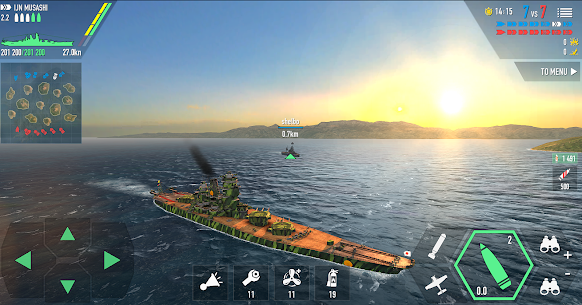
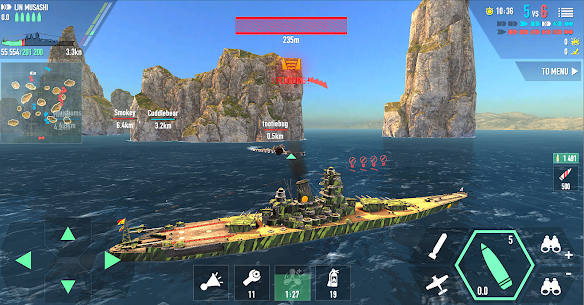
No campaign story runs underneath this multiplayer shooter. Instead, the setting comes entirely from the ships themselves. IJN Musashi, KMS Bismarck, HMS Hood and USS Montana all appear with reasonably faithful silhouettes.
France arrives through FS Super-Alsace and FS Dunkerque, while the Soviet Union fields Sovetsky Soyuz. Imperial Germany even shows up as SMS Großer Kurfürst. For anyone who follows naval warfare history, the roster alone carries a lot of the appeal.
How This Ship Simulator Compares to Other Android Naval Games
World of Warships Blitz remains the deeper rival on Android, with a tech tree spanning hundreds of hulls and a much slower progression curve. By contrast, this title hands you strong ships faster and asks less patience. Matches also feel more arcade paced.
WARSHIP BATTLE: 3D World War II from JOYCITY takes a third route, building scripted missions around real WWII engagements instead of live team fights. Warships Universe: Naval Battle sits closer, though its PvP runs 6v6 rather than seven a side. Consequently, the choice comes down to whether you want scripted missions, a long tech tree, or quick live skirmishes.
Touch Controls, Gyroscope Aiming and Torpedo Timing
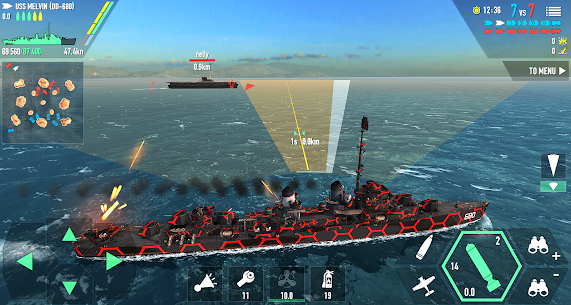
Aiming works by dragging a finger across the screen until the reticle sits over an enemy hull, and the Shot button then fires every gun that currently bears. Steering runs off a separate slider, so both hands stay busy. A gyroscope option replaces drag aiming with physical device tilt.
Shell type matters as much as aim. AP rounds punch through armour, while HE rounds start fires on lightly protected targets. Switching between them takes one tap.
Torpedoes and interceptors sit on their own buttons with independent cooldowns. Additionally, aircraft carriers swap the gun controls entirely for a plane launch interface. Settings also include a shoot all guns at once toggle, which suits smaller screens.
Steering, Throttle and the Shot Button
Movement uses a throttle slider plus directional control, and turning is deliberately slow on heavy hulls. Therefore you plan a turn several seconds before you need it. Momentum carries a battleship well past the point where you released the input.
The Shot button fires whatever guns currently have line of sight. Guns still behind your superstructure will not fire, so hull angle directly controls your damage output. For example, a target dead astern usually leaves half your main battery idle.
Choosing Between AP and HE Shells
AP shells reward patience against thick armour, especially when you catch a broadside. Aim slightly below the waterline on large targets. Against angled armour, though, AP tends to bounce and waste an entire salvo.
HE shells trade penetration for fire damage and consistent chip damage. Destroyers and cruisers take heavy punishment from HE. As a result, most experienced captains carry both types and switch mid engagement rather than committing to one.
Torpedo Spreads and Interceptor Timing
Torpedoes travel slowly and telegraph their path, so you fire them where a ship will be rather than where it is. Three battleships carry them, alongside destroyers and certain cruisers. Z20 torpedoes deal only around 10K damage each, which makes them a finishing tool rather than an opener.
Interceptors are your only real answer to enemy aircraft. Nevertheless, most beginners burn them within the first minute on nothing. Holding them until an enemy carrier commits its strike wing usually saves your health bar outright.
Battleship, Cruiser and Destroyer Roles in a 7v7 Fleet
Battleships, cruisers, destroyers and aircraft carriers each fill a different job in a seven ship fleet, and mixing them badly loses matches. Heavy hulls hold ground. Light hulls take space.
The community sorts these classes further into practical roles. Flagships anchor a team, heavy gunboats melt anything they catch, and support cruisers throw up anti aircraft cover for everyone nearby. Destroyer health tops out around 150K even on the sturdiest hull.
Knowing your own role matters more than knowing the enemy roster. Because a destroyer cannot trade shells with a Montana, its value comes from speed, torpedoes and map control instead. Similarly, a carrier that pushes forward simply dies.
Flagship Hulls Like Yamato, Montana and Super-Alsace
Flagships are the vessels that survive to the last two minutes and decide the outcome. USS Montana, KMS H41, the Yamato class and FS Super-Alsace all qualify. HMS Hood joined that group as a newer addition with strong stats and armament.
IJN Yamato held the top damage spot until H41 and Super-Alsace arrived. Even now, a quirk in its main battery means flags push its damage back to the front. However, its mobility remains poor, so positioning errors punish it harder than most.
Heavy Gunboats Like Shimakaze and Support Cruisers
Shimakaze and Yukikaze sit in an odd middle category, since their gun output rivals cruisers and even low tier capital ships. Shimakaze lands around 12K per salvo, while Yukikaze pushes closer to 15K. Both play as pocket cruisers rather than pure torpedo boats.
Z20 takes the opposite approach with a shell every two seconds, roughly 150 rounds per minute. Paired with HE, that rate of fire starts fires constantly. Meanwhile, support cruisers such as Des Moines, Brooklyn and San Diego exist mainly to throw up a wall of anti aircraft gun fire for the fleet.
Aircraft Carrier Play and Staying Off the Front Line
An aircraft carrier in this game launches planes and jets while carrying almost no defensive punch of its own. Consequently, your survival depends entirely on where you park. Island cover and map edges beat open water every time.
The strongest carrier habit is simply staying quiet until someone shells you. Green Hills and Forgotten Islands both offer plenty of hiding spots for exactly this. By contrast, the small Islands map leaves carriers badly exposed, since there is nowhere to break line of sight.
How to Unlock Warships in the Store by Rank
Rank unlocks most of the Store in this naval shooter, and Dollars pay the price once a ship appears. Premium hulls such as KMS Tirpitz, USS Missouri and USS Montana sit behind Gold or real money instead, and Super Ships need Components collected from containers.
Rank comes from battle performance, not from time played. Therefore damage, kills and survival all feed the same meter. Premium accounts add 50 percent to rank earned, and Ultra Premium doubles that bonus outright.
The battleship category alone holds 26 hulls. FS Richelieu and Roma have both been named as planned additions. In practice, that means your Store list keeps growing long after you stop counting.
Rank Gates and Dollar Prices in the Store
Each non premium ship carries two barriers: a rank requirement and a Dollar price tag. Reaching the rank only makes the ship visible for purchase. You still need the Dollars in hand.
New players often hit a rank gate with an empty wallet, which stalls progress badly. Because of that, banking Dollars before a rank threshold arrives works better than spending them on partial upgrades. Quests and battle payouts both feed the same pool.
Premium Ships Like Tirpitz, Missouri and Montana
Premium hulls skip the rank ladder entirely and open through Gold or direct purchase. KMS Tirpitz, USS Missouri, IJN Yamato and USS Montana all sit in this tier. Several of them arrive with camouflage already fitted.
Tirpitz in particular carries an exclusive five star camouflage worth a 15 percent bonus, the only non premium rated five star finish in the game. Its health rivals Yamato and it keeps cruiser like mobility. Nevertheless, buying it early gives you a strong hull you cannot yet aim, which is a common and expensive mistake.
Building Super Ships From Components
Super Ships do not appear as a straight purchase. Instead, you collect Components, which drop from containers and accumulate slowly. Once you hold a full set, the ship becomes buildable.
Spare Components have a second use, since the Items tab lets you sell surplus parts back for currency. That gives long term players a steady side income. However, selling parts you actually need sets your build back by weeks.
How to Upgrade Ships in the Workshop
Inside the Workshop sit eleven upgrade slots, covering main battery damage, secondary battery, anti aircraft gun, torpedoes, interceptor performance and amount, aircraft performance and amount, turn time, engine speed and health points. Each upgrade costs Dollars and takes real time to finish, so spending Gold can shorten the wait between battles.
Upgrades apply per ship rather than per account. Therefore switching hulls means starting the whole process again. That single design choice is why spreading Dollars across four ships leaves you weak in all four.
The scale of these gains is easy to underestimate. FS Super-Alsace holds 205,230 health points stock and 302,098 once fully upgraded with health flags. That gap of 96,868 exceeds the entire health pool of most destroyers.
Main Battery, Secondary Battery and Anti Aircraft Gun
Main battery upgrades raise the damage of your primary guns, and they carry the highest visible payoff per Dollar spent. Every non carrier ship has them. Secondary battery upgrades matter far less unless you fight at close range regularly.
Anti aircraft gun upgrades feel useless until the first carrier match, then feel essential. Support cruisers gain the most here. For a battleship, though, one or two levels usually covers what you need before you move on.
Health Points, Engine Speed and Turn Time
Health point upgrades are the safest first investment on any hull. More health buys you time to correct positioning errors, and beginners make plenty of those. Additionally, health scales with country flag bonuses, which compounds the benefit.
Engine speed and turn time change how a ship feels more than any weapon upgrade does. A heavy hull with stock turn time cannot dodge torpedoes at all. Consequently, most veterans finish health points, then turn, then speed, before touching secondary guns.
Camouflage, Stickers and Country Flag Bonuses
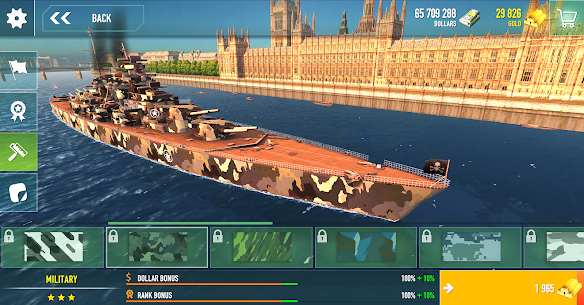
Camouflage in this game is not purely cosmetic, since finishes carry star ratings and attached stat bonuses. A five star camouflage such as the one fitted to Tirpitz grants 15 percent. Stickers, by contrast, are decoration only.
Country flag choice feeds directly into combat performance. American and pirate flags suit KMS Bismarck, because its main battery gains additional damage from flag bonuses. IJN Yamato shares that same quirk, so flag selection changes its damage ceiling more than an extra upgrade level would.
How Dollars, Gold and Platinum Work Together
Three separate currencies circulate in this ship simulator: Dollars buy hulls and upgrades, Gold buys shortcuts and premium items, and Platinum opens battle containers. Gold converts into Dollars inside the Store, but the trade never runs the other way around.
That one way exchange is the single most expensive thing new players get wrong. Spending Gold on Dollars feels productive, yet it strips your ability to shorten upgrade timers later. Gold is also the currency that restores ship durability.
Platinum arrives after every battle without any purchase. Premium accounts boost all three currencies by 50 percent, and Ultra Premium by 100 percent. The Beginner’s package timer resets to 24 hours forever, so its countdown carries no real deadline.
Earning Dollars From Battles, Quests and Daily Rewards
Dollars come from three reliable places: battle payouts, completed quests, and the daily rewards chart. Destroying enemy ships adds a bonus on top of your base payout. Therefore aggressive but survivable play earns roughly double what passive play does.
The daily rewards chart runs on a 28 day cycle and pays out simply for opening the game. Missing days costs you position on that chart. For a free to play captain, those daily claims add up faster than an extra battle or two.
Where Gold Comes From and What It Shortens
Gold flows in from quests, battle results, advert views and real money purchases. The free advert button pays 50 Gold per view on a short cooldown, which in my runs comes around roughly every ten minutes. Nothing else in the game gives premium currency that consistently for free.
Its best use is time, not items. Gold speeds up upgrade timers, restores durability, and buys special items outright. Because upgrade waits stack across eleven components, shortening them is where Gold earns its keep.
Containers, Container Points and Platinum
Containers come in several types and most of them cost Platinum to open. The video container needs an advert view and carries a 30 minute wait, while the daily container runs on a 4 hour timer. Rare containers work differently again.
Rare containers open only when the Container Points bar reaches 100 percent, and that bar builds up as you open other containers. Once you claim a Rare container, the bar resets to zero. As a result, opening cheap containers constantly is actually the fastest route to the expensive ones.
All 11 Maps and the Weather Change System
About ten seconds into a battle on Forgotten Islands, the rain thins out and long range shots become viable again. Snow maps behave differently, since precipitation there never stops. Weather is a live variable, not a background texture.
Eleven maps make up the rotation. Named entries include Islands, Green Hills, Canals, Forgotten Islands, North Mountains, Icebergs, Grassy Cliffs, Blue Ice and Perilous Cliffs. Each layout changes island density, sightlines and how far a destroyer can sneak.
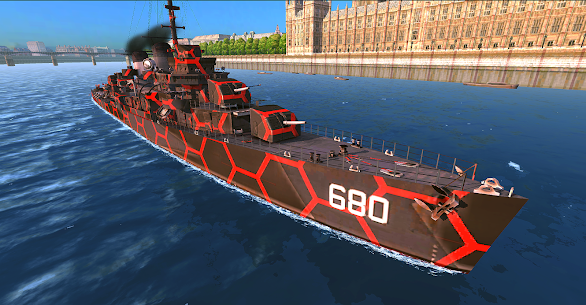
Terrain also determines which class thrives. Open maps favour heavy guns, while cluttered maps favour torpedoes and carriers. In addition, port backgrounds can be swapped between Ocean, Italy and London, though that choice is purely visual.
Island Maps Like Green Hills, Canals and Grassy Cliffs
Islands and Green Hills were among the first maps built for the game. Islands is compact and offers very little cover, which leaves carriers badly exposed. Green Hills runs slightly larger with smaller but more numerous landmasses, giving damaged ships somewhere to retreat.
Canals uses darker, larger islands arranged in staggered lines rather than neat rows. Grassy Cliffs raises the stakes further with tall stone spires that block shots completely. However, the islands there are small, so sitting still usually gets you spotted and focused.
Snow and Ice Maps Like North Mountains and Blue Ice
North Mountains features snow covered islands and a narrow strait through the centre, with a large mountain marking the lower left of the minimap. Snowfall continues for the entire battle. Consequently, long range gunnery suffers throughout.
Icebergs adds tall ice formations that rise higher than the spectator camera can climb. Blue Ice drops islands entirely and replaces them with icebergs and scattered ice sheets, which neither break nor deal damage on contact. Roughly a quarter of the rotation uses this frozen terrain, so cold weather tactics are worth having ready.
How Rain and Night Change Your Firing Range
The weather change system cycles rain, sun, sunset and snow across the map pool, and each state alters how clearly you can pick out a distant hull. Night battles compress engagement ranges noticeably. Therefore torpedo ships gain value after dark.
Perilous Cliffs shows the opposite case, with bright orange mesas arranged in a near diagonal pattern and clean sightlines between them. Heavy guns dominate there. For example, a fully upgraded flagship can hold an entire lane on that map simply by parking behind one mesa and firing through the gaps.
Common Mistakes That Sink New Captains
Position beats hull size in almost every losing match I have reviewed. New players buy bigger ships expecting easier wins, then die in the same spot they always died. The hull changed and the habit did not.
Three errors account for most early frustration. Sailing into the centre of the map, spending real money before spending upgrade Dollars, and selling parts that a future build needs. All three feel reasonable in the moment.
Matchmaking makes these mistakes sting harder, since it pairs by ship rather than by player skill. As a result, an unupgraded premium hull frequently lands you against fully built opponents. Fixing your habits costs nothing and fixes more than any purchase will.
Sailing Through the Middle Instead of Holding a Flank
Capturing the centre does nothing useful for your team in this game. Instead, it hands the enemy a free crossfire from both directions. Battles naturally spill toward the middle later anyway, once the flanks resolve.
The better pattern is picking a flank, clearing it with two allies, then crossing over to help the other side. Fast destroyers are the one exception, since they can survive a centre run and disrupt the enemy line. Even then, staying alive into the final minutes matters more, because that is when you chase down the ships nobody else can catch.
Buying a Premium Hull Before Any Upgrades
Force buying a premium ship is the most common early spending mistake, and Tirpitz attracts it most of all. Its stats are so forgiving that players assume the ship carries them. Community nicknames for that habit exist for a reason.
A stock premium hull loses to an upgraded standard hull in most straight fights. Because upgrades apply per ship, buying a new vessel resets you to zero on that one. Therefore finishing health points on your current ship beats owning a bigger one you cannot support.
Selling Components You Need for a Super Ship
The Items tab makes selling Components look like easy income, especially when your inventory fills with parts you do not recognise. Many players clear it out for quick currency. That decision is not reversible.
Components accumulate slowly through containers, so a full Super Ship set represents weeks of drops. Check which parts your intended build needs before selling anything. Otherwise you fund a single upgrade level and lose a ship worth far more.
Best Battle of Warships Tips and Tricks for Beginners
A fully upgraded FS Super-Alsace carries 302,098 health points, while the same hull starts at 205,230. That gap explains why habits and investment beat hull shopping. Skill compounds on top of both.
Three habits separate players who climb from players who stall. Angling your armour, coordinating a flank, and saving your container currency all cost nothing. Moreover, each one keeps paying off as you move up the roster.
None of these require a purchase or a specific ship. They work equally well on a Brooklyn and on an H41. Start applying them in your next battle and the difference shows within a session.
Bow Tank With AP Shells Against Heavy Hulls
Bow tanking means pointing your front armour at an incoming battleship so its shells bounce instead of penetrating. Your forward guns still fire while you do it. Consequently, you trade damage at a favourable rate against ships that outgun you.
The technique has one hard exception worth remembering. Never bow tank toward HMS Hood, because its torpedoes can strip most of your health in a single strike. Against Rodney or Fuso, though, an angled bow with AP loaded turns a losing trade into a winning one.
Hold a Flank With Two Allies Instead of Roaming
Two ships covering one flank beat four ships scattered across the map. Pick a side at spawn and commit. Because there are no respawns in standard mode, every ally lost early swings the numbers permanently.
Watch the minimap for allied movement rather than chasing kills. Then push as a pair once your flank clears. Additionally, staying near a support cruiser gives you anti aircraft coverage you would never get alone.
Bank Platinum Toward Rare Containers
Spending Platinum the moment it arrives is tempting and almost always wasteful. Cheap containers give small returns. Saving instead lets you reach the Premium and Legendary container tiers, which hold the best items and the largest currency drops.
There is a second reason to save. Since Container Points build as you open containers, a deliberate opening pattern gets you to Rare containers faster than random spending does. In my runs, holding Platinum for around a week produced noticeably better Components than opening daily.
Frequently Asked Questions About Battle of Warships
Is Battle of Warships free to play on Android?
Yes. Battle of Warships downloads at no cost from Google Play and runs on Android and iOS, with the current build sitting around latest version and roughly 250 MB of storage. In app purchases cover premium hulls, currency bundles and account boosts, though none of them are required to start.
Can you play without an internet connection?
Yes, offline play works, though it swaps human opponents for bots. The matchmaker only pairs you with real captains when the connection is stable. One quirk catches people out: if you leave a live match and return, every remaining vessel runs on bot logic instead of player input.
Does the game still get new ships?
Yes. The roster keeps growing, and HMS Hood arrived as one of the newer additions to the heavy line. Older vessels also get rebuilt rather than retired, since update 1.70.4 overhauled FS Super-Alsace. Developers have also named FS Richelieu and Roma as ships planned for future releases.
Who This Naval Shooter Suits Best
This title suits players who want short, arcade paced sea fights without a tech tree stretching over months. Newcomers should start with a support cruiser such as San Diego, bank their container currency instead of spending it, and finish health point upgrades before chasing a bigger hull. Anyone hunting deep fleet strategy or clan seasons will find the systems thin by comparison. After several weeks of daily battles, my honest verdict is that the upgrade grind wears thin somewhere in the middle ranks, yet the moment to moment gunnery still holds up. Install it for the combat, not for the economy.
Images
Download links
ℹ️ Download link not working? Please refresh the page and try again.



New Apps
Most Played Mobile Games


